How to Add Invoice OCR to Your Accounting App in Under a Day
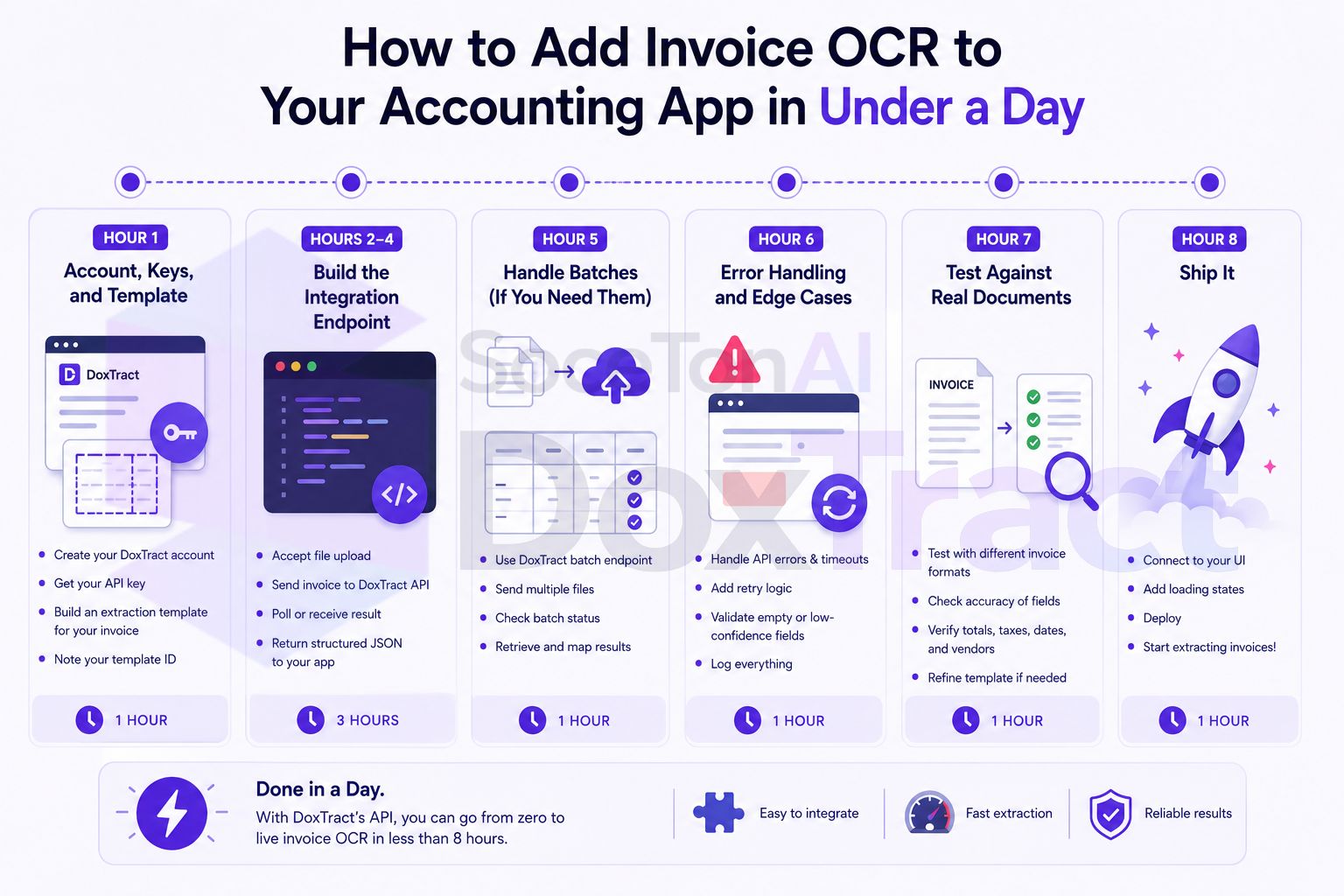
"Add OCR" tends to sit on a roadmap for months because it sounds like a research project — model selection, training data, accuracy tuning. If you're using an extraction API rather than building a model from scratch, it's actually a integration task, not a research one, and a realistic one at that: template, endpoint, storage, error handling, test. Here's a real hour-by-hour breakdown for getting invoice OCR live in your accounting app in a single working day.
Before You Start: What "Done" Means Here
By end of day, you'll have: an endpoint in your app that accepts an uploaded invoice, extracts structured fields (vendor, date, amount, line items) via DoxTract's API, and stores the result against the right user/account record. This isn't a proof-of-concept in a notebook — it's a real endpoint you can point your frontend at.
Hour 1: Account, Keys, and Template
(0:00–0:15) Get your API credentials. Sign up, go to your dashboard, click Generate New Key, name it, and copy the API Key and API Secret immediately.
(0:15–1:00) Build your extraction template. This is the one manual, visual step in the whole process — and it only needs doing once. In the Template Editor, upload a real sample invoice from whatever your users typically send:
Draw a Fixed Header Box around each label that stays constant (vendor name, "Total," "Invoice Date").
Draw a Value Box around the data next to it and connect the two.
Repeat for line items if your app needs itemized detail, not just a total.
Save it, and copy the
template_idfrom the Doxtract App — you'll hardcode this into your integration (or make it configurable per document type, if your app handles more than one).
If your app serves multiple document formats (different vendor invoice layouts, receipts vs. purchase orders), build one template per format now — it's the same process repeated, and doing it up front saves you from a mid-afternoon detour.
Hours 2–4: Build the Integration Endpoint
This is the core engineering work. A minimal FastAPI endpoint that accepts a file upload and returns extracted data:
from fastapi import FastAPI, UploadFile, File, HTTPException
import httpx
import os

app = FastAPI()

DOXTRACT_API_KEY = os.environ["DOXTRACT_API_KEY"]
DOXTRACT_API_SECRET = os.environ["DOXTRACT_API_SECRET"]
TEMPLATE_ID = os.environ["DOXTRACT_TEMPLATE_ID"]

@app.post("/invoices/extract")
async def extract_invoice(file: UploadFile = File(...)):
    async with httpx.AsyncClient(timeout=30) as client:
        response = await client.post(
            "https://api.soceton.com/doxtract/api/read",
            headers={
                "x-api-key": DOXTRACT_API_KEY,
                "x-api-secret": DOXTRACT_API_SECRET,
            },
            files={"files": (file.filename, await file.read(), file.content_type)},
            data={"data": f'{{"template_id":"{TEMPLATE_ID}"}}'},
        )

    if response.status_code != 200:
        raise HTTPException(status_code=502, detail="Extraction failed")

    result = response.json()
    if not result.get("success"):
        raise HTTPException(status_code=422, detail="Could not extract document")

    return result["result"]
The equivalent in Node (Express) if that's your stack:
app.post("/invoices/extract", upload.single("file"), async (req, res) => {
  const form = new FormData();
  form.append("files", req.file.buffer, req.file.originalname);
  form.append("data", JSON.stringify({ template_id: process.env.DOXTRACT_TEMPLATE_ID }));

  const response = await fetch("https://api.soceton.com/doxtract/api/read", {
    method: "POST",
    headers: {
      "x-api-key": process.env.DOXTRACT_API_KEY,
      "x-api-secret": process.env.DOXTRACT_API_SECRET,
    },
    body: form,
  });

  const result = await response.json();
  if (!result.success) return res.status(422).json({ error: "Extraction failed" });
  res.json(result.result);
});
(2:00–3:00) Get the basic call working end to end against a real test invoice — confirm you're getting back the fields your template defines.
(3:00–4:00) Wire the extracted result into your data model — mapping result.result.vendor, .date, .total, and any line items into whatever your app's invoice/expense schema looks like, and persisting it against the right user or account record.
Hour 5: Handle Batches (If You Need Them)
If your app needs to support uploading multiple invoices at once, DoxTract returns a job_id instead of an immediate result for multi-file requests. Add a polling step:
async def poll_job(job_id: str, client: httpx.AsyncClient) -> dict:
    while True:
        resp = await client.get(
            f"https://api.soceton.com/doxtract/api/jobs/{job_id}",
            headers={"x-api-key": DOXTRACT_API_KEY, "x-api-secret": DOXTRACT_API_SECRET},
        )
        data = resp.json()
        if data["status"] == "completed":
            return data
        await asyncio.sleep(3)
If your app is strictly single-invoice-at-a-time (a common MVP scope), skip this hour entirely — the immediate-result path from Hour 2–4 already covers you.
Hour 6: Error Handling and Edge Cases
Real invoices misbehave. Budget an hour for the cases that will actually happen in production:
Unsupported or corrupted files — validate file type before sending, and handle a non-200 response gracefully rather than letting it 500 out to your frontend.
Low-confidence or partial extractions — decide now whether a missing field blocks the upload or just flags it for manual review; don't leave this undecided until a user hits it.
Rate limits or timeouts — add a retry with backoff for transient failures, since a single failed call shouldn't require the user to re-upload.
Template mismatches — if a user uploads a document type your template wasn't built for, decide what happens: reject with a clear message, or fall back to a generic template if you've built one.
Hour 7: Test Against Real Documents
Run your actual end users' typical documents through the endpoint — not just your one sample invoice from Hour 1. This is where you'll find the layout variations your template needs to handle (a vendor's second invoice format, a slightly different table structure) before your users do. If accuracy is off on a specific format, that's a quick trip back to the Template Editor to add or adjust a box, not a rebuild.
Hour 8: Ship It
Deploy behind whatever feature flag or rollout process you'd normally use, and point your frontend upload flow at the new endpoint. If you started at 9 AM, this is a reasonable finish line by end of day — genuinely working invoice OCR in your product, not a demo.
What Makes This Realistic (and What Would Blow the Timeline)
This estimate assumes:
You're integrating an existing extraction API, not training or fine-tuning a model — that's a fundamentally different, much longer project.
Your document format is reasonably consistent (even if complex) — wildly inconsistent, one-off documents from many different sources would need more template iteration time.
You have basic file upload handling already in your app — building that from scratch adds time this estimate doesn't include.
If any of those don't hold, budget more time for the template-building step specifically — everything else in this walkthrough scales linearly with format complexity, not with your codebase size.
Getting Started
Start the clock with the template — it's the one step that has to happen before any code gets written. Build it in the Template Editor, free to try with no signup required. Check Pricing before pointing this at production traffic; the free tier (200 pages/month) is enough to build and test the whole integration first.