How to Reconcile Vendor Invoices Faster
Most guides on invoice reconciliation are written for accounts payable teams doing three-way matching — comparing a purchase order, a receiving report, and a vendor invoice before a payment goes out. That process makes sense at a company with a procurement department. It doesn't describe what a freelance bookkeeper actually does.
Your version of reconciliation is simpler in structure but no less tedious in practice: matching a vendor invoice to the bank or credit card transaction that paid it, confirming the amount and vendor line up, and flagging anything that doesn't. There's no purchase order to check against — there's a PDF and a bank feed, and your job is making sure they agree.
Why This Takes Longer Than It Should
The friction isn't the matching logic — "does this invoice amount match this bank line" is a simple comparison. The friction is getting to a comparable state in the first place:
Opening every invoice to find the vendor, date, and amount before you can even start looking for its match
Vendor name mismatches — the invoice says "Acme Corporation," the bank feed says "ACME CORP #4471"
Timing gaps — an invoice dated the 3rd might not clear the bank until the 7th, so exact-date matching misses real matches
Partial payments or combined invoices — one bank transaction covering two invoices, or one invoice paid across two transactions
Multiple documents per vendor per month, where you're holding several unmatched invoices open at once while you work through a bank statement line by line
None of these are hard problems individually. They're time-consuming because they require you to have structured data — vendor, date, amount — in front of you for every invoice at once, and getting there usually means opening PDFs one at a time.
The Fix: Extract Before You Match, Not While You Match
The fastest reconciliation workflow separates two steps that usually happen at the same time: reading the invoice, and comparing it to the bank feed. Do all the reading up front, in one batch, and the comparison step becomes fast because you're comparing two tables instead of a table to a stack of PDFs.
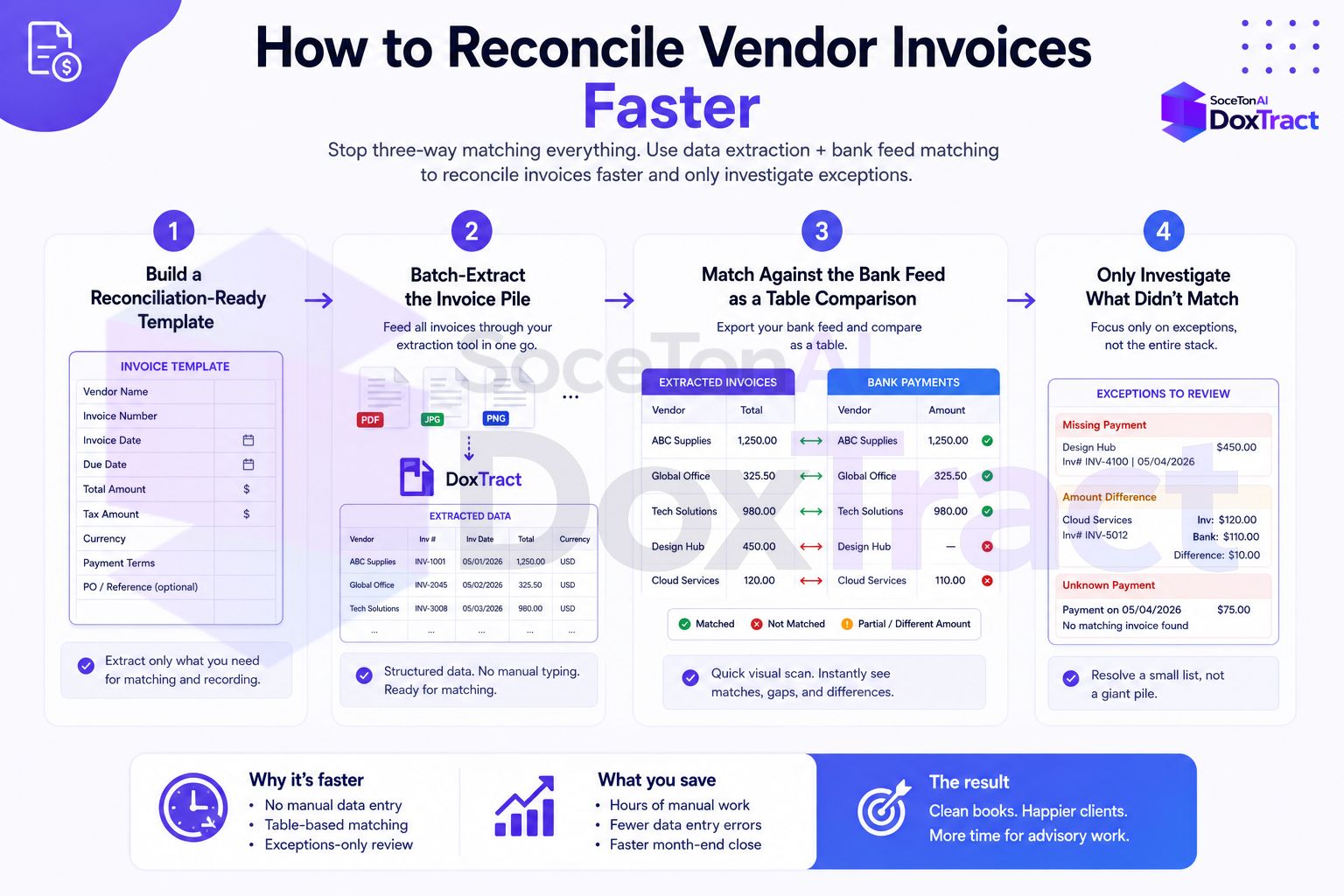
Step 1: Build a Reconciliation-Ready Template
In the Template Editor — no signup needed to try it — build a template per vendor (or per client, if one template reasonably covers most of their vendors) that pulls exactly the fields you need to match against a bank feed:
Vendor name
Invoice date
Total amount
Invoice number (useful for spotting duplicates)
Keep it minimal. You don't need every line item extracted for reconciliation purposes — just enough to identify which bank transaction an invoice belongs to.
Step 2: Batch-Extract the Invoice Pile
Run the whole month's invoices for a client through that template at once from the Doxtract dashboard. You get back one row per invoice — vendor, date, amount — instead of a folder of PDFs you'd otherwise open individually.
Step 3: Match Against the Bank Feed as a Table Comparison
Export the bank or credit card transactions for the same period, and now you're matching two tables instead of hunting through documents:
By amount first — exact amount matches are usually unambiguous and clear most of the list immediately
By vendor name, loosely — a simple "contains" match (does the bank description contain part of the invoice vendor name) catches most of the formatting mismatches between "Acme Corporation" and "ACME CORP #4471"
By date range, not exact date — match within a window (say, ±5 days) rather than requiring an exact date, to account for clearing delays
A basic version of this in a spreadsheet is just a couple of lookup formulas once both sides are structured data. If you're comfortable with a script, the same logic in Python takes a few lines with pandas:
import pandas as pd

invoices = pd.read_csv("invoices_extracted.csv")
bank = pd.read_csv("bank_transactions.csv")

# Round-trip merge on amount, then filter by date window
matched = invoices.merge(bank, on="amount", suffixes=("_inv", "_bank"))
matched = matched[
    (matched["date_bank"] - matched["date_inv"]).abs().dt.days <= 5
]

unmatched_invoices = invoices[~invoices["invoice_number"].isin(matched["invoice_number"])]
Whatever's left in unmatched_invoices is the genuinely small set that needs a human look — not the whole pile.
Step 4: Only Investigate What Didn't Match
This is the actual time savings: instead of manually cross-referencing every invoice against the bank statement, you're only spending attention on the handful that didn't auto-match — a real discrepancy, a partial payment, or a vendor name too different for the loose match to catch. That's usually a small fraction of the total.
Handling the Edge Cases
Combined payments (one bank line, two invoices): flag these during the amount-match step — if two invoices sum to exactly one bank transaction, that's worth a specific check rather than treating both as unmatched.
Split payments (one invoice, two transactions): the reverse case — look for bank transactions to the same vendor within the invoice's date window that sum to the invoice total.
Recurring vendors: once you've built a template for a recurring vendor, every future invoice from them extracts the same way, so this workflow gets faster every month rather than staying constant.
Scaling Up: Automating the Extraction Step Too
Everything above assumes you're uploading a batch to the Doxtract App when you sit down to reconcile — which is the right setup for most freelance bookkeepers and small practices, since there's nothing to build or maintain beyond the template itself.
If invoices arrive continuously rather than in a clean monthly batch, or you're reconciling for a high-volume client where even the upload step adds up, the same template can be called through the API instead:
curl -X POST "https://api.soceton.com/doxtract/api/read" \
  -H "x-api-key: YOUR_API_KEY" \
  -H "x-api-secret: YOUR_API_SECRET" \
  -F "files=@invoice.pdf" \
  -F 'data={"template_id":"123"}'
That gets you the same structured invoices_extracted.csv-equivalent data automatically as documents arrive, so the matching script from Step 3 can run on a schedule instead of you manually kicking off a batch each time. This is purely a scaling option, though — the dashboard path above produces identical data and is the simpler starting point for most practices.
Why This Beats Manual Reconciliation
The core problem with reading invoices one at a time during reconciliation is that you're doing two cognitively different tasks in the same pass — extracting information and comparing it — which is slower than doing each separately in bulk. Batch-extracting first turns "read this invoice, then go find its match" into "scan a pre-built table for the row that matches," which is a much faster operation, especially as the pile grows.
Getting Started
Pick the client whose reconciliation currently takes longest, build one template for their most common vendor, and run their next batch through the extract-then-match workflow above instead of opening each invoice by hand. Check Pricing — the free tier (200 pages/month) is enough to test this on a real reconciliation cycle before deciding to expand it to more clients.