What is OCR? A Complete Guide to Optical Character Recognition (OCR)
If you've ever used your phone to scan a receipt, deposited a check by taking a photo, or searched for text inside a scanned PDF, you've used OCR technology — often without realizing it. But what exactly is OCR, how does it work, and why does it matter for businesses today?
What Does OCR Stand For?
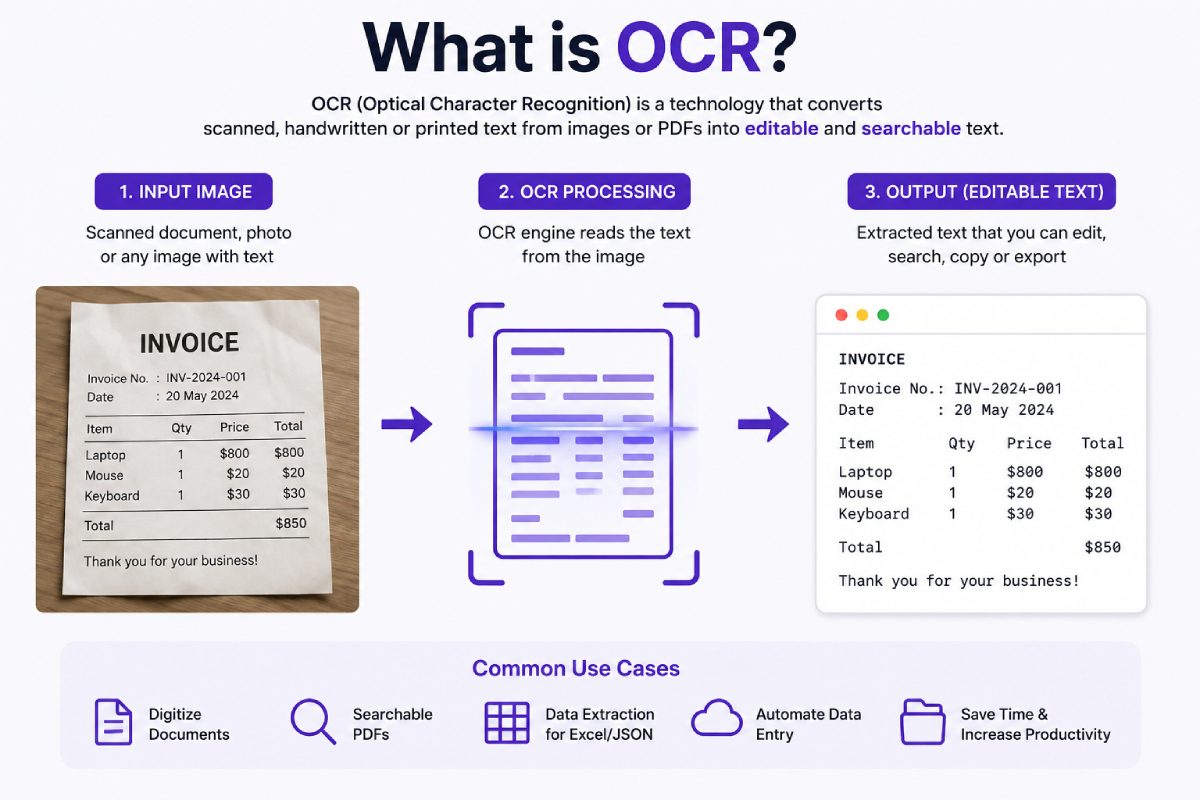
OCR stands for Optical Character Recognition. It's a technology that converts different types of documents — scanned paper documents, PDFs, or images captured by a camera — into editable, searchable data.
In simple terms, OCR takes a picture of text and turns it into text your computer can actually understand: something you can copy, edit, search, or feed into another system.
How Does OCR Work?
While the underlying technology has evolved dramatically over the decades, most OCR systems follow a similar pipeline:
1. Image Acquisition
The process starts with a digital image — a scanned document, a photo taken with a phone, or a PDF page rendered as an image.
2. Preprocessing
Before any text can be recognized, the image usually needs cleanup. This can include:
Straightening skewed or rotated pages
Removing noise, shadows, or background clutter
Adjusting contrast and converting to black-and-white
Cropping out irrelevant regions
3. Layout and Text Detection
The system identifies where text actually lives on the page — separating paragraphs, tables, headers, and images from one another. This step, sometimes called layout analysis, is critical for documents like invoices or forms where position and structure carry meaning.
4. Character Recognition
This is the core step: the system analyzes individual characters or words and matches visual patterns to known letters, numbers, and symbols. Modern OCR engines rely on deep learning models trained on millions of text samples, which makes them far more accurate than older template-matching approaches — especially with varied fonts, handwriting, and lower-quality scans.
5. Post-Processing
Raw recognition output often needs correction — fixing common misreads (like "0" vs "O"), normalizing spacing and punctuation, and applying dictionaries or context rules to catch errors a human reader would immediately spot.
6. Output
The final result is structured, machine-readable text — plain text, searchable PDF, or structured data like JSON, ready to be stored, searched, or plugged into other software.
Types of OCR Technology
Traditional OCR — pattern-matching against known character shapes; fast but brittle with unusual fonts or noisy scans.
AI/ML-based OCR — uses neural networks trained on large datasets, handling varied fonts, handwriting, and messy real-world documents far more reliably.
Intelligent Document Processing (IDP) — goes a step further than plain OCR, combining text recognition with document understanding to extract specific structured fields (like "invoice total" or "due date") rather than just raw text.
Common Use Cases for OCR
OCR shows up in far more places than most people realize:
Digitizing archives — turning paper records, books, and historical documents into searchable digital text
Invoice and receipt processing — extracting vendor names, line items, totals, and dates automatically instead of manual data entry
ID and passport verification — reading fields from identity documents during onboarding or KYC checks
Searchable PDFs — making scanned documents indexable so you can search their contents like any other text file
Automated data entry — feeding extracted data directly into accounting, ERP, or CRM systems
Accessibility tools — converting printed text to speech for visually impaired users
Why OCR Matters for Businesses
Manual data entry is slow, expensive, and error-prone. A business processing hundreds of invoices or receipts a month can lose significant time to typing information from PDFs and scans into spreadsheets or accounting software.
Modern OCR — particularly OCR combined with structured data extraction — turns that manual process into an API call. A document goes in; clean, structured data comes out, ready to be used by other software without a human ever retyping a single number.
OCR vs. Structured Data Extraction
It's worth drawing a distinction here. Plain OCR gives you text — a wall of characters pulled off the page. Structured data extraction goes further: it identifies what that text means — this is the invoice number, this is the total, this is the due date — and returns it as clean, structured fields your systems can actually use directly.
That distinction is exactly where document processing platforms add value beyond basic OCR: not just reading the page, but understanding it.
Example OCR API Providers
If you're building OCR into a product instead of doing it by hand, you generally won't train your own model — you'll call an API. Here are some of the providers commonly used:
AWS Textract — Amazon's document analysis service, well integrated with the AWS ecosystem, supports forms and tables.
Google Document AI — Google Cloud's OCR and document parsing service, strong general-purpose accuracy backed by Google's models.
Azure AI Document Intelligence — Microsoft's offering (formerly Form Recognizer), popular with teams already on Azure.
Mindee — developer-focused API specializing in prebuilt models for receipts, invoices, and IDs.
Nanonets — offers both prebuilt and trainable custom OCR models with a workflow-automation layer on top.
Veryfi — focused on receipts and expense documents with fast turnaround for financial workflows.
DoxTract — an OCR and structured data extraction API built for invoices, receipts, and purchase orders, positioned as a lower-cost alternative to the larger cloud providers.
Final Thoughts
OCR has quietly become one of the more useful pieces of everyday technology — powering everything from phone apps to enterprise document pipelines. Understanding what it does under the hood makes it a lot easier to evaluate the tools built on top of it, and to know what to expect when you're deciding whether OCR (or full structured extraction) is the right fit for your workflow.