Amazon FBA Sellers: How to Digitize and Organize Shipping/Customs Documents
Every FBA shipment that crosses a border generates a stack of paperwork — commercial invoices, packing lists, bills of lading, certificates of origin, customs entry summaries — and most sellers end up with these scattered across supplier emails, freight forwarder portals, and a customs broker's own files. That's manageable until you need one specific document fast: a CBP audit request, a duty drawback claim, a dispute with a supplier over a shipment, or just trying to figure out why a SKU's landed cost doesn't match what you expected.
Here's a system for digitizing and organizing this paperwork properly, and why it matters more than it might seem day to day.
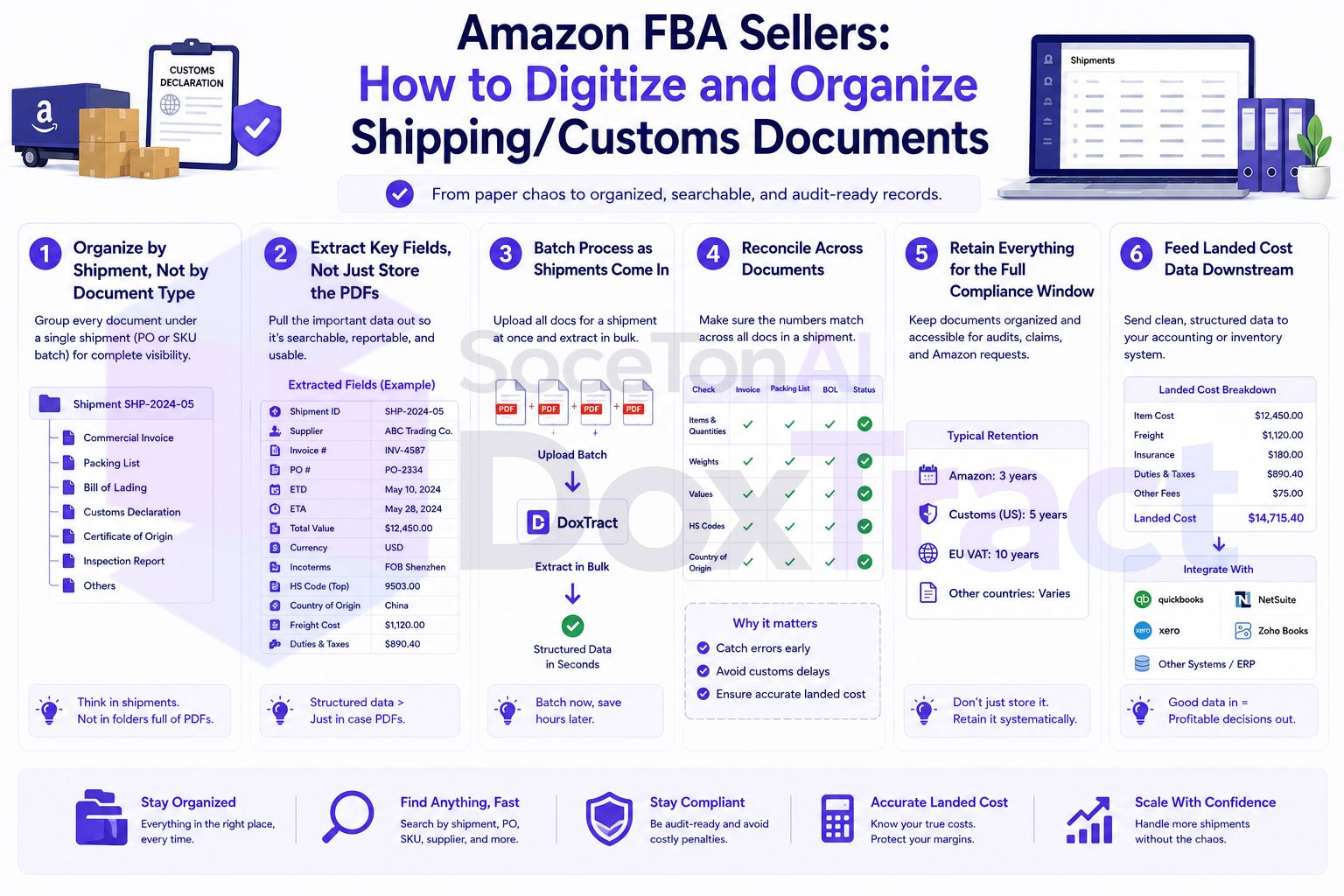
The Documents You're Actually Dealing With
A typical international FBA shipment involves several distinct documents, each serving a different purpose:
Commercial invoice — the supplier's bill for the goods, the primary basis for calculating duties owed
Packing list — what's actually in each carton, by SKU and quantity
Bill of lading (ocean) or air waybill (air freight) — the shipping document from your freight forwarder or carrier
Certificate of origin — establishes where goods were manufactured, relevant for duty rates and trade agreement eligibility
Customs entry summary (CBP Form 7501) — the official U.S. entry record, prepared by your customs broker
FBA shipment plan / ASN — Amazon's own record of what you told them was coming, useful for reconciling against what customs and your supplier documented
Each of these needs to be captured, but they're not interchangeable — a commercial invoice and a packing list can disagree slightly (a supplier substitution, a partial shipment), and knowing that requires having both documents organized and comparable, not just filed somewhere.
Why This Matters Beyond Good Habits
CBP recordkeeping requirements are real and enforced. As an importer of record, you're generally required to retain records related to a customs entry for five years from the date of entry, under 19 CFR Part 163 — and that requirement applies to underlying supporting documents, not just what was filed with CBP at the time of entry. An audit can look back across that full window, and reconstructing a shipment's paperwork after the fact, months or years later, is far harder than having organized it from the start.
Landed cost accuracy depends on having all of it. Your actual per-unit cost isn't just what the commercial invoice says — it includes freight and duty, both of which live on separate documents. Missing or disorganized paperwork here doesn't just risk a compliance headache, it risks a wrong picture of which products are actually profitable.
Disputes need paper trails. A supplier shorting a shipment, a freight forwarder's damage claim, an Amazon receiving discrepancy — all of these get resolved faster when you can pull the exact commercial invoice, packing list, and BOL for that shipment in seconds instead of searching three inboxes.
Step 1: Organize by Shipment, Not by Document Type
The most useful structure groups every document related to one shipment together, since that's how you'll actually need to retrieve them:
/Shipments
  /2026-03-15_Supplier-A_PO1042
    commercial_invoice.pdf
    packing_list.pdf
    bill_of_lading.pdf
    certificate_of_origin.pdf
    cbp_entry_summary.pdf
Name the folder with the shipment date, supplier, and PO or reference number — enough to identify it without opening anything.
Step 2: Extract Key Fields, Not Just Store the PDFs
Filed documents are necessary for compliance, but they're not enough on their own to catch discrepancies or feed landed cost calculations — for that you need structured data, not a folder of scans. Build extraction templates per document type in the Template Editor — free to try, no signup required:
Commercial invoice template: vendor, invoice number, per-line-item product description, quantity, unit price, and total.
Packing list template: carton count, quantity per SKU, gross/net weight — useful for reconciling against both the commercial invoice and what actually arrives at Amazon.
Bill of lading template: carrier, container/booking number, ports of origin and destination, dates — often needed quickly for tracking or dispute purposes.
Because each document type has a genuinely different layout, keep templates separate per document type (and per supplier/forwarder, if their formats vary) rather than trying to force one template to read all of them.
Step 3: Batch Process as Shipments Come In
From the Doxtract App, select the relevant template and run extraction on each new shipment's documents as they arrive from your supplier and forwarder. This gives you structured data — line items, quantities, costs — alongside the organized PDF originals, rather than one or the other.
Step 4: Reconcile Across Documents
With structured data from multiple documents in the same shipment, discrepancies become a quick comparison instead of a manual cross-read:
Commercial invoice quantity vs. packing list quantity, per SKU
Packing list quantity vs. what Amazon's receiving report shows actually arrived
Commercial invoice total vs. what you were actually charged
Catching a mismatch here — a short shipment, a substituted item, a billing error — is far easier when the numbers are already extracted and comparable than when it means reopening three PDFs side by side.
Step 5: Retain Everything for the Full Compliance Window
Once organized and extracted, keep the full folder structure — including original PDFs, not just extracted summaries — for at least five years from the date of entry, in line with CBP recordkeeping requirements. Electronic storage is acceptable under 19 CFR 163.5 as long as records remain retrievable and legible, which an organized digital shipment folder satisfies far better than a scattered inbox ever would.
Step 6: Feed Landed Cost Data Downstream
The extracted commercial invoice and freight data — unit cost, quantity, shipping, duty — becomes the input for accurate per-SKU landed cost, which in turn feeds your actual margin analysis. This is the same underlying workflow covered in more depth in tracking COGS automatically from vendor invoices — FBA shipping documents are simply a specific, compliance-heavy case of that broader problem.
Getting Started
Start with your highest-volume supplier or your most recent shipment, build templates for their commercial invoice and packing list in the Template Editor — no signup required — and organize that one shipment's folder as the model for every future one. Check Pricing; the free tier (200 pages/month) is enough to test the full workflow on a real shipment before rolling it out across your supplier list.