How Accurate is OCR? Understanding OCR Accuracy and Error Rates
"99% accurate" is probably the most repeated — and least useful — number in OCR marketing. It sounds close to perfect until you realize a 99% character accuracy rate still puts roughly 30 wrong characters on a single 500-word page. For a purchase order or invoice, one of those characters can be a digit in the total amount.
This post breaks down what "OCR accuracy" actually means, how it's measured, why the number that matters most depends on what you're extracting, and what real-world benchmark data — including our own — shows about where OCR holds up and where it doesn't.
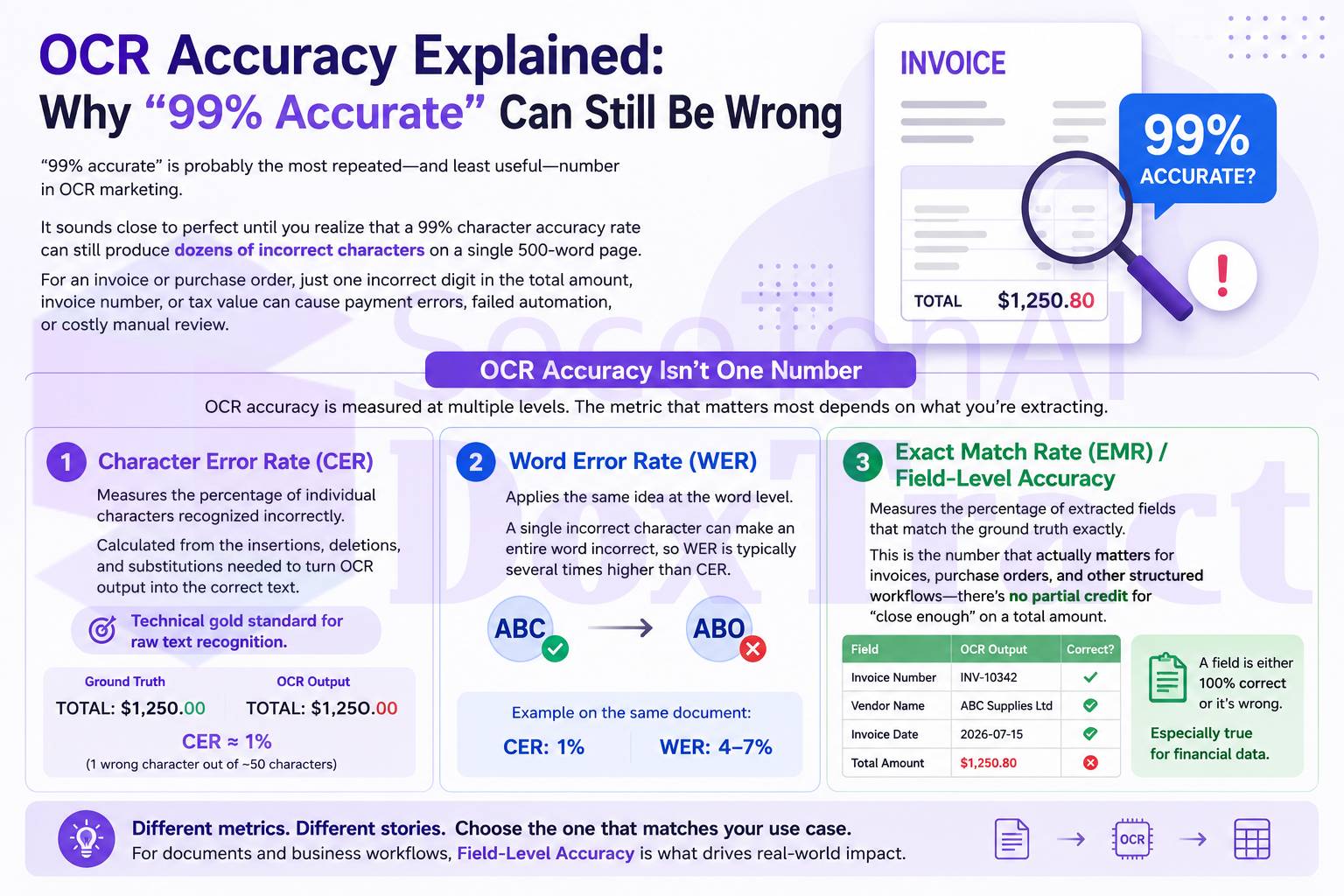
OCR Accuracy Isn't One Number
Vendors love quoting a single accuracy percentage, but accuracy is measured differently depending on what layer of the pipeline you're looking at:
Character Error Rate (CER) — the percentage of individual characters transcribed incorrectly, calculated from the insertions, deletions, and substitutions needed to turn the OCR output into the correct text. This is the closest thing to a technical gold standard for raw text recognition.
Word Error Rate (WER) — the same idea at the word level. A single mistyped character can break an entire word, so WER is typically several times higher than CER on the same document.
Exact Match Rate (EMR) / Field-Level Accuracy — the percentage of extracted fields (invoice number, total, vendor name) that match the ground truth exactly. This is the number that actually matters for accounts payable and other structured-data workflows, because a field is either right or it's wrong — there's no partial credit for "close enough" on a total amount.
A system can post a strong CER and still get the invoice total wrong, because CER measures character-level transcription, not whether the model correctly identified which number on the page was the total. That distinction is the source of most of the confusion around OCR accuracy claims.
What "Good" Looks Like in 2026
Rough benchmarks for printed text, drawn from current industry data:
| Metric | Good | What it means |
|---|---|---|
| CER, clean printed text | Below 1–2% | Roughly industry standard for scanned business documents |
| WER, printed text | Historically 7–16% in older OCR literature; modern cloud/VLM engines are meaningfully lower on clean scans | Word-level mistakes compound faster than character-level ones |
| Field-level accuracy (structured docs) | 99%+ to enable straight-through processing | The threshold most AP teams need before they'll skip human review |
Two things move these numbers more than anything else: scan quality and layout consistency. Dropping from 300 DPI to 150 DPI can cost 20% or more in accuracy on its own. And a benchmark run on a clean, controlled test set will almost always outperform the same system running on a messy real-world document corpus — vendors' quoted numbers and your actual production numbers are rarely the same figure.
Why "Accurate OCR" and "Accurate Extraction" Are Different Problems
This is the part most comparisons skip. Reading the characters on a page correctly (OCR) is a different problem from knowing which characters matter — which line is the total, which number is the invoice ID, which block is the vendor's address (extraction/layout understanding). A system can nail the text recognition and still put the wrong number in the "Total" field because it misjudged the document's structure.
We tested this directly. In a benchmark of SoceTonAI DoxTract run on 4,000 real invoices across four distinct templates from a public 7,000-invoice dataset, we tracked three fields — Invoice Number, Total Amount, and Contact/Vendor — per template:
On stable, consistent layouts, field accuracy reached up to 100%, with minimal post-processing needed.
Across templates, Invoice Number accuracy ranged from 92% to 100%, and Contact/Vendor accuracy ranged from 94% to 100% — both fields held up well even as layouts varied.
Total Amount was consistently the weakest field, dropping as low as 67% on layout-shifted templates. The failures weren't OCR misreads — they were caused by multi-line totals, tax/subtotal grouping, and positional variation in where the total actually sits on the page.
The pattern was clear across every template we tested: when a field's position and format stay consistent, extraction is close to deterministic. When the surrounding layout shifts — a different vendor, a different invoice design — the fields most sensitive to where they sit on the page, like totals, are the ones that suffer. Text recognition itself wasn't the bottleneck; layout reasoning was. Read the full benchmark write-up →
Why This Matters Before You Compare Vendors
This distinction matters more than it looks like it should, because it changes what question you should actually be asking when evaluating an OCR or Document AI vendor. "How accurate is your OCR?" is the wrong question — every major provider will quote a number in the high 90s for clean printed text, and they're not lying. The better questions are:
What's your field-level accuracy on the specific document type I care about (invoices, receipts, POs), not just raw text recognition?
How does accuracy hold up when the layout changes — new vendor, new template, new region on the page?
What happens to the fields that are hardest to pin down positionally, like totals and line items — do they degrade gracefully into a review queue, or fail silently?
Those answers vary a lot more between vendors than the headline "99% accurate" claim ever will — and they're exactly what determines how much manual review your team ends up doing downstream. That's the real cost driver behind any OCR or IDP pricing page, which is where we'll go next.