OCR vs Document AI: What's the Difference?
"OCR" and "Document AI" get used almost interchangeably — search for either term and you'll land on the same handful of products. But they're not the same thing, and knowing the difference matters if you're choosing a tool to extract data from invoices, receipts, contracts, or forms.
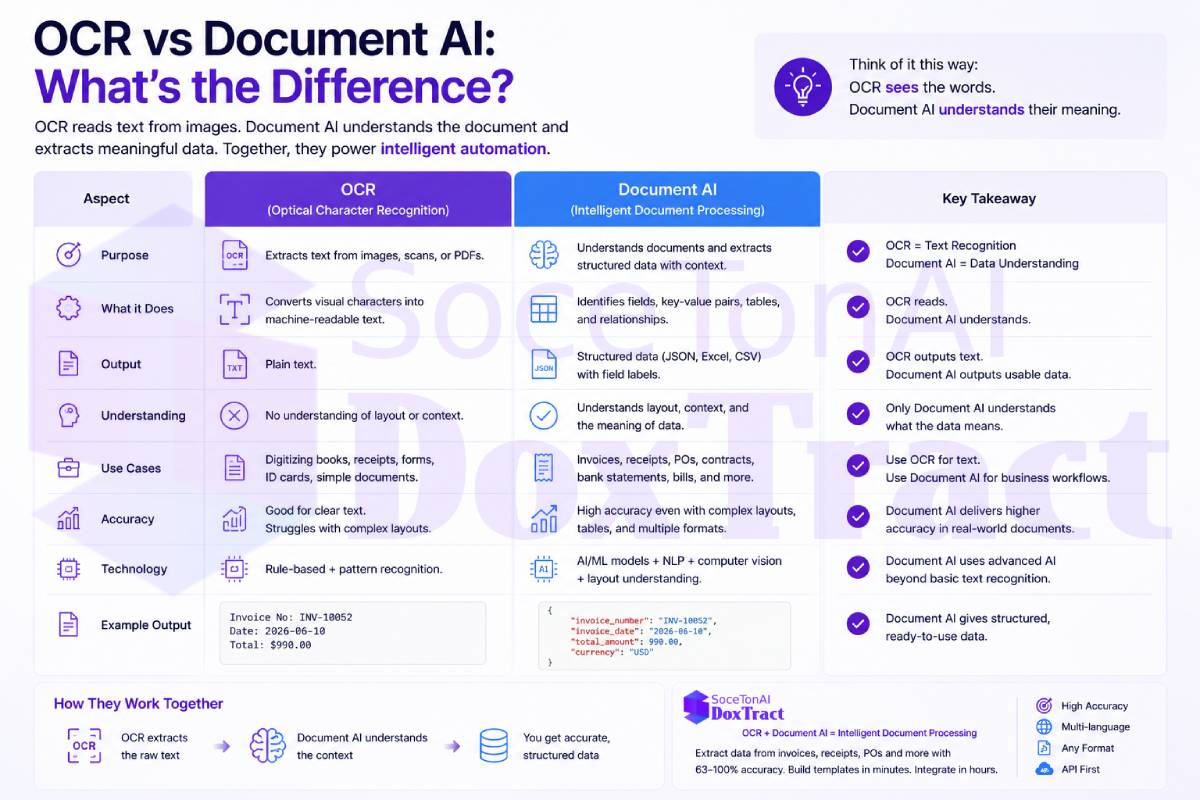
The short version: OCR reads characters. Document AI understands documents. Here's what that actually means in practice.
What OCR Is
OCR — Optical Character Recognition — is the technology that converts an image of text into machine-readable text. Point it at a scanned page or a photo of a document, and it gives you back the words on that page as a string of text.
Classic OCR is good at exactly one job: turning pixels into characters. It doesn't know what an "invoice number" is, it doesn't know that a block of text is a table, and it doesn't know that the number in the top-right corner is a total rather than a page number. It just reads text, left to right, top to bottom (or however its layout logic works), and hands it back to you.
This is why raw OCR output on a real-world invoice often looks like a jumbled wall of text — line items get merged, columns get scrambled, and header fields end up mixed in with the body.
What Document AI Is
Document AI (also called Intelligent Document Processing, or IDP) is a layer built on top of OCR. It combines text recognition with machine learning models trained to understand document structure and meaning — not just what the characters say, but what role each piece of text plays.
A Document AI system can typically:
Identify specific fields (invoice number, vendor name, due date, total) regardless of where they sit on the page
Recognize and correctly parse tables and repeating line items
Handle different layouts and templates without needing a rule for every vendor's invoice format
Return clean, structured output (usually JSON) instead of a flat block of text
Normalize inconsistent formatting — currency symbols, date formats, spacing — into usable data
In short: OCR answers "what does this page say?" Document AI answers "what does this document mean, and can you hand me the specific data point I need?"
Why the Difference Matters
If you're building or buying software that needs to act on document data — post an invoice to an ERP, match a receipt to an expense report, populate a form — raw OCR text isn't enough. You'd still need to write brittle parsing logic to figure out which chunk of text is the total and which is a line item, and that logic breaks the moment a new vendor sends you an invoice in a different layout.
This is exactly the problem we covered in What Is Accounts Payable Automation? — AP automation depends entirely on reliable, structured data extraction. OCR alone gets you words on a page; Document AI/IDP is what actually makes automated invoice processing, three-way matching, and ERP sync possible.
A quick side-by-side:
| OCR | Document AI / IDP | |
|---|---|---|
| Output | Raw text | Structured fields (JSON) |
| Understands layout? | No | Yes |
| Handles tables/line items? | Not reliably | Yes |
| Works across different templates? | Not without custom rules | Yes, via trained models |
| Typical use | Digitizing text, searchable PDFs | Invoice/receipt/form data extraction, automation pipelines |
Where DoxTract Fits
DoxTract is a Document AI / IDP platform, not just an OCR wrapper — it's built specifically to turn invoices, receipts, and purchase orders into clean, structured data that plugs directly into automation workflows, bookkeeping tools, or ERP systems, without the brittle template rules that raw OCR requires. If you're building the kind of automation described in our AP automation guide, that's the layer DoxTract is designed to handle. You can try it at soceton.com.