What Is Accounts Payable Automation? (And Why OCR Is the Engine Behind It)
If you've ever worked in or around a finance team, you know the drill: invoices arrive by email, PDF, or paper. Someone opens each one, keys the vendor name, invoice number, line items, and totals into an accounting system, routes it for approval, and eventually schedules a payment. Multiply that by hundreds or thousands of invoices a month, and you have a process that's slow, expensive, and one typo away from a vendor dispute.
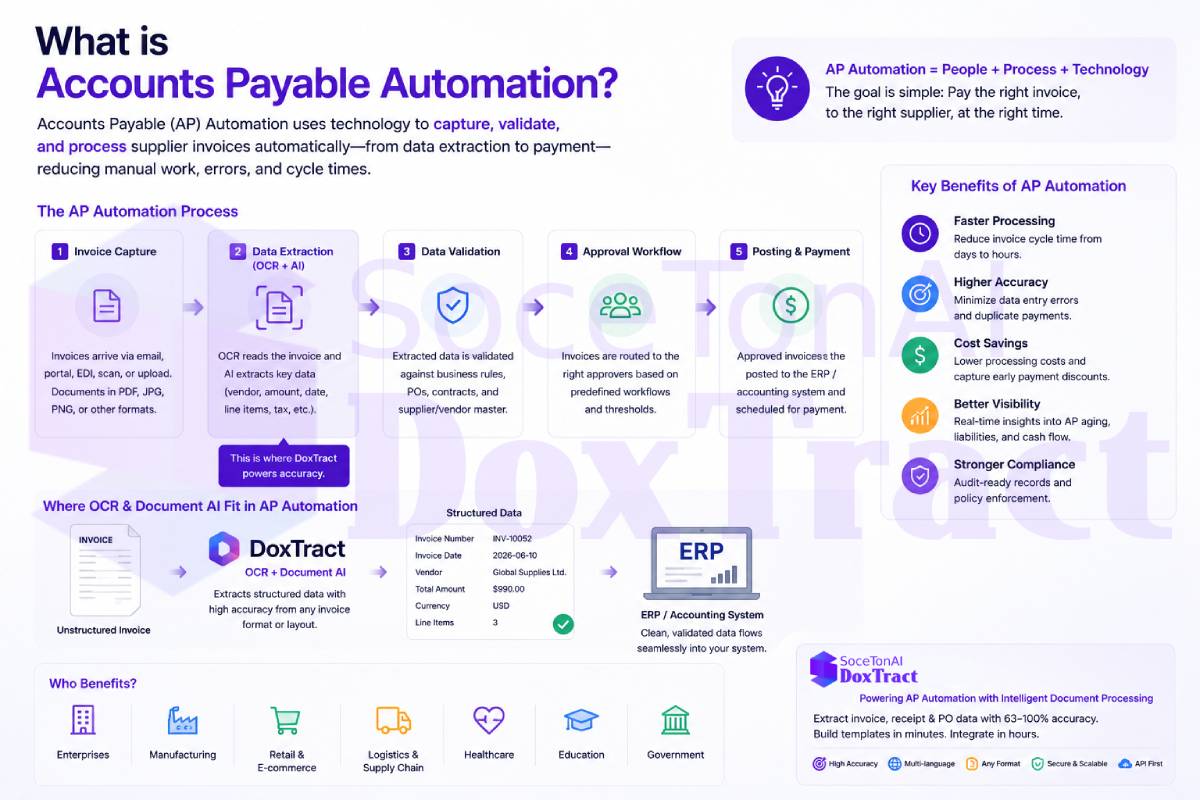
Accounts payable (AP) automation is the set of tools and workflows that replace that manual cycle with software — from the moment an invoice lands in an inbox to the moment it's matched, approved, and paid. And at the core of almost every AP automation system sits a technology you might not immediately associate with finance: OCR and document data extraction.
This post breaks down what AP automation actually does, where OCR fits into the picture, and which providers — from document-extraction APIs to full AP platforms — are solving this problem today.
The Manual AP Process (and Why It Breaks Down)
A typical unautomated AP workflow looks something like this:
An invoice arrives via email, mail, or a vendor portal.
Someone manually reads it and types the data into an ERP or accounting system.
The invoice is matched against a purchase order and receipt (if one exists).
It's routed to the right person for approval — often over email or in person.
Once approved, it's scheduled for payment.
The paper or PDF gets filed away for audit purposes.
Every one of these steps is a place where things go wrong: mistyped line items, duplicate payments, lost invoices, approval bottlenecks, and no real-time visibility into what the company actually owes. Industry research consistently puts the cost of manually processing a single invoice somewhere between $8 and $30, and a large share of AP teams still spend 10+ hours a week on data entry alone.
The Cost of Manual Accounts Payable Processes
Manual accounts payable work can create significant operational costs as invoice volumes grow. APQC benchmark data reports a median total cost of approximately $6.00 per invoice processed across its cross-industry sample. This measure includes personnel, systems, overhead, outsourced services, and other operational costs involved in processing accounts payable invoices.
The actual cost varies depending on invoice volume, process complexity, labor costs, technology, and the level of automation. Organizations with inefficient or highly manual workflows may also spend additional time correcting data-entry errors, resolving exceptions, following up on approvals, and searching for invoice information.
Accounts payable automation can help reduce these operational burdens by automating invoice capture, data extraction, validation, approval routing, and accounting-system updates. However, the financial impact depends on the organization’s existing workflow and how effectively the automation system is implemented.
Source: APQC, Total Cost to Perform the Process “Process Accounts Payable (AP)” per Invoice Processed.
How AP Automation Reduces Manual Work and Costs
AP automation reduces repetitive work by using software to capture invoice data, validate information, match invoices with purchase orders, and route documents for approval. This helps finance teams process invoices faster, reduce data-entry errors, improve visibility, and focus on exceptions that require human review.
Common AP automation features include:
Invoice capture and OCR/IDP data extraction
Data validation and duplicate invoice detection
Purchase order and receipt matching
Automated approval workflows
ERP and accounting software integrations
Invoice tracking, audit logs, and reporting
By automating these tasks, businesses can handle growing invoice volumes more efficiently without increasing manual work at the same rate.
For an example of how document extraction can reduce manual processing time in a bookkeeping workflow, see our breakdown of manual data entry vs automated document extraction.
The Manual AP Process vs. Automated AP Process:
| AP stage | Manual process | Automated process |
|---|---|---|
| Invoice intake | Email, paper, or portal checked manually | Invoices captured automatically |
| Data entry | Staff type invoice fields | OCR and Document AI extract fields |
| Validation | Manual review | Automated validation rules |
| Matching | Manual PO and receipt comparison | Automated two-way or three-way matching |
| Approval | Email follow-ups | Rule-based approval workflows |
| Accounting entry | Data entered again | Data synchronized with ERP/accounting software |
| Audit records | Files and spreadsheets | Searchable digital audit trail |
What Accounts Payable Automation Actually Does
AP automation software digitizes and automates that entire invoice-to-payment cycle. The core components are usually:
Automated invoice capture — invoices come in as PDFs, scans, or emails and are automatically ingested rather than manually opened and read.
Data extraction — vendor name, invoice number, dates, line items, tax, and totals are pulled out of the document automatically, regardless of the invoice's layout.
Three-way matching — the invoice is automatically checked against the purchase order and the goods receipt to catch discrepancies before payment.
Approval workflows — invoices are routed to the right approver based on amount, vendor, or department, with reminders and audit trails built in.
ERP/accounting sync — approved invoices post directly into systems like QuickBooks, NetSuite, Xero, or SAP without anyone re-typing anything.
Payment execution — ACH, virtual cards, or other electronic payment methods replace paper checks.
AP automation workflow:
Invoice → Data extraction → Validation → Matching → Approval → Accounting → Payment
By automating repetitive tasks, AP automation helps finance teams process invoices faster, reduce manual data entry, and focus on exceptions that require human review.
AP Automation Technology
AP automation uses several technologies to streamline invoice processing and reduce manual work:
OCR (Optical Character Recognition): Reads text from invoices, PDFs, and scanned documents.
Intelligent Document Processing (IDP): Identifies and extracts structured data such as vendor names, invoice numbers, dates, totals, and line items.
AI and machine learning: Help improve data extraction, document classification, and exception handling.
Workflow automation: Routes invoices to the appropriate employees for review and approval.
Business rules: Validate invoice data, detect possible duplicates, and flag missing or incorrect information.
ERP and accounting integrations: Transfer approved invoice data to financial systems without requiring duplicate data entry.
Together, these technologies help automate the journey from invoice capture and data extraction to approval, accounting, and payment.
Where OCR and Document Extraction Fit In
Everything above depends on one unglamorous but critical capability: turning an unstructured document into structured data.
An invoice isn't a form with fixed fields — every vendor formats theirs differently. Some are scanned paper, some are native PDFs, some are photos taken on a phone. Before any matching, routing, or ERP posting can happen, software needs to reliably answer questions like "what's the invoice number," "what's the due date," and "what are the individual line items and their amounts" — regardless of layout.
This is the job of Intelligent Document Processing (IDP): OCR combined with AI/ML models that understand invoice structure, not just raw text. A good IDP layer will:
Handle scanned, photographed, and digital-native documents alike
Extract both header-level fields (vendor, date, total) and repeating line items
Normalize messy OCR output (currency symbols, inconsistent spacing, odd punctuation) into clean, usable data
Return structured JSON that plugs directly into an AP workflow or ERP
In other words, IDP is the plumbing that makes AP automation possible in the first place. Without accurate extraction, "automation" just becomes a different flavor of manual review.
OCR vs. Intelligent Document Processing for AP
OCR (Optical Character Recognition) converts text from invoices, PDFs, and scanned documents into machine-readable text. However, OCR alone may not understand which information represents the vendor, invoice number, date, or total amount.
Intelligent Document Processing (IDP) builds on OCR by identifying, extracting, and organizing invoice data into structured fields. It can also support document classification, data validation, and exception handling.
In an AP workflow, OCR reads the invoice, while IDP turns the invoice content into structured data that can be used for approval, accounting, and payment processes.
| Feature | OCR | Intelligent Document Processing (IDP) |
|---|---|---|
| Primary purpose | Converts text in invoices into machine-readable text | Extracts and organizes invoice data into structured fields |
| Understands document context | Limited | Yes, identifies the meaning and context of data |
| Invoice data extraction | Reads text but may not identify specific fields | Extracts fields such as vendor name, invoice number, date, total, and line items |
| Document classification | Usually not included | Can classify invoices and other document types |
| Data validation | Limited | Can validate extracted data and flag missing or inconsistent information |
| Handling different layouts | May require templates or additional processing | Can adapt to different invoice formats and layouts |
| Use in AP automation | Provides the text-reading foundation | Produces structured data for approval, accounting, matching, and payment workflows |
| Best described as | Reads the invoice | Understands and structures invoice data |
Document AI vs. Full AP Automation
Document AI and full AP automation serve different roles in the accounts payable process.
Document AI focuses on reading invoices and extracting structured data such as vendor names, invoice numbers, dates, totals, and line items. This data can then be sent to accounting software, ERP systems, or custom workflows.
Full AP automation includes a broader set of functions, such as invoice capture, data validation, purchase order matching, approval workflows, accounting integrations, and payment processing.
SoceTonAI DoxTract provides the Document AI and data extraction layer. It helps businesses and developers extract structured information from invoices and other financial documents, which can then be used as part of a larger AP automation workflow.
| Feature | Document AI | Full AP Automation |
|---|---|---|
| Primary purpose | Extracts structured data from invoices and other financial documents | Automates the broader accounts payable workflow |
| Invoice data extraction | Extracts fields such as vendor name, invoice number, date, total, and line items | May include built-in document extraction or connect to a Document AI provider |
| Data validation | Can validate extracted fields and flag missing or inconsistent data | Validates invoice data as part of the overall AP workflow |
| Purchase order matching | Usually not a core function | Often supports two-way and three-way matching |
| Approval workflows | Typically handled by external systems or custom workflows | Includes configurable invoice approval workflows |
| ERP and accounting integration | Sends extracted data to connected systems through APIs or integrations | Synchronizes invoice and payment data with ERP or accounting software |
| Payment processing | Usually not included | May include payment scheduling or payment capabilities |
| Best suited for | Businesses and developers that need document data extraction | Organizations that need an end-to-end AP solution |
| Role in AP automation | Provides the document intelligence and data extraction layer | Manages the complete invoice-to-payment workflow |
Existing IDP / Accounts Payable Automation Providers
The market splits roughly into two layers: document-extraction / IDP providers that specialize in turning invoices into structured data (often consumed via API by other software), and full-suite AP automation platforms that handle the entire invoice-to-payment workflow, usually with their own extraction built in.
Document Extraction / IDP Providers
SoceTonAI DoxTract — SoceTonAI's document OCR and structured data extraction API/SaaS, purpose-built for invoices, receipts, and purchase orders. Positioned as a more affordable alternative to the large cloud providers, with a free tier and simple, developer-friendly pricing for teams that want to build AP automation, bookkeeping tools, or ERP integrations on top of reliable extraction.
AWS Textract — Amazon's OCR and document analysis service, with dedicated invoice and receipt parsing.
Google Document AI — Google Cloud's document parsing platform, including a prebuilt invoice processor.
Azure AI Document Intelligence — Microsoft's document extraction service (formerly Form Recognizer), with prebuilt invoice models.
Mindee — API-first document processing platform with prebuilt invoice and receipt extraction.
Nanonets — OCR and workflow automation platform with a strong focus on AP-specific use cases.
Veryfi — Real-time OCR API focused on receipts and invoices, popular in expense-management integrations.
Docsumo — Document processing platform aimed at finance and lending use cases, including invoice extraction.
Rossum — AI-driven document processing platform built specifically around invoice and AP data capture.
Full-Suite AP Automation Platforms
Bill.com — Widely used AP/AR automation platform for small and mid-sized businesses.
Tipalti — Global payables automation, strong for mass and international vendor payments.
Stampli — Collaboration-first AP platform with AI-assisted invoice workflows.
Ramp Bill Pay — AP automation bundled with corporate cards and spend management.
Medius — Enterprise-focused AP automation with strong e-invoicing and compliance support in Europe.
Tungsten Automation — Long-standing IDP and capture vendor with deep AP and SAP integration history.
Basware — Global procure-to-pay platform with wide multi-country compliance coverage.
AvidXchange — AP automation targeted at mid-market industries like real estate and construction.
Coupa — Full procure-to-pay suite with AP as one part of a broader spend management platform.
The line between these two categories is blurring — many full-suite platforms license or build their own IDP, and many IDP providers are adding lightweight workflow features. But if you're building or buying, it's worth knowing which layer you actually need: a raw extraction engine to power your own workflow, or a complete out-of-the-box AP system.
Where SoceTonAI DoxTract Fits
If you're building AP automation, a bookkeeping tool, or an ERP integration and need reliable invoice and receipt extraction without committing to the pricing or complexity of the big cloud providers, that's exactly the gap SoceTonAI DoxTract is built for — a straightforward OCR and extraction API with a free tier to get started. You can see current pricing and try it directly at soceton.com.
Conclusion
Accounts payable automation helps businesses reduce manual invoice work by streamlining data extraction, validation, approval, and accounting workflows. Technologies such as OCR and Intelligent Document Processing provide the structured data needed to automate these processes, while full AP automation platforms manage broader functions such as purchase order matching, approvals, and payments.
The right solution depends on your business needs. Companies looking for a complete invoice-to-payment system may benefit from full AP automation software, while businesses and developers that need accurate, affordable document data extraction can use a Document AI solution such as SoceTonAI DoxTract as part of a larger AP workflow.
By choosing the right tools and automating repetitive tasks, finance teams can process invoices more efficiently, improve visibility, and spend more time on work that requires human judgment.
Frequently Asked Questions About Accounts Payable Automation
What is accounts payable automation?
Accounts payable automation is the use of software to automate repetitive AP tasks such as invoice capture, data extraction, validation, approval routing, purchase-order matching, and accounting-system updates. It helps finance teams reduce manual data entry, process invoices faster, improve accuracy, and maintain better visibility into the accounts payable workflow.
How does accounts payable automation work?
Accounts payable automation typically begins when an invoice is received by email, uploaded to a portal, or scanned. OCR and Intelligent Document Processing extract information such as the vendor name, invoice number, date, line items, and total amount. The system then validates the data, checks for duplicates, matches the invoice with purchase orders or receipts, routes it for approval, and sends the approved information to an ERP or accounting system.
What technology is used in accounts payable automation?
Accounts payable automation technology can include OCR, Intelligent Document Processing (IDP), artificial intelligence, machine learning, workflow automation, business rules, and ERP or accounting integrations. These technologies work together to capture invoice data, validate information, automate approval workflows, and reduce the amount of manual work required from finance teams.
How does OCR help automate accounts payable?
OCR, or Optical Character Recognition, converts text from scanned invoices, PDFs, and images into machine-readable data. In an AP workflow, OCR can help capture information such as invoice numbers, vendor names, dates, amounts, and line items. Intelligent Document Processing can then identify and organize this information into structured fields for validation, approval, and accounting workflows.
What is the difference between AP automation and invoice automation?
Invoice automation usually focuses on automating the invoice lifecycle, including invoice capture, data extraction, validation, matching, and approval. AP automation is broader and may also include vendor management, payment workflows, accounting-system synchronization, reporting, and other accounts payable processes. Invoice automation is often one part of a complete AP automation system.
What is an AP automation system?
An AP automation system is software that helps businesses automate accounts payable tasks. Depending on the platform, it may provide invoice capture, OCR and data extraction, approval workflows, purchase-order matching, duplicate invoice detection, ERP integrations, payment capabilities, audit trails, and reporting. Some solutions provide the complete AP workflow, while others focus on specific layers such as invoice data extraction.
Is accounts payable automation only for large companies?
No. Accounts payable automation can benefit small and medium-sized businesses as well as large enterprises. Smaller companies may use automation to reduce manual invoice entry and organize approval workflows, while larger organizations may use it to process high invoice volumes, manage complex approval rules, and integrate with enterprise resource planning systems.
What are the main benefits of accounts payable automation?
The main benefits of accounts payable automation include faster invoice processing, less manual data entry, fewer data-entry errors, improved invoice visibility, more consistent approval workflows, better audit trails, and easier access to AP data. Automation can also help finance teams manage growing invoice volumes without increasing manual work at the same rate.
What features should accounts payable automation software have?
Useful AP automation features may include invoice capture, OCR or Intelligent Document Processing, invoice and line-item extraction, data validation, duplicate invoice detection, two-way or three-way matching, configurable approval workflows, ERP or accounting integrations, audit logs, reporting, and API access. The best feature set depends on the company’s invoice volume, existing software, and workflow requirements.
Can OCR alone automate the accounts payable process?
OCR alone does not automate the entire accounts payable process. OCR mainly converts document text into machine-readable information. A complete AP automation workflow may also require data validation, business rules, purchase-order matching, approval routing, accounting integrations, payment workflows, and exception handling. OCR is an important data-capture technology, but it is only one part of AP automation.
What is the role of Document AI in accounts payable automation?
Document AI helps convert unstructured invoices, receipts, purchase orders, and other financial documents into structured data. It can identify relevant fields and, depending on the system, extract information from different document layouts. The structured data can then be sent to AP workflows, accounting software, ERP systems, or custom applications for further processing.
Is SoceTonAI DoxTract a complete accounts payable automation platform?
SoceTonAI DoxTract provides the document extraction layer used in accounts payable workflows rather than a complete end-to-end AP automation system. It can extract structured data from invoices, receipts, purchase orders, PDFs, and images. Businesses and developers can use the extracted data in accounting systems, approval workflows, ERP integrations, or custom AP automation applications.