3-Way PO Matching Explained (and How to Automate It)
Every accounts payable team eventually runs into the same question: how do you know an invoice is actually legitimate before you pay it? The standard answer is matching — checking the invoice against other documents in the purchase cycle before money moves. The most common version of this is 3-way matching, and it's one of the highest-leverage places to automate in the entire AP process.
This post explains what 3-way matching actually is, how it compares to 2-way and 4-way matching, why it's usually done badly by hand, and how document extraction makes it practical to automate.
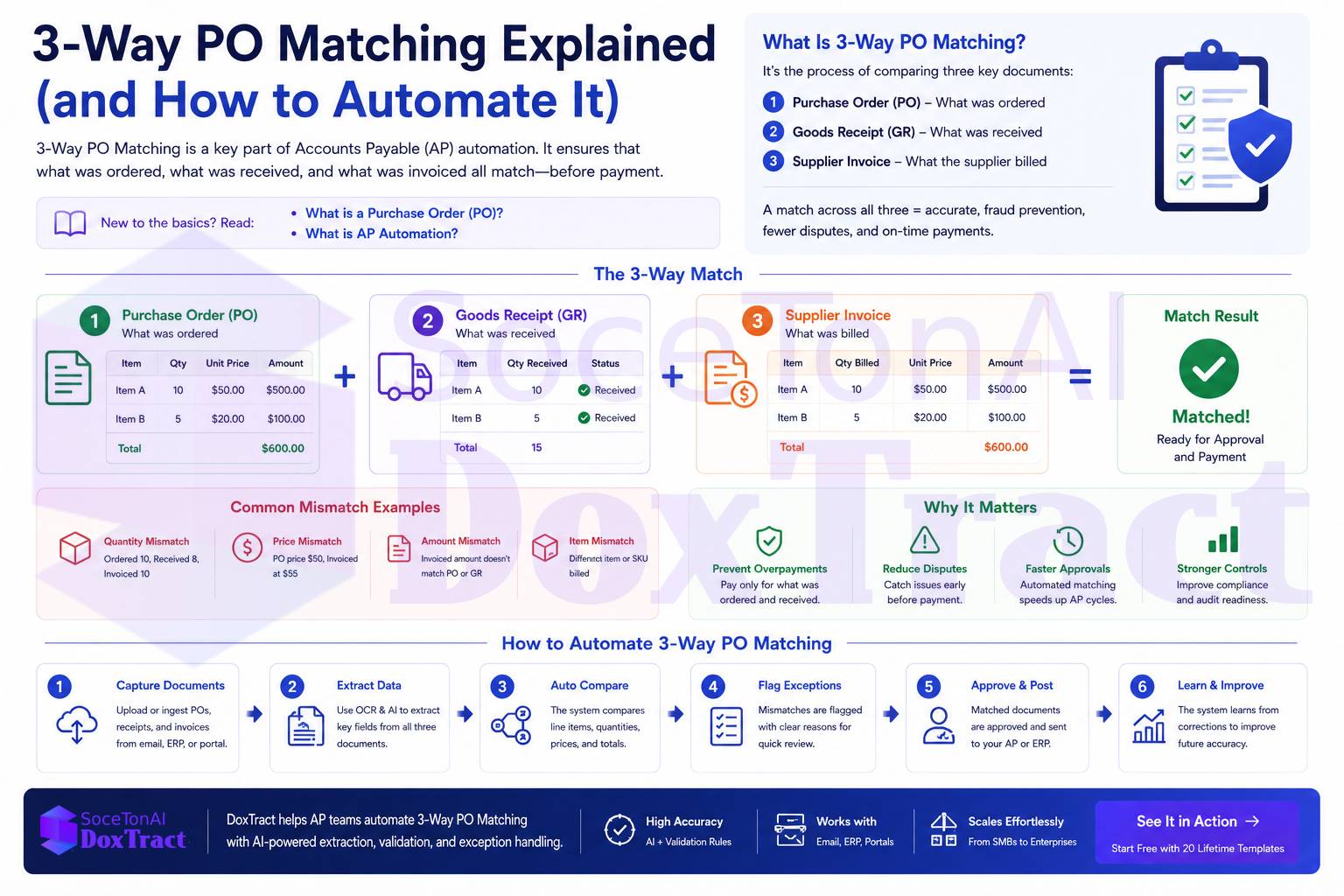
What Is a Purchase Order, and Why Does Matching Start There?
A purchase order is the buyer's formal record of what was ordered, from whom, at what price, and in what quantity — created before the goods or services arrive. It's the anchor document for matching because it represents what was actually authorized, independent of whatever shows up later on an invoice.
Matching exists because an invoice alone is just a claim. The vendor is asserting "you owe us this amount for this delivery" — and without something to check that claim against, AP teams are trusting the invoice at face value.
2-Way vs. 3-Way vs. 4-Way PO Matching
Matching comes in a few standard levels, each adding one more document to check against:
| Type | Documents compared | What it catches |
|---|---|---|
| 2-way match | Purchase Order + Invoice | Price and quantity discrepancies between what was ordered and what was billed |
| 3-way match | Purchase Order + Invoice + Goods Receipt/Delivery Note | Everything 2-way catches, plus confirmation that the goods or services were actually received |
| 4-way match | PO + Invoice + Goods Receipt + Inspection/Quality Report | Everything 3-way catches, plus confirmation the goods passed a quality or inspection check |
3-way matching is the industry standard for most mid-size and larger organizations, because it closes the biggest gap in 2-way matching: a vendor can send a valid-looking invoice for goods that were never actually delivered, and 2-way matching alone wouldn't catch it. 4-way matching adds real value in industries with strict quality requirements (manufacturing, pharma, regulated goods) but is overkill for most general AP workflows.
| Type | Documents Compared | Best For | Risk Level |
|---|---|---|---|
| 2-Way Matching | PO + Invoice | Services, subscriptions | Medium |
| 3-Way Matching | PO + Goods Receipt + Invoice | Physical goods | Low |
| 4-Way Matching | PO + GRN + Inspection + Invoice | Manufacturing, regulated industries | Lowest |
Different matching methods are used depending on the purchasing process and the level of financial control required. While 2-way matching is suitable for simple purchases, 3-way matching is the most common approach for physical goods because it verifies that the items were ordered, received, and invoiced correctly. 4-way matching adds an additional quality inspection step for industries with stricter compliance requirements.
How 3-Way Matching Actually Works
The process compares three fields across three documents:
Quantity — does the invoice quantity match what the PO authorized and what the goods receipt confirms was actually received?
Price — does the invoice's unit price match the price agreed on the PO?
Vendor and item details — is this the same vendor, the same item or service, referencing the same PO number?
If all three align within an acceptable tolerance (some AP teams allow a small variance threshold for rounding or minor pricing adjustments), the invoice is cleared for payment automatically. If anything doesn't line up, it gets flagged as an exception for a human to review before payment is released.
Why Manual 3-Way Matching Breaks Down
On paper, 3-way matching sounds simple. In practice, done manually, it's one of the slowest and most error-prone parts of AP:
It requires pulling three separate documents — often from three different systems or inboxes — and manually cross-checking fields by eye.
Partial deliveries and partial invoices are common, meaning a single PO might need matching against multiple invoices and multiple delivery notes over time, which manual trackers handle poorly.
Exception volume is high. Even a modest mismatch rate across POs, invoices, and receipts compounds into a meaningful chunk of every AP team's week, and manual investigation typically costs 20–30 minutes per exception. (See the full cost breakdown of manual invoice processing →)
It's a bottleneck on payment timing. Manual matching is a major contributor to the multi-day cycle times common in AP teams that haven't automated — and slow cycle times mean missed early-payment discounts and strained vendor relationships.
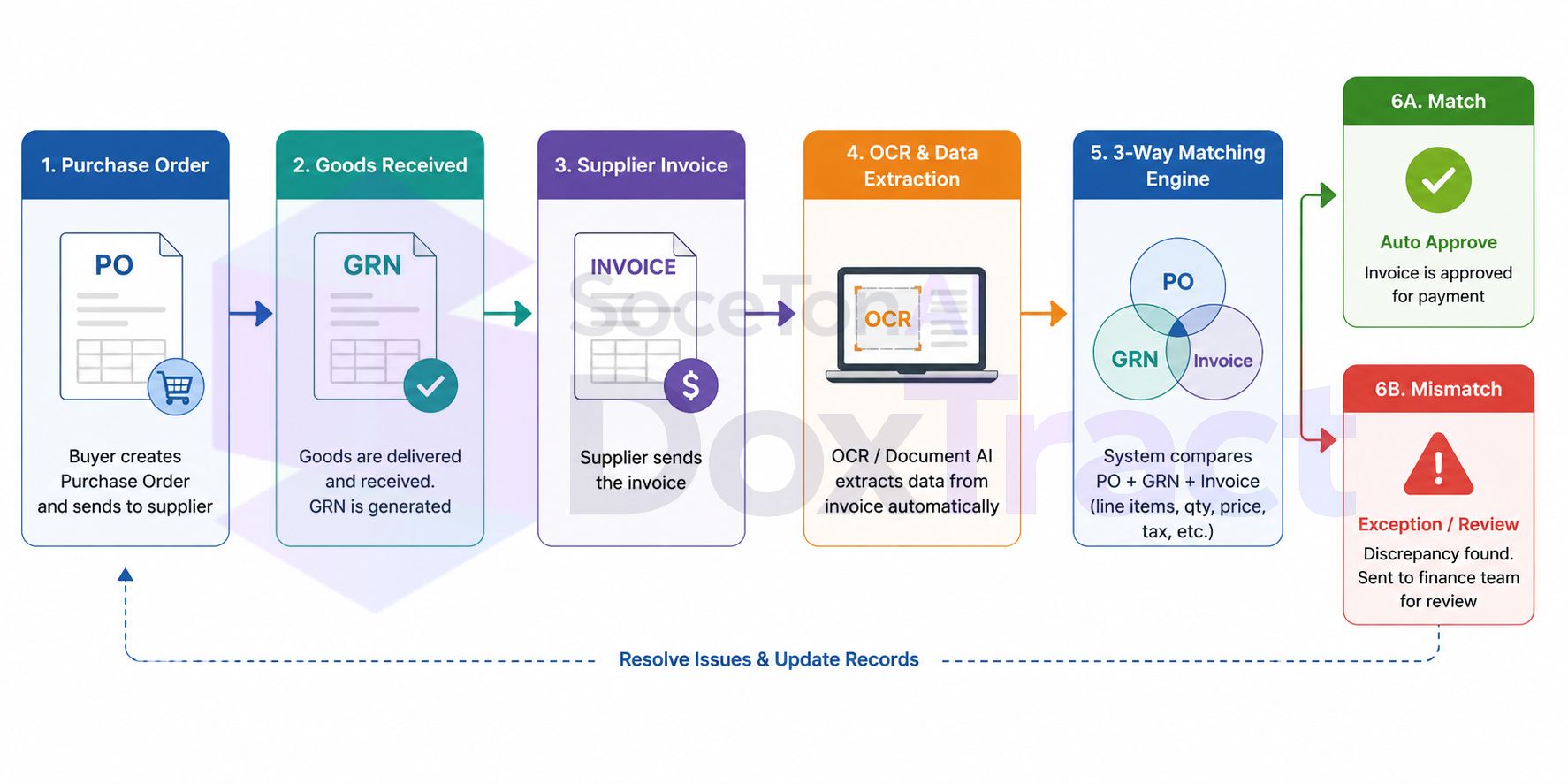
3-Way PO Matching Workflow
The 3-way matching workflow begins when a purchase order is created, followed by the receipt of goods and the supplier's invoice. OCR and Document AI automatically extract key fields from the invoice, while the matching engine compares the purchase order, goods receipt, and invoice. If all three documents agree within the configured tolerance rules, the invoice is automatically approved for payment. If a discrepancy is detected, it is routed to the finance team for review before payment is processed.
Real Example of 3-Way PO Matching
Suppose a company orders 100 office chairs at $150 each from a supplier. When the shipment arrives, the warehouse confirms that only 98 chairs were delivered. However, the supplier's invoice still charges for all 100 chairs.
| Document | Quantity | Unit Price | Total |
|---|---|---|---|
| Purchase Order (PO) | 100 | $150 | $15,000 |
| Goods Receipt (GRN) | 98 | $150 | $14,700 (received value) |
| Supplier Invoice | 100 | $150 | $15,000 |
Result: The 3-way matching process detects that the invoice quantity does not match the goods received. Instead of automatically approving the payment, the invoice is flagged for review so the finance team can resolve the discrepancy with the supplier before payment is made. This helps prevent overpayments and ensures the business only pays for items that were actually received.
Common Reasons for 3-Way PO Matching Failures
Not every invoice matches perfectly with the purchase order and goods receipt. When a discrepancy is detected, the invoice is typically routed for manual review to prevent incorrect or duplicate payments. Below are some of the most common reasons for mismatches.
| Mismatch Reason | Description |
|---|---|
| Quantity mismatch | The number of items on the invoice differs from the quantity received or ordered. |
| Price mismatch | The unit price or total amount on the invoice does not match the purchase order. |
| Missing Purchase Order | The invoice references a PO that doesn't exist or no PO was created for the purchase. |
| Partial delivery | Only part of the order has been received, but the supplier invoiced the full order. |
| Duplicate invoice | The same invoice is submitted more than once, creating a risk of duplicate payment. |
| Incorrect supplier | The invoice is associated with the wrong vendor or supplier account. |
| Tax or shipping differences | Additional taxes, freight charges, or fees differ from what was approved in the PO. |
| Data entry errors | Incorrect invoice numbers, PO numbers, quantities, or prices caused by manual entry mistakes. |
Tip: Modern AP automation software uses OCR and Document AI to automatically compare purchase orders, goods receipts, and invoices, flagging only the exceptions for human review. This reduces manual work while improving payment accuracy.
What Automating 3-Way Matching Actually Requires
Automated matching isn't a single feature — it's the output of three things working together, and this is where AP automation platforms and standalone extraction tools diverge:
Structured extraction from all three document types. You can't match what you haven't extracted. That means reliable field-level extraction from purchase orders, invoices, and delivery notes/goods receipts — not just invoices, which is where a lot of "invoice OCR" tools stop short.
A shared key to link documents together. PO number is the common thread that ties an invoice and a delivery note back to the original purchase order — extraction needs to reliably capture that reference field, or automated matching has nothing to match on.
Tolerance logic and exception routing. Matching isn't binary in practice — a system needs configurable thresholds for acceptable variance, and a clear path for anything outside that threshold to land in front of a human instead of silently passing or silently blocking.
The extraction accuracy of the underlying OCR layer matters more here than almost anywhere else in AP, because a matching system is only as reliable as the fields it's comparing. A total-amount field that's wrong 10% of the time doesn't just produce one bad data point — it produces false-positive exceptions (real matches flagged as mismatches) and false negatives (real mismatches that slip through), both of which erode trust in the automation and send work back to manual review. (See how field-level accuracy varies by document type →)
How to Automate 3-Way PO Matching
Manually comparing purchase orders, goods receipts, and supplier invoices can be time-consuming and prone to human error, especially for organizations processing hundreds or thousands of invoices each month. By combining OCR, Document AI, business rules, and ERP integrations, businesses can automate the entire 3-way matching process—from invoice capture to payment approval. Instead of manually searching for documents and comparing line items, the system automatically extracts data, retrieves the relevant records, validates them against predefined rules, and only sends exceptions to finance teams for review.
The following workflow shows how a typical automated 3-way PO matching system works.
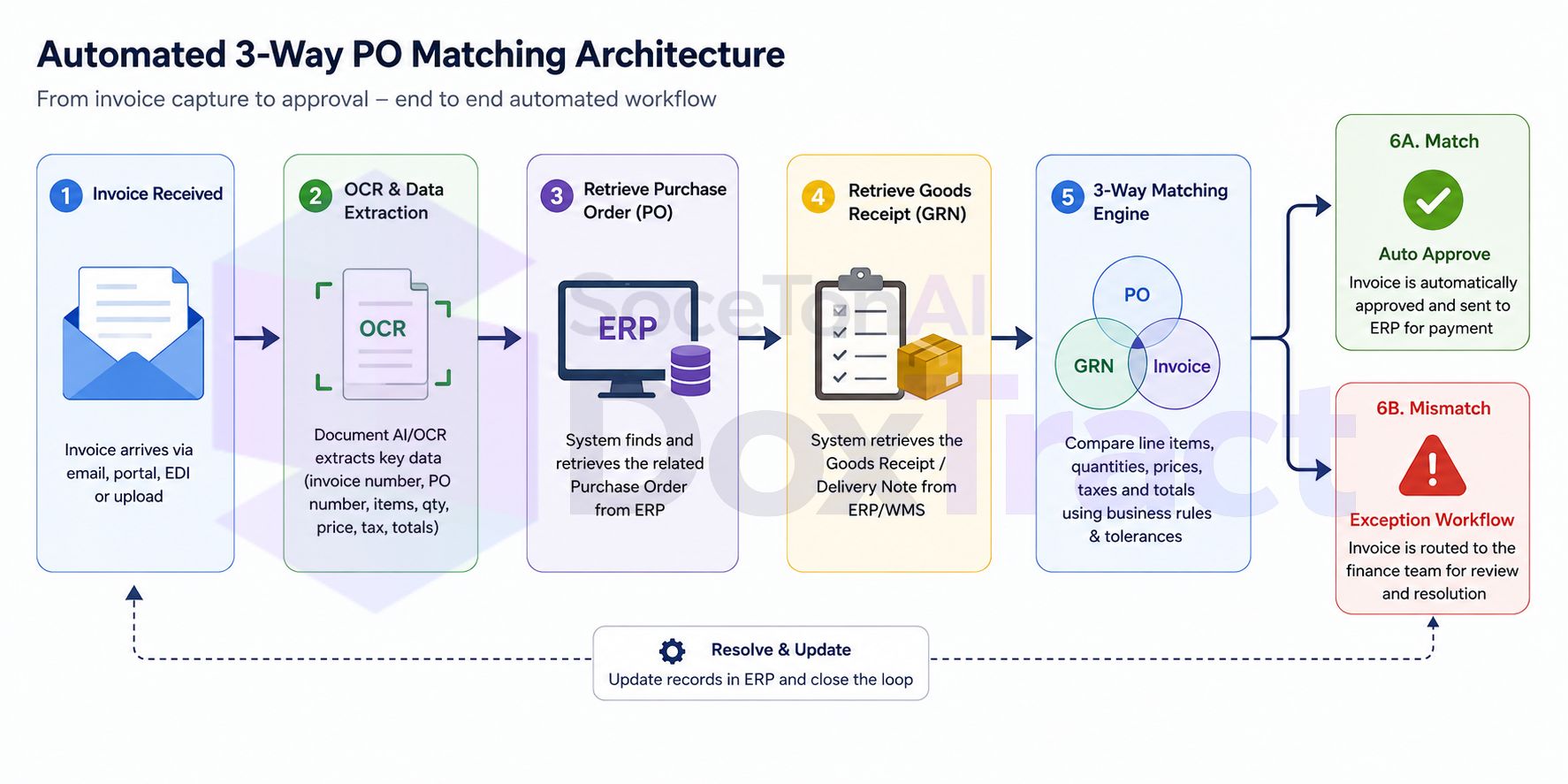
1. Invoice Received
The process begins when a supplier submits an invoice through email, a vendor portal, EDI, or another electronic channel. The invoice may be in PDF, scanned image, or paper format. Once received, it is automatically forwarded to the document processing system, eliminating the need for manual data entry.
2. OCR & Data Extraction
OCR and Document AI analyze the invoice and extract important fields such as the invoice number, supplier name, purchase order number, invoice date, due date, line items, quantities, unit prices, taxes, discounts, shipping charges, and total amount. The extracted data is converted into a structured format that can be processed automatically by downstream systems.
3. Retrieve Purchase Order (PO)
Using the extracted purchase order number, the system queries the ERP or procurement platform to retrieve the original purchase order. This document contains the approved items, negotiated prices, ordered quantities, payment terms, and supplier information that serve as the baseline for comparison.
4. Retrieve Goods Receipt (GRN)
Next, the system retrieves the corresponding Goods Receipt Note (GRN) or receiving record from the warehouse management or ERP system. The GRN confirms what was actually delivered, including received quantities and delivery dates. This step ensures the business only pays for goods that have been physically received.
5. 3-Way Matching Engine
The matching engine automatically compares the purchase order, goods receipt, and supplier invoice. It validates key fields such as supplier information, PO number, item descriptions, SKUs, quantities, unit prices, taxes, shipping costs, discounts, and invoice totals. Most systems also apply configurable tolerance rules, allowing small differences—such as a minor rounding adjustment or a 1% price variance—to pass automatically while flagging larger discrepancies.
6A. Match → Auto Approval
If all documents match within the configured tolerance limits, the invoice is automatically approved. The approved invoice is then sent to the ERP or accounting system, where it enters the payment workflow without requiring manual intervention. This significantly reduces processing time and allows finance teams to focus on higher-value tasks.
6B. Mismatch → Exception Workflow
If the matching engine detects a discrepancy—such as an incorrect quantity, price difference, missing purchase order, duplicate invoice, or unmatched goods receipt—the invoice is routed to an exception workflow. Finance or procurement teams are notified to investigate the issue, communicate with the supplier if necessary, and resolve the discrepancy before payment is approved.
Benefits of Automating 3-Way PO Matching
Automating the 3-way matching process provides several advantages over manual invoice verification:
Faster invoice processing by eliminating manual document comparison.
Reduced data entry through OCR and AI-powered data extraction.
Lower risk of overpayments by validating invoices against approved purchase orders and goods receipts.
Automatic detection of duplicate invoices and pricing discrepancies.
Improved compliance by enforcing consistent approval policies and audit trails.
Fewer manual reviews, as only invoices with exceptions require human attention.
Better visibility into accounts payable workflows with real-time invoice tracking.
Scalability to process thousands of invoices without increasing finance headcount.
By integrating OCR, Document AI, ERP systems, and business rules into a single workflow, organizations can transform 3-way PO matching from a manual, error-prone process into an automated workflow that improves accuracy, speeds up invoice approvals, and strengthens financial controls.
Getting Started
If you're evaluating automation for 3-way matching, start narrow:
Pick your highest-volume vendor — the one generating the most invoices and the most manual matching effort today.
Template that vendor's PO, invoice, and delivery note formats.
Run matching in parallel with your existing manual process for a few cycles to validate accuracy before turning off the manual check.
Expand vendor by vendor, prioritizing by volume and how much manual time each currently costs.
Try SoceTonAI DoxTract free — 200 pages a month and 20 lifetime templates is enough to template your top vendor's full document set and see how the matching data holds up before committing further.
Conclusion
3-way PO matching is one of the most effective controls for preventing overpayments, duplicate invoices, and unauthorized purchases. By comparing the purchase order, goods receipt, and supplier invoice before payment, businesses can improve accuracy, strengthen financial controls, and reduce costly errors in the accounts payable process.
However, manually matching these documents can quickly become a bottleneck as invoice volumes grow. Automating the process with OCR, Document AI, and ERP integrations allows organizations to extract invoice data automatically, compare documents in seconds, apply configurable business rules, and route only exceptions for manual review. The result is faster invoice approvals, lower processing costs, and greater confidence that every payment is accurate.
If you're looking to automate invoice processing and 3-way PO matching, SoceTonAI DoxTract can help. It uses AI-powered OCR to extract structured data from invoices and other business documents, making it easier to integrate with your ERP or accounts payable workflow with lowest processing cost in the market. Whether you're processing hundreds or thousands of invoices each month, automation can help your finance team spend less time on manual verification and more time on strategic work.
Ready to automate your invoice workflow? Explore SoceTonAI DoxTract to see how AI-powered document extraction can simplify invoice processing, improve matching accuracy, and accelerate accounts payable automation. Also, check the SoceTonAI DoxTract price.
Frequently Asked Questions
What is 3-way PO matching?
3-way PO matching is an accounts payable process that compares three documents—the purchase order (PO), goods receipt (GRN), and supplier invoice—before approving payment. The goal is to verify that the goods were ordered, received, and invoiced correctly, helping prevent overpayments and payment errors.
What is the difference between 2-way and 3-way PO matching?
2-way matching compares only the purchase order and supplier invoice, making it suitable for services or recurring expenses where no physical goods are received. 3-way matching adds the goods receipt (GRN) to confirm that the ordered items were actually delivered before payment is approved.
What documents are required for 3-way matching?
A standard 3-way matching process requires:
Purchase Order (PO)
Goods Receipt Note (GRN) or Receiving Report
Supplier Invoice
These three documents are compared to ensure the quantities, prices, and supplier information match.
What happens if the documents don't match?
If a discrepancy is found—such as a price difference, quantity mismatch, duplicate invoice, or missing purchase order—the invoice is flagged as an exception. It is then routed to the finance or procurement team for investigation and approval before payment can be processed.
Can 3-way PO matching be automated?
Yes. Modern accounts payable automation software uses OCR, Document AI, and ERP integrations to automatically extract invoice data, retrieve the purchase order and goods receipt, compare the documents, and approve matching invoices. Only invoices with exceptions require manual review.
What are the benefits of automated 3-way PO matching?
Automating 3-way matching helps organizations:
Reduce manual data entry
Process invoices faster
Prevent duplicate payments
Detect pricing and quantity discrepancies
Improve compliance and audit readiness
Lower accounts payable processing costs
Is 3-way matching required for every invoice?
No. Businesses typically use 3-way matching for purchases involving physical goods. For service invoices, subscriptions, utilities, or recurring expenses where no goods receipt exists, 2-way matching is often sufficient.
What is a Goods Receipt Note (GRN)?
A Goods Receipt Note (GRN) is a document created when ordered goods are received. It records what was delivered, including quantities and delivery details, and serves as proof that the items arrived before payment is approved.
What is the difference between 3-way and 4-way matching?
4-way matching includes all the documents used in 3-way matching plus an inspection or quality approval report. It is commonly used in manufacturing, construction, healthcare, and other industries where products must pass quality checks before payment is released.
Which industries use 3-way PO matching?
3-way PO matching is widely used in manufacturing, retail, wholesale distribution, logistics, healthcare, government, construction, and any organization that purchases physical goods through purchase orders.