What Is Intelligent Document Processing (IDP)? A Practical Guide for Developers and Businesses
If you've spent any time researching Intelligent Document Processing (IDP) or Document AI, you've probably come across the term in enterprise software, analyst reports, and comparison pages for tools like AWS Textract, Google Document AI, and Azure Document Intelligence. However, the term is often used loosely—sometimes as another name for OCR, and other times as a catch-all for AI-powered document automation.
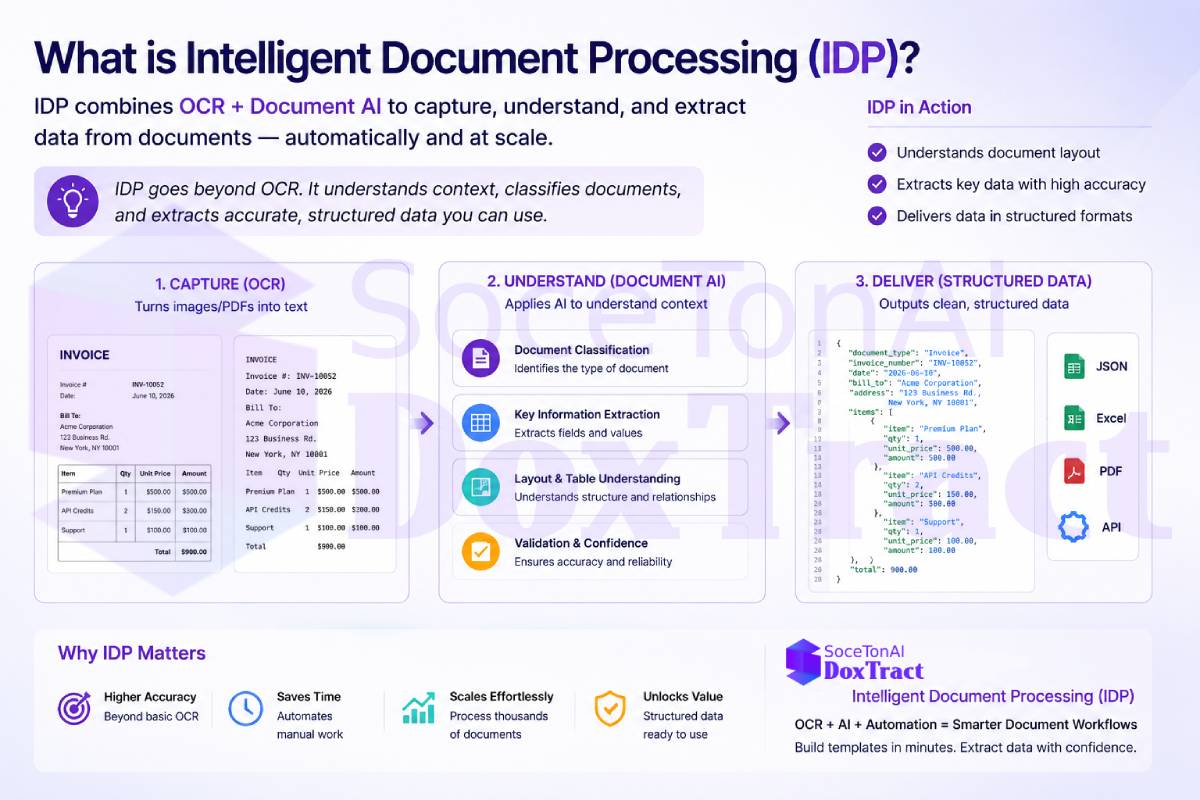
In reality, IDP is much more than text recognition. It combines OCR with artificial intelligence to classify documents, extract structured data, validate results, and automate document-driven workflows.
This guide explains what Intelligent Document Processing is, how it differs from traditional OCR, how it works, common business use cases, and what to look for when choosing an IDP solution.
The short definition
Intelligent Document Processing (IDP) is the use of AI to automatically capture, classify, extract, and validate data from documents — turning unstructured or semi-structured content (PDFs, scanned images, photos of paper documents) into clean, structured data that a system can actually use.
IDP is best understood as a pipeline, not a single technology. It typically combines:
OCR (Optical Character Recognition) — converting pixels into raw text
Document classification — figuring out what type of document you're looking at (invoice vs. receipt vs. PO)
Data extraction/entity recognition — pulling out the specific fields that matter (vendor name, total amount, line items, dates)
Validation and structuring — checking extracted values against business rules and formatting them into structured output like JSON
What Problem Does Intelligent Document Processing Solve?
Most business information is trapped inside documents such as invoices, receipts, purchase orders, contracts, bank statements, and forms. While people can easily read these documents, software cannot use the information until it has been extracted and organized into a structured format.
Traditionally, this meant employees manually opening each document, finding the required information, and entering it into an ERP, accounting system, database, or spreadsheet. This process is slow, repetitive, expensive, and prone to human error—especially when organizations process hundreds or thousands of documents every day.
Intelligent Document Processing (IDP) solves this problem by automatically reading documents, understanding their contents, extracting the required fields, validating the results, and exporting structured data to downstream systems. Instead of spending hours on manual data entry, teams can focus on reviewing exceptions and higher-value work.
For example, an accounts payable team can automatically extract invoice numbers, supplier names, due dates, and totals from incoming invoices, then send the validated data directly to an ERP system. Similarly, logistics companies can process shipping documents, healthcare providers can digitize patient forms, and finance teams can automate receipt and expense processing.
In short, IDP transforms document-heavy workflows into automated, accurate, and scalable business processes.
How Intelligent Document Processing (IDP) Works
Intelligent Document Processing transforms raw documents into structured, usable data through a series of AI-powered steps. While implementations vary by platform, most IDP solutions follow a similar workflow:
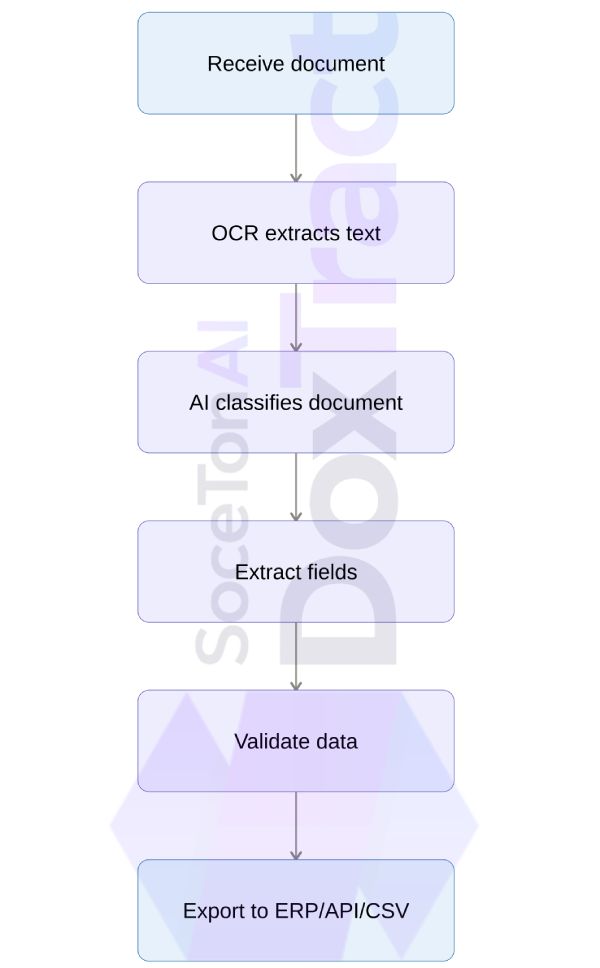
1. Receive the Document
The process begins when a document is uploaded or received from a source such as email, cloud storage, a scanner, an ERP system, or an API. IDP platforms typically support PDFs, scanned documents, images, and digital files in various formats.
2. OCR Extracts the Text
Optical Character Recognition (OCR) converts the document's printed or handwritten text into machine-readable text. This digitizes the document and provides the foundation for further processing.
3. AI Classifies the Document
Once the text is extracted, AI models identify the document type automatically. For example, the system can determine whether the file is an invoice, receipt, purchase order, bank statement, contract, or another document type. This allows the correct extraction rules or AI model to be applied.
4. Extract the Required Fields
After classification, the IDP system identifies and extracts the information you need. Depending on the document, this may include invoice numbers, dates, supplier names, totals, tax amounts, line items, customer information, or other structured fields.
5. Validate the Data
Before the data is used, IDP validates the extracted information. Validation may include checking required fields, comparing totals, verifying date formats, applying business rules, or assigning confidence scores so low-confidence extractions can be reviewed manually.
6. Export to Business Systems
Finally, the structured data is exported to downstream systems or workflows. Most IDP platforms support JSON output through REST APIs, CSV or Excel exports, databases, ERP and accounting software, document management systems, or other business applications for further automation.
Why OCR alone isn't IDP
This is the distinction that trips people up most often. OCR answers one question: what text is on this page? It gives you a wall of characters — no understanding of what any of it means.
IDP answers a different question: what does this document tell me, in a form my software can use? That means knowing that "INV-00231" is an invoice number, that "$1,240.00" is a total (not a line item), and that a table of rows and columns represents itemized purchases rather than random text fragments.
In practice:
OCR → "Acme Corp, Invoice #4471, $842.50, Net 30..."
IDP →
{"vendor": "Acme Corp", "invoice_number": "4471", "total": 842.50, "payment_terms": "Net 30"}
The second output is what actually plugs into an accounting system, an ERP, or a database without a human retyping it.
| OCR | Intelligent Document Processing (IDP) |
|---|---|
| Reads text | Understands documents |
| Text extraction | Classification + extraction |
| Rules | AI models |
| Little validation | Validation and confidence scoring |
| Unstructured documents struggle | Handles semi-structured and unstructured |
| Basic digitization | End-to-end automation |
Why "Document AI" and "IDP" get used interchangeably
Vendors like Google (Document AI) and Microsoft (Document Intelligence) essentially productized IDP under their own branding. "Document AI" is generally used as a product name for a platform that performs IDP-style extraction; "IDP" is the broader industry/category term analysts and enterprise buyers search for. If you're evaluating tools, it helps to know they're describing the same underlying capability:
OCR = the text-recognition layer
Document AI = a vendor's product implementing IDP
IDP = the category/discipline these products belong to
Common Use Cases for Intelligent Document Processing
Intelligent Document Processing is used anywhere organizations need to extract structured data from large volumes of business documents. By automating data capture and validation, IDP reduces manual entry, speeds up workflows, and improves accuracy.
Some of the most common use cases include:
Accounts payable: Extract invoice data such as supplier names, invoice numbers, dates, totals, and line items, then send the validated data directly to ERP or accounting systems.
Expense management: Read receipts, capture merchant and transaction details, categorize expenses, and prepare data for reimbursement or financial reporting.
Procurement: Extract purchase order information and match it against invoices and receiving documents to streamline three-way matching and reduce processing time.
Logistics and supply chain: Capture shipment details, tracking numbers, customs information, and bills of lading to automate shipping and inventory workflows.
Healthcare and insurance: Process patient intake forms, insurance claims, medical records, and other documents by extracting key information for faster review and decision-making.
The common thread across these use cases is the need to process high volumes of structured, semi-structured, or unstructured documents that would otherwise require significant manual data entry. IDP automates this process, enabling faster, more accurate document workflows.
What to Look for in IDP Software
Not all Intelligent Document Processing (IDP) platforms offer the same capabilities. Some solutions simply perform OCR and return extracted text, while others provide end-to-end document automation with AI-powered extraction, validation, and integrations.
If you're evaluating IDP software or building document automation into your product, consider these key features:
Accurate AI-powered extraction: The platform should identify and extract structured fields—not just raw text—from documents such as invoices, receipts, purchase orders, and forms.
Document and template support: Check whether the software supports your document types out of the box or allows you to create custom templates for industry-specific documents.
OCR quality: Look for solutions that can handle real-world documents, including scanned PDFs, mobile photos, rotated pages, low-resolution images, and noisy scans.
Validation and confidence scores: A good IDP platform should validate extracted data, apply business rules, and provide confidence scores so uncertain fields can be reviewed before entering your systems.
Consistent output: Extracted data should be standardized into predictable formats for dates, currencies, numbers, and addresses, reducing the need for custom post-processing.
API and integrations: Choose software that offers REST APIs, webhooks, and integrations with ERP, CRM, accounting, or document management systems to fit into your existing workflows.
Security and compliance: Ensure the platform meets your organization's security requirements, such as encryption, access controls, audit logs, and compliance standards relevant to your industry.
Transparent pricing: Compare pricing based on pages processed, API requests, or subscriptions, and consider additional costs for templates, training, or premium features.
One of the biggest differences between a basic OCR service and a true IDP solution is the output. OCR typically returns raw text that still requires custom parsing and business logic, whereas an IDP platform delivers structured, validated data that's ready to integrate into downstream applications and business processes.
Where SoceTonAI DoxTract fits
SoceTonAI DoxTract is built around this exact pipeline: OCR plus classification, extraction, and normalization, purpose-built for invoices, receipts, and purchase orders. Instead of returning a block of recognized text, SoceTonAI DoxTract returns structured data — vendor names, totals, line items, dates — cleaned and formatted, via a straightforward API.
It's designed as a more affordable alternative to platforms like AWS Textract, Google Document AI, and Azure Document Intelligence, without requiring you to stitch together OCR output and your own extraction logic. If IDP is the category, SoceTonAI DoxTract is built to compete squarely within it — specifically for the document types businesses process the most.
Frequently Asked Questions
What is Intelligent Document Processing (IDP)?
Intelligent Document Processing (IDP) is a technology that combines OCR, artificial intelligence (AI), machine learning, and data validation to automatically classify documents, extract structured data, and integrate it into business systems. Unlike traditional OCR, IDP understands document context and returns usable data instead of just text.
Is IDP the same as OCR?
No. OCR converts images or scanned documents into machine-readable text, while IDP builds on OCR by classifying documents, extracting specific fields, validating the results, and exporting structured data for business workflows.
What types of documents can IDP process?
Most IDP platforms can process invoices, receipts, purchase orders, bank statements, contracts, tax forms, insurance claims, shipping documents, and many other structured or semi-structured business documents. Some solutions also support unstructured documents with AI-powered extraction.
How does Intelligent Document Processing work?
A typical IDP workflow includes document ingestion, OCR text extraction, AI-based document classification, field extraction, data validation, and exporting the structured data to business applications such as ERP, CRM, or accounting systems.
What is the difference between OCR and IDP?
OCR focuses on recognizing text from documents. IDP goes further by understanding document layouts, identifying important fields, validating extracted information, and automating document-based workflows. In most modern document automation systems, OCR is one component of a larger IDP solution.
What are the benefits of Intelligent Document Processing?
IDP helps organizations reduce manual data entry, improve extraction accuracy, accelerate document processing, lower operational costs, and integrate document data into existing business systems with minimal human intervention.
What industries use Intelligent Document Processing?
IDP is widely used in finance, accounting, healthcare, insurance, logistics, manufacturing, government, legal services, and any industry that processes large volumes of business documents.
Can IDP process handwritten documents?
Many modern IDP platforms can recognize handwritten text using AI-powered handwriting recognition. However, accuracy depends on factors such as handwriting quality, document clarity, and the underlying OCR and AI models.
What should I look for in an IDP solution?
When evaluating IDP software, consider extraction accuracy, document type support, OCR quality, AI-powered field extraction, validation features, confidence scores, API availability, integrations, security, scalability, and pricing.
Can IDP integrate with existing business systems?
Yes. Most IDP platforms provide REST APIs, webhooks, and integrations that allow extracted data to be sent directly to ERP, CRM, accounting software, databases, or custom business applications.