What Is Invoice OCR / Invoice Data Extraction? A Complete Guide for 2026
If your team still opens invoices by hand, keys line items into a spreadsheet, and chases down mismatched totals before every payment run, you already know the problem invoice OCR was built to solve. This guide walks through what invoice OCR and invoice data extraction actually mean, how the technology works today, who the major providers are, and how to pick the right one for your accounts payable (AP) or finance operations workflow.
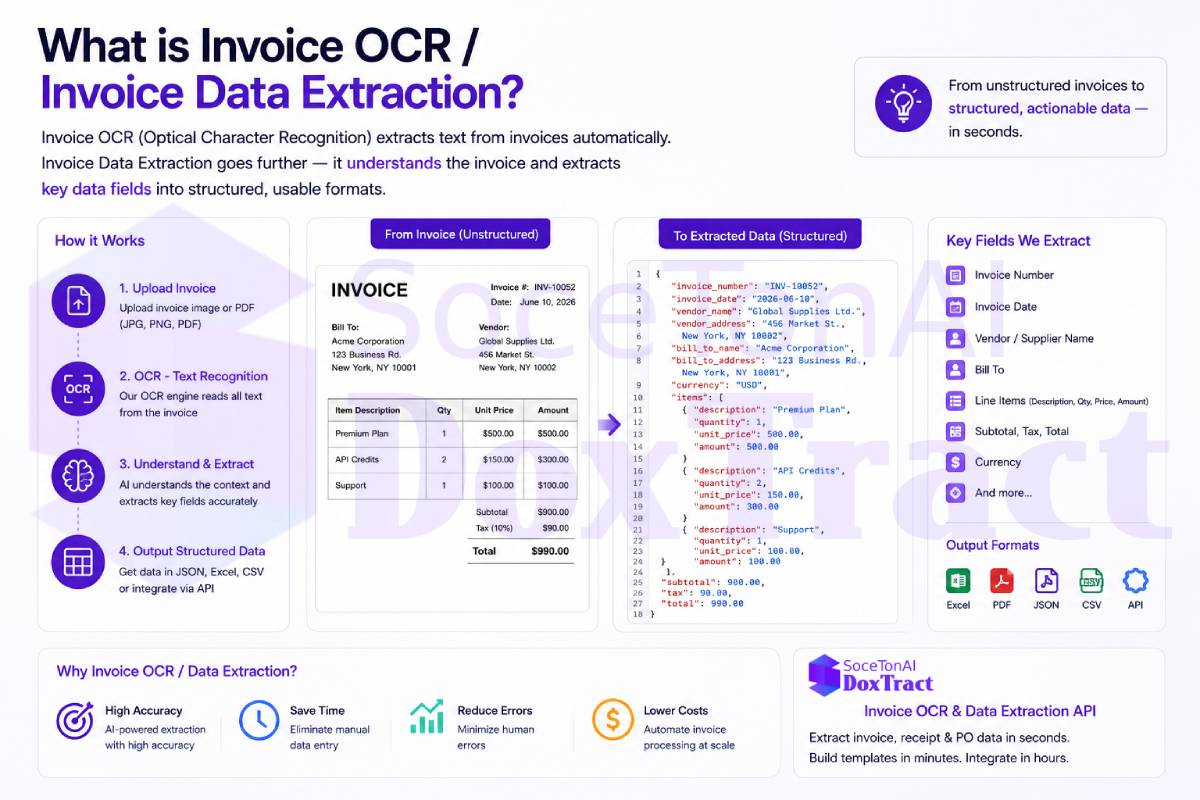
What Is Invoice OCR?
Invoice OCR (Optical Character Recognition) is the process of scanning an invoice — whether it's a PDF, a scanned paper document, or a photo taken on a phone — and converting the text on it into machine-readable data. On its own, OCR just reads characters: it turns pixels into words and numbers.
Invoice data extraction goes a step further. It takes the raw OCR output and understands it — pulling out the specific fields that matter for accounting and operations, such as:
Vendor name and address
Invoice number and date
Due date and payment terms
Line items (description, quantity, unit price, amount)
Subtotal, tax, discounts, and total amount due
PO number and currency
Modern invoice OCR platforms combine OCR with machine learning models trained specifically on document layouts, so the system doesn't just "read" the invoice — it labels each piece of text with what it means, in a structured format like JSON, ready to feed into an ERP, accounting system, or database.
What fields can be extracted?
| Header Fields | Line Items |
|---|---|
| Invoice Number | Product Name |
| Invoice Date | Quantity |
| Due Date | Unit Price |
| Vendor Name | Tax |
| Currency | Discount |
| PO Number | Line Total |
| Payment Terms | SKU |
| Total Amount | Description |
Why Invoice OCR Matters
Invoices are one of the most common documents a business processes, and also one of the most inconsistent. Every vendor uses a different template, different field names, different layouts, and sometimes different languages. Manually keying this data in is slow, error-prone, and doesn't scale as transaction volume grows.
Automating invoice data extraction typically delivers:
Faster processing times — invoices that took minutes to key in manually are processed in seconds
Fewer data-entry errors — reducing costly mismatches during three-way matching (PO, receipt, invoice)
Lower cost per document — especially at high volume, where manual entry cost scales linearly with headcount
Faster close cycles — AP teams can keep up with volume spikes without adding staff
Better audit trails — structured, timestamped extraction data supports compliance and reconciliation
Invoice Data Extraction Workflow
This workflow illustrates how modern invoice data extraction converts invoices into structured, machine-readable data that can be used by business applications. The process begins with an invoice received as a scanned image, PDF, or photo. If the document is image-based, an OCR engine first converts the visible text into digital text.
Next, a Document AI system analyzes the document's layout to identify key business information such as the invoice number, vendor name, invoice date, due date, purchase order number, tax amounts, line items, and total amount. Unlike traditional OCR, which only extracts text, Document AI understands the structure of the invoice and maps each value to the correct field, even when different suppliers use different invoice layouts.
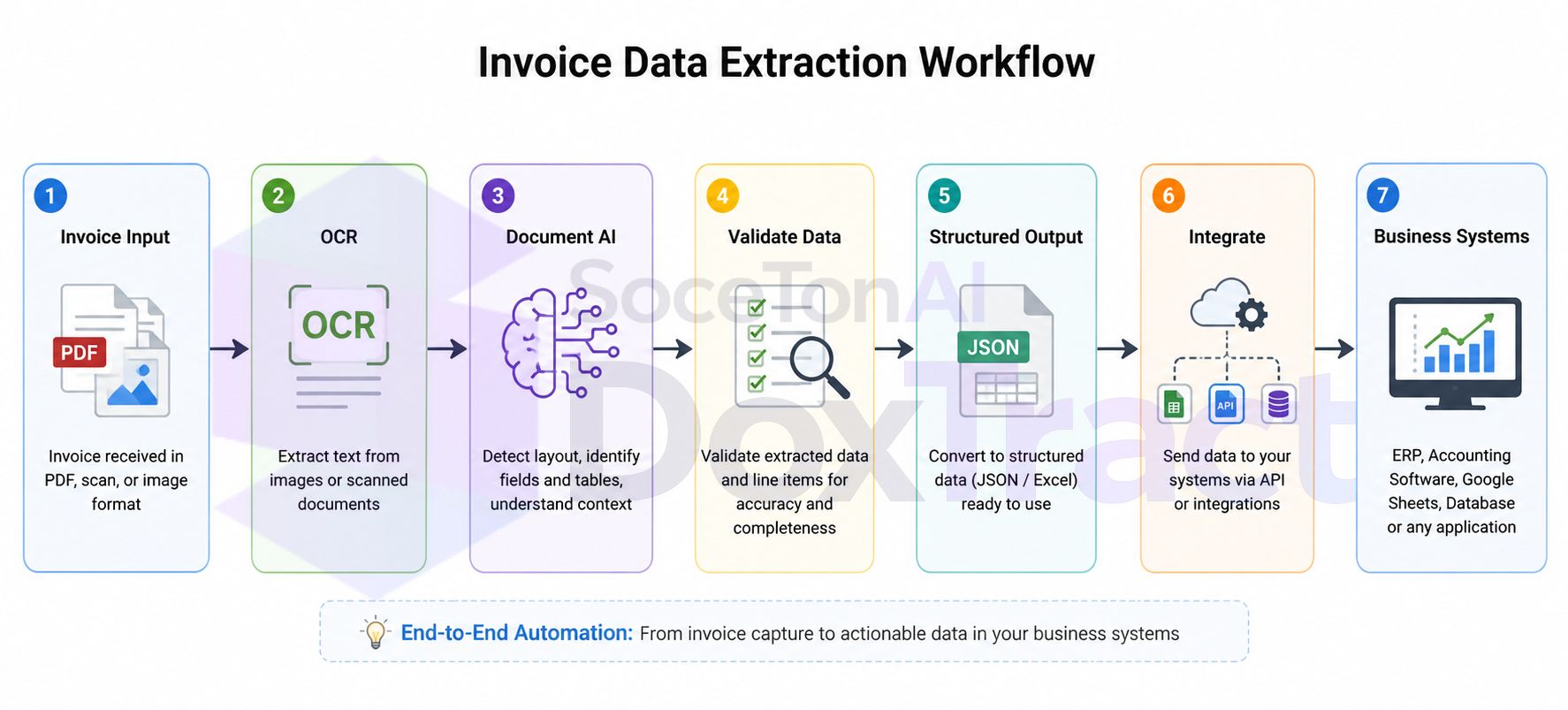
The extracted information is then validated to improve accuracy and ensure required fields are present. Validation may include checking date formats, verifying calculated totals, detecting missing values, and confirming that extracted line items are consistent with the invoice.
After validation, the data is converted into a structured format such as JSON or Excel, making it easy to integrate with other systems. Finally, the structured output is sent to business applications—including ERP systems, accounting software, databases, spreadsheets, or custom APIs—where it can automate workflows such as accounts payable, invoice approval, financial reporting, and bookkeeping.
This end-to-end workflow eliminates manual data entry, reduces processing errors, and enables organizations to process invoices faster and at a much larger scale.
Invoice OCR vs. Document AI
Invoice OCR and Document AI are related, but they're not the same.
Traditional Invoice OCR focuses on converting the text in an invoice into machine-readable text. It works well for simple documents but often requires templates or additional processing to identify specific fields like invoice numbers, totals, or line items.
Document AI goes a step further by understanding the structure and meaning of the document. Instead of just reading text, it automatically identifies key fields, extracts tables and line items, and returns structured data such as JSON, even when invoices come from different suppliers with different layouts.
| Invoice OCR | Document AI |
|---|---|
| Extracts text | Extracts structured data |
| Best for simple invoices | Handles diverse invoice layouts |
| May require templates | Often works without templates |
| Limited understanding of tables | Extracts line items and tables |
| Text output | JSON, Excel, or API-ready output |
If you process invoices from multiple vendors or want to automate accounts payable workflows, Document AI is generally a more robust solution than OCR alone.
Invoice OCR vs. PDF Parsing
Invoice OCR and PDF parsing solve different problems.
Invoice OCR extracts text from scanned invoices or image-based PDFs by recognizing the characters in the document. PDF parsing reads text directly from digital PDFs that already contain selectable text, so no OCR is needed.
If a PDF is a scanned image, PDF parsing alone won't extract the text—you'll need OCR first. Many modern document processing solutions combine PDF parsing and OCR automatically to handle both digital and scanned invoices.
| Invoice OCR | PDF Parsing |
|---|---|
| Works with scanned invoices and images | Works with text-based PDFs |
| Uses optical character recognition | Reads embedded PDF text |
| Handles image-based documents | Doesn't work on scanned PDFs alone |
| Can process photos and scans | Faster when text is already embedded |
Common Challenges and Accuracy of Invoice OCR
The accuracy of invoice OCR depends on both the quality of the invoice and the technology used. While modern Document AI solutions can extract data reliably from many invoice formats, certain situations remain challenging.
Common Challenges
Poor scan quality – Blurry, low-resolution, or noisy images make text difficult to recognize.
Different invoice layouts – Vendors often use unique templates, making field detection more complex.
Multi-page invoices – Important information may be spread across several pages.
Complex tables – Extracting line items with merged cells or irregular formatting can be difficult.
Multiple languages – Invoices containing different languages or currencies require multilingual support.
Handwritten notes – Signatures and handwritten annotations are typically harder to recognize than printed text.
What Affects Accuracy?
Several factors influence how accurately invoice data can be extracted:
Image quality and resolution
Document orientation (rotation or skew)
OCR and Document AI model quality
Invoice layout complexity
Presence of tables and line items
Language and font variations
For the best results, use high-quality scans and a Document AI solution that combines OCR with layout analysis and field recognition. Unlike traditional OCR, Document AI understands the structure of invoices, making it more reliable for extracting invoice numbers, dates, vendor details, line items, taxes, and totals across different invoice formats.
Existing IDP / Invoice OCR Providers
Intelligent Document Processing (IDP) and invoice OCR is a crowded space, ranging from large cloud platforms to specialized document AI startups. Here's a look at how the major providers compare.
AWS Textract
Amazon's managed OCR and document analysis service. Textract offers a dedicated AnalyzeExpense API for invoices and receipts, and integrates naturally if you're already running infrastructure on AWS. Pricing is usage-based but can get expensive at scale, and output often needs additional post-processing to match a specific schema.
Google Document AI
Google's document processing platform, including a purpose-built Invoice Parser. It offers strong accuracy backed by Google's ML infrastructure, and is a natural fit for teams already on Google Cloud. Setup and pricing are geared toward larger enterprise deployments.
Azure AI Document Intelligence
Microsoft's equivalent, with a prebuilt invoice model plus custom model training. It integrates well with the Microsoft ecosystem (Power Automate, Dynamics, SharePoint) and is a common choice for enterprises already standardized on Azure.
Mindee
A developer-focused OCR API company offering prebuilt invoice and receipt parsing endpoints alongside custom model training. Mindee is popular with smaller engineering teams for its simple API and quick integration path.
Nanonets
A no-code/low-code IDP platform aimed at business users who want to build extraction workflows without writing code. Nanonets emphasizes workflow automation (approvals, integrations) on top of extraction, which suits ops-heavy teams but can add cost as volume grows.
Veryfi
Focused on receipt and invoice OCR with an emphasis on speed and data privacy (on-device / non-retention options), often used by expense management and fintech products needing real-time processing.
SoceTonAI DoxTract
SoceTonAI DoxTract is a document OCR and structured data extraction API and SaaS platform built specifically around invoice, receipt, and purchase order extraction. It's positioned as a more affordable alternative to the larger cloud platforms and specialized OCR vendors above, aimed at developers and businesses that want accurate structured output without enterprise-scale pricing.
Key aspects of
SoceTonAI DoxTract's approach:
A free tier with recurring monthly page allowance plus lifetime template storage, making it easy to test before committing
Support for reusable templates for recurring vendors, so repeat invoice formats extract reliably and cheaply
A developer-friendly API (FastAPI backend) alongside a full web console for teams that prefer a UI over raw API calls
Transparent, usage-based pricing built to undercut the larger providers for small and mid-volume workloads
If you're evaluating invoice OCR providers and your priority is a straightforward, cost-effective API that doesn't lock you into a large cloud ecosystem, SoceTonAI DoxTract is worth including in your comparison alongside the providers above.
How to Choose an Invoice OCR Provider
The right fit depends less on which provider has the best marketing page and more on how your invoice volume, vendor mix, and existing stack line up. Here's how the criteria map to the providers above:
Already committed to a cloud ecosystem
If your infrastructure already runs on AWS, GCP, or Azure, AWS Textract, Google Document AI, or Azure AI Document Intelligence are worth the price premium — native IAM, storage, and billing integration often outweigh the per-page cost difference. See the full pricing comparison to size that premium against your actual volume before deciding it's worth it.
Budget-conscious, mid-volume processing
Flat, predictable pricing matters most once you're past prototype volume and into hundreds or thousands of invoices a month. SoceTonAI DoxTract charges $7/1,000 pages flat for structured extraction — invoices, receipts, forms, and custom templates all included — with no surcharge for line items or tables. That's a meaningful gap versus the $10–50/1,000 structured-extraction tier on AWS, Google, and Azure; the cheapest document AI API breakdown walks through the numbers at different volume levels.
Mostly repeat vendors vs. constant new formats
If you regularly receive invoices from the same vendors in a consistent layout, template-based extraction (SoceTonAI DoxTract, Mindee) lets you define a template once and reuse it cheaply. If you're dealing with a high volume of new or one-off vendors, zero-shot/schema-based extraction — which most large-cloud providers lean on — handles unfamiliar layouts without a setup step, though usually at a higher per-page cost.
No engineering resources, need a visual workflow
Nanonets and Mindee both offer visual builders for non-technical teams. SoceTonAI DoxTract's template editor covers similar ground — build an extraction template through the UI with no code — while still leaving the option to move to the API later.
Mobile or field-captured receipts
Veryfi is purpose-built for camera-based capture, with an SDK and privacy-focused (on-device/non-retention) options — a better fit than a general document AI API if your use case is field teams photographing receipts on phones.
Testing before committing
Whatever provider you're evaluating, request a trial with your own invoices, not demo samples — accuracy varies most on your actual document quirks (non-standard layouts, faded scans, handwriting), not on published benchmarks. Among the providers here, SoceTonAI DoxTract's 200 pages/month recurring free tier and Mindee's 500-page trial are the least restrictive ways to do that without a sales call.
Once you've picked a provider
Choosing the extraction API is only half the workflow — see our guides on connecting extraction to Zapier, Make.com, or auto-importing into QuickBooks/Xero for what comes after extraction.
Final Thoughts
Invoice OCR and data extraction have moved well past simple text recognition — today's platforms combine OCR with machine learning to deliver structured, ready-to-use data straight into your finance stack. The real decision isn't "OCR or no OCR" anymore; it's which provider's pricing, accuracy, and integration model actually fits your volume and vendor mix, since the gap between the cheapest and most expensive structured-extraction tier can run 5–10x for the same page (see the full pricing comparison for exact numbers).
Whether you're a startup processing a few hundred invoices a month or an enterprise with a high-volume AP pipeline, there's a provider suited to your scale and budget. For teams that want strong accuracy without enterprise pricing,SoceTonAI DoxTract offers a practical, developer-friendly starting point — flat $7/1,000-page pricing, a recurring free tier, and a template editor that works without writing code first.
Once you've picked a provider, extraction is only step one. The bigger unlock is connecting it to your actual workflow — whether that's Zapier, Make.com, a direct QuickBooks/Xero integration, or building extraction into your own product. That's where the time savings actually show up — not in the extraction itself, but in never touching the data by hand again.
Frequently Asked Questions
What is invoice OCR?
Invoice OCR is the process of using Optical Character Recognition (OCR) to extract text and data from invoices. It converts invoices in PDF, scanned, or image formats into machine-readable text that can be processed automatically.
What is invoice data extraction?
Invoice data extraction goes beyond OCR by identifying and extracting structured information such as invoice numbers, dates, vendor names, line items, taxes, and total amounts. Modern Document AI solutions can return this information in formats like JSON or Excel.
Can invoice OCR extract line items?
Yes, advanced invoice OCR and Document AI solutions can extract line items, including product descriptions, quantities, unit prices, taxes, and totals. Basic OCR, however, may only extract raw text without understanding table structures.
Does invoice OCR work with scanned PDFs?
Yes. Invoice OCR is specifically designed to process scanned PDFs and image-based invoices. For digital PDFs that already contain selectable text, PDF parsing may be used instead of OCR.
How accurate is invoice OCR?
Accuracy depends on factors such as image quality, invoice layout, language, and the OCR engine used. Modern Document AI solutions typically achieve much higher accuracy than traditional OCR because they understand document structure in addition to recognizing text.
What's the difference between invoice OCR and Document AI?
Invoice OCR extracts text from invoices, while Document AI understands the document's layout and automatically identifies fields such as invoice numbers, vendor details, totals, and line items. Document AI generally requires less manual configuration and works better across different invoice formats.
Can invoice OCR integrate with accounting software?
Yes. Most invoice OCR APIs can export structured data to ERP systems, accounting software, databases, Google Sheets, or custom applications through APIs and automation platforms.
What invoice formats are supported?
Most invoice extraction solutions support PDFs, scanned documents, JPEG, PNG, TIFF, and photos captured from mobile devices. Some platforms also support multi-page invoices and batch processing.