Cheapest Document AI/OCR API in 2026: Full Price Comparison
If you're evaluating document AI APIs purely on cost — because you're bootstrapped, processing high volume, or just tired of watching your AWS bill creep up every time you add a new document type — this is the short version. We pulled the actual per-page rates across every major structured-extraction provider and ranked the cheapest options, from free self-hosted open-source through the lowest-cost managed APIs.
A quick caveat before the picks: cheapest isn't the same as best value. A $0/page open-source model can end up costing more than a $7/1,000-page API once you factor in engineering time, and a provider's "entry-level" rate often only applies to a subset of document types. We flag those tradeoffs below rather than just ranking by sticker price.
For the full breakdown across every provider — including the ones that didn't make the cheapest-three cut — see our complete OCR & Document AI pricing comparison.
The Cheapest Document AI APIs in 2026
1. Open-source (Tesseract, PaddleOCR, docTR) — $0 per page + infustructure cost
If pure cost is the only variable, self-hosted open-source wins outright — there's no per-page fee at any volume. The catch is that none of these do true document AI out of the box; they handle raw text extraction well, but structured field extraction (invoice numbers, line items, key-value pairs) requires you to build and maintain that logic yourself, plus the infrastructure to run the models. This is the cheapest option only if you have the engineering time to make it work — otherwise the "free" API cost gets replaced by a much larger cost in developer hours.
2. SoceTonAI DoxTract — $0.6-$7 per 1,000 pages
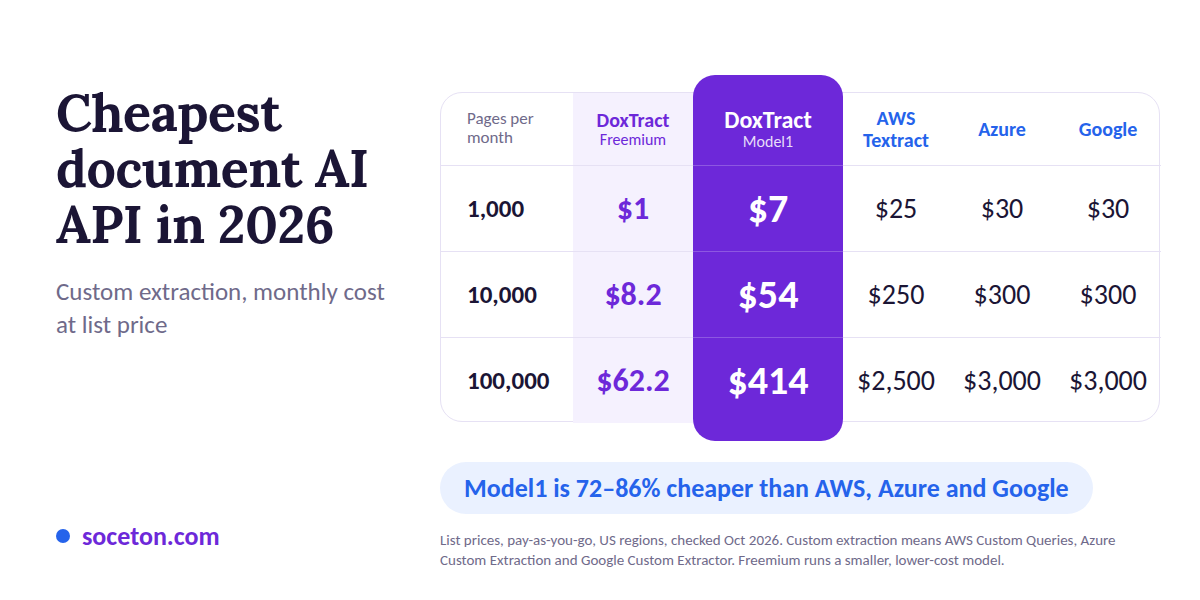
The cheapest fully-managed document AI option with a real API. One per-page rate covers invoices, receipts, forms, and custom templates — no separate surcharge for structured extraction like the hyperscalers charge. Volume discounts also start early: the effective rate drops from $7/1,000 pages at 1,000 pages to about $4.14/1,000 at 10,000, rather than waiting for enterprise-scale thresholds. At after 10,000 pages a month that's $54 total, versus $300+ on AWS or Google for the equivalent structured extraction tier. It also has the most usable free tier in this category — 200 pages/month, recurring, no expiry.
3. Google Document AI / Azure Document Intelligence / AWS Textract — $25-$30 per 1,000 pages
For like-for-like custom extraction, Google Custom Extractor and Azure Custom Extraction run $30/1,000 pages, and AWS Textract Custom Queries (the closest AWS equivalent) runs $25/1,000. That's well above SoceTonAI DoxTract, but native integration can justify it if you're already on GCP, Azure, or AWS. Their prebuilt invoice and receipt models are cheaper (about $10/1,000), but that rate only applies if a prebuilt model fits your document type.
| Pages / Month | DoxTract Freemium | DoxTract Model1 | Google Custom Extractor | Azure Custom Extraction | AWS Textract Custom Queries |
|---|---|---|---|---|---|
| 1,000 | $1 | $7 | ~$30 | ~$30 | ~$25 |
| 5,000 | $4.2 | $31 | ~$150 | ~$150 | ~$125 |
| 10,000 | $8.2 | $54 | ~$300 | ~$300 | ~$250 |
| 50,000 | $32.2 | $214 | ~$1,500 | ~$1,500 | ~$1,250 |
| 100,000 | $62.2 | $414 | ~$3,000 | ~$3,000 | ~$2,500 |
The Cheapest Raw OCR APIs in 2026
Here are the top three cheapest managed API options alongside the open-source self-hosted suite represented as a single combined instance. Check out the full Cheapest Raw OCR APIs comparison here.
Self-Hosted Open Source (Tesseract, PaddleOCR, docTR)
Represents all non-managed, self-hosted libraries. They incur $0 in per-page API fees, trading API costs for host infrastructure, GPU/CPU hardware, and setup engineering.
LlamaParse
The lowest-cost managed API tier for basic text parsing ($1.25 / 1K pages). It produces Markdown output tailored for LLM ingestion and RAG pipelines.
Hyperscalers (AWS Textract, Google Document AI, Azure Document Intelligence)
Tied at $1.50 / 1K pages for basic raw text detection. They offer standard cloud reliability with entry-level free trial quotas.
| Rank | Provider / Category | Free Tier | OCR Price (per 1K pages) |
|---|---|---|---|
| 1 | Open Source Suite (Tesseract, PaddleOCR, docTR) | Unlimited | $0 (+ infrastructure) |
| 2 | LlamaParse | 10,000 Fast credits/month | $1.25 |
| 3 | Hyperscalers (AWS Textract, Google Doc AI, Azure) | 500–1,000 pages/month | $1.50 |
Why They're Cheapest
Two things keep the real bill low: no per-document-type surcharges, and volume discounts that start early.
Hyperscalers charge a steep premium once you move from raw OCR ($1.50/1,000 pages) to custom extraction ($25-$30/1,000), and their volume discounts generally only apply above 1,000,000 pages a month or with a monthly commitment, a scale most teams never reach. Below that, you pay the full rate.
SoceTonAI DoxTract charges one per-page rate regardless of document type, and the effective rate falls as you scale: about $7/1,000 pages at 1,000 pages, $5.40 at 10,000, and $4.14 at after 10,000. That matters most for startups and mid-volume processors, who feel per-page costs but are nowhere near the volume where hyperscaler discounts apply. (Open-source avoids per-page pricing entirely, at the cost of engineering time.)
What "Cheapest" Doesn't Cover
A low per-page rate doesn't capture the full cost of a document pipeline. Before picking based on price alone, account for:
Engineering time — especially for open-source options, where you're building and maintaining the extraction logic yourself
Accuracy and rework cost — a cheaper API that requires more manual correction can cost more in labor than a pricier one that gets it right the first time
Overage fees, template limits, and support tiers — the same hidden costs that apply to any provider, cheap or not (see our full breakdown of what's not in the sticker price)
Want the Full Picture, Not Just the Cheapest?
This post ranks by price on purpose — but cheapest isn't always right for your situation. Two quick reads worth checking before you commit:
OCR vs. Document AI: What's the Difference? — if you're not sure whether you actually need structured extraction or just plain text, the cheapest document AI API might be overkill (or the wrong tool entirely) for what you're building.
Build vs. Buy: In-House OCR or API? — before you go with the $0/page open-source route because it's technically the cheapest, this breaks down what that actually costs once engineering time is factored in.
Free Document AI/OCR API: No Credit Card Required
Most "free tier" claims come with an asterisk: sign up, add a credit card, and you won't be charged unless you cross a limit. If you're testing an idea or building a side project, that's a meaningfully different offer than a tier you can start using with nothing but an email address. Here's how that actually breaks down — and it's also worth distinguishing a genuinely recurring free tier from a one-time trial, since both get marketed as "free."
Recurring, no card required:
Tesseract, PaddleOCR, docTR — open-source and self-hosted, so there's no signup at all. You install and run it, with no time limit. The tradeoff, covered elsewhere on this page, is that you're providing your own infrastructure and doing your own accuracy tuning — and none of these do structured document AI extraction out of the box, only raw text.
SoceTonAI DoxTract — 200 pages/month (Freemium model only), recurring, no card required to start. The allowance renews every month rather than expiring after a trial window, so it's usable as an ongoing free option for real document AI (invoices, receipts, forms), not just a testing sandbox.
One-time trial, no card required (but it does end):
Mindee — a 14-day, 500-page trial with no credit card required, enough to fully test the platform. After the trial period, there's no free tier to fall back on — you need a paid plan starting at €44/month for 500 pages. [See comparison]
LlamaParse — 10,000 free credits/month with no card required, and unlike Mindee this one is recurring monthly rather than a one-time window. Worth noting for OCR/text-extraction use, though it's built for parsing documents into LLM-ready markdown rather than structured field extraction — a different job than the document AI providers in this list. At Fast tier that's ~10,000 pages; higher-accuracy tiers cover far fewer pages for the same credits.
Free tier, but expect a card at signup:
AWS Textract and Azure Document Intelligence both require a full cloud account (AWS/Azure) to access their free tiers, meaning a credit card on file even though you won't be charged within the free allowance. AWS's tier lasts only 3 months; Azure's F0 tier caps each document to 2 pages — neither holds up much past initial testing. [See comparison]
Google Document AI doesn't have a standing free tier at all — only trial credits tied to a new Google Cloud account, which also requires billing setup.
Nanonets gives $200 in non-expiring credits on signup, but account creation goes through the same card-on-file flow as their paid plans. [See comparison]
The practical takeaway: if you want an ongoing free option with zero billing setup, self-hosted open-source, SoceTonAI DoxTract's recurring free tier, and LlamaParse's recurring credits (for OCR-only use) are the only ones here that keep working month after month. Mindee's trial is genuinely card-free, but it's a countdown, not a standing option.
Full Comparison
The three options above are the cheapest by sticker price, but they're not the only ones worth considering — accuracy, support, integrations, and document-type coverage all factor into the real decision, not just cost per page.
For the full breakdown across every provider, see our complete OCR & Document AI pricing comparison.
Which One Should You Actually Pick?
The sections above cover cost — this one covers fit. Cheapest and free-tier-friendliest isn't always the same answer for every kind of user, so here's a quick breakdown by who's asking.
Solo freelancers & indie developers
You want zero setup friction and a plan that doesn't expire while you're still deciding if the project is worth building. SoceTonAI DoxTract's 200 pages/month recurring free tier fits this best — no card, no countdown, and once you're ready to pay, $4-$7/1,000 (Model1) pages for full document AI (or $0.6-$1/1,000 on Freemium model) is low enough that a side project doesn't need a business case to justify it. Open-source (Tesseract, PaddleOCR) is the only cheaper option, but it demands infrastructure and extraction logic most solo developers don't want to own for a side project.
Early-stage startups
At this stage you're validating whether the extraction pipeline even works before committing engineering time to it — which means a real UI matters as much as the API. This is where SoceTonAI DoxTract's console stands out: a working template editor and extraction UI you can test documents in before writing a single line of integration code, rather than reading API docs to figure out what the output even looks like. Most of the providers on this page — AWS, Google, Azure, Mindee — are API-first with no comparable no-code testing surface; you're writing code just to see what you'd be buying.
Non-technical teams / ops & finance staff
If nobody on the team is going to write API integration code, price comparisons matter less than "can someone drag-and-drop a template and get structured output today." Nanonets and Mindee both offer visual builders aimed at this audience, and SoceTonAI DoxTract's template editor covers the same need — build an extraction template through the UI, no engineering required to get started, with the option to move to the API once you do need automation.
High-volume processors on a budget
Early volume discounts and no document-type surcharges (DoxTract) beat hyperscaler pricing until you’re deep into enterprise volume — see the cheapest document AI breakdown above for the exact numbers at each tier.
Enterprises already committed to a cloud
If you're already running on AWS, GCP, or Azure with existing IAM, storage, and billing infrastructure, the native document AI service is often the pragmatic choice even at a price premium — the integration savings can outweigh the per-page difference.
The short version: if you're a freelancer, indie builder, or early-stage startup that wants to see extraction working — templates, output, accuracy — before wiring up an integration, SoceTonAI DoxTract's combination of a real free tier, low per-page pricing that drops with volume, and a usable web console for template building is built for exactly that stage. Larger, cloud-committed teams will still find AWS/Google/Azure worth the premium for infrastructure fit.
Conclusion
If price is the deciding factor, the choice comes down to how much engineering time you're willing to trade for it. Open-source (Tesseract, PaddleOCR, docTR) is genuinely free per page but asks the most of your team. SoceTonAI DoxTract sits just above that at $4-$7/1,000 (Model1) pages and $0.6-$1/1,000 (Freemium) pages with a fully managed API and no surcharges for structured extraction — the best balance of low cost and low effort for most teams. Google Document AI and Azure Document Intelligence are worth the jump to $10/1,000 pages mainly if you're already inside their cloud ecosystem and the integration savings offset the premium.
None of these numbers stay still for long — providers change pricing, add tiers, and shift models throughout the year, which is exactly why this page exists as a living comparison rather than a one-time post. For the complete picture across every provider, including the ones that didn't make this shortlist, see our full OCR & Document AI pricing comparison.
Frequently Asked Questions
Is there a truly free document AI API?
Only if you self-host. Tesseract, PaddleOCR, and docTR are free and open-source with no per-page fee at any volume — but none of them do structured extraction (invoice fields, line items, key-value pairs) out of the box. You're trading the API cost for engineering time to build and maintain that layer yourself. Every managed API with real document AI capability, even the cheapest ones, charges per page.
What's the cheapest document AI API for invoices and receipts?
Among managed APIs with a real free tier and volume-discounted per-page pricing, SoceTonAI DoxTract is the cheapest at $4-$7/1,000 pages (Model1) and $0.6-$1/1,000 pages (Freemium), with no separate surcharge for invoice- or receipt-specific extraction. For custom extraction on the hyperscalers, Google Custom Extractor and Azure Custom Extraction are $30/1,000 pages, and AWS Textract Custom Queries is $25/1,000. Their prebuilt invoice and receipt models run about $10/1,000, but only work if a prebuilt model fits your documents.
Is the cheapest option actually the best value?
Not always. A $0/page open-source model can cost more overall than a $7/1,000-page managed API once you account for engineering time, hosting, and accuracy tuning. "Cheapest" measures per-page cost; "best value" measures total cost including labor, rework from extraction errors, and how fast you can ship. For most teams without dedicated ML infrastructure, a low flat-rate managed API ends up cheaper in practice than free self-hosted OCR.
Do cheap or free document AI APIs charge extra for structured extraction?
It depends on the provider. Open-source tools have no per-page fee, but you're building the structured-extraction logic yourself, so there's no "surcharge" because there's no built-in feature to charge for. Among managed APIs, this varies a lot — some (like SoceTonAI DoxTract) charge one per-page rate regardless of document type, while others charge a base OCR rate plus a much higher fee once you need forms, tables, or invoice-specific fields.
Does a lower price mean lower accuracy?
Not necessarily, but it's worth verifying before committing to volume. Price and accuracy aren't directly correlated in this market — some of the cheaper providers use the same underlying model quality as the expensive ones, just with leaner margins or different business models. Test on your actual documents before deciding, since accuracy varies more by document type and quality than by price tier.