What Is an OCR API / Document AI API?
If you're a developer, you don't want a dashboard where you upload documents one at a time and copy out the results by hand — you want to send a document to an endpoint and get structured data back, so your own application can do something with it automatically. That's exactly what an OCR API or Document AI API is for.
This post is aimed squarely at that audience: what these APIs actually do, how they typically work, and what to look for if you're integrating one into your own product.
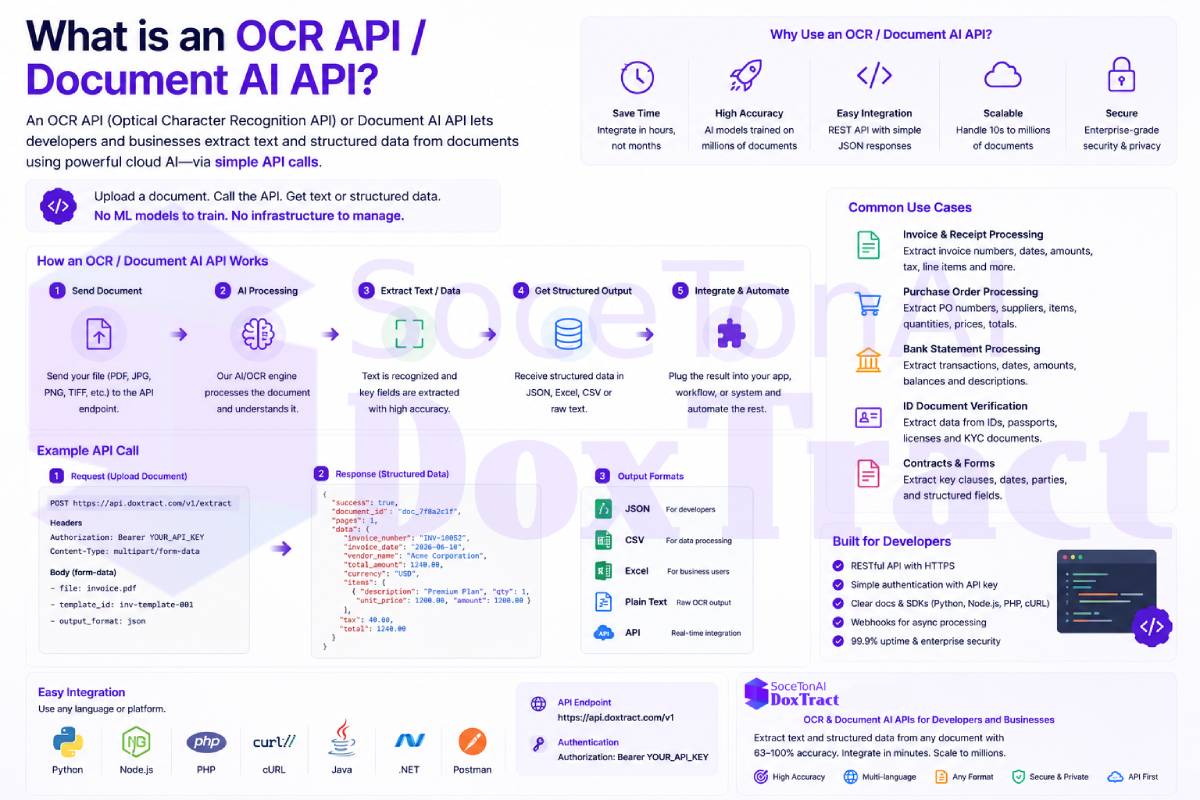
What an OCR API / Document AI API Does
At its core, an OCR API takes a document — a PDF, an image, a scanned page — and programmatically returns the text or data it contains via an HTTP request, rather than through a manual UI. A basic OCR API might just return raw extracted text. A Document AI API goes further: instead of a wall of text, it returns structured, labeled fields, as we covered in What Is Structured Data Extraction? — invoice number, vendor name, line items, totals — ready to plug straight into your database, ERP integration, or workflow logic.
A typical request/response pattern looks something like this:
curl -X POST https://api.example.com/v1/extract \
  -H "Authorization: Bearer YOUR_API_KEY" \
  -F "file=@invoice.pdf" \
-F "document_type=invoice"{
"invoice_number": "INV-10432",
"vendor_name": "Acme Supplies Ltd.",
"invoice_date": "2026-07-01",
"line_items": [
{ "description": "Widget A", "quantity": 10, "unit_price": 4.50, "total": 45.00 }
],
"total": 45.00,
"confidence": 0.97
}No dashboard, no manual copy-paste — just a request in, structured JSON out.
Why Developers Reach for an API Instead of Building Extraction In-House
Building your own OCR/document-understanding pipeline from scratch means training or fine-tuning models, handling a wide range of scanned/photographed/native-PDF input quality, dealing with layout variation across vendors, and consistently maintaining accuracy as edge cases arise. For most teams, that's a multi-quarter distraction from the actual product they're trying to build.
An OCR/Document AI API abstracts all of that away. You send a document, you get structured data back, and the extraction accuracy, model updates, and edge-case handling are the API provider's problem, not yours.
This matters most for teams building things like:
AP automation tools — the workflow described in What Is Accounts Payable Automation?, where invoice and PO data needs to flow automatically into matching and approval logic
Bookkeeping and accounting software — auto-populating transactions from receipts and invoices
ERP or ecommerce integrations — syncing purchase order or invoice data directly into internal systems
Expense management apps — parsing receipts as users upload them
Custom internal tools — any workflow where documents currently require manual data entry
What to Look for in an OCR / Document AI API
Not all APIs in this space are built the same way. A few things worth evaluating before you integrate one:
Structured output, not just raw text. If you need specific fields rather than a wall of text, make sure the API actually returns labeled data — not something you'll need to parse yourself afterward.
Document type coverage. Does it handle the specific documents you care about — invoices, receipts, purchase orders — or is it a generic OCR tool that treats every document the same way?
Line-item / table handling. As covered in What Is a Purchase Order (PO) and How Is PO Data Extracted?, multi-row tables are one of the hardest things to get right — check whether the API reconstructs them accurately or scrambles them.
Template support. If you process the same recurring document layouts repeatedly, an API with template-based extraction can give you more precise, consistent results than general extraction alone.
Pricing model. Per-page, per-document, or subscription-based — and whether there's a free tier to test against your real documents before committing.
Response time and reliability. If extraction sits in a user-facing flow (e.g., someone uploading a receipt), latency and uptime matter as much as accuracy.
Ease of integration. Clear docs, simple auth, and a response format that maps cleanly onto your own data model, so you're not writing extra glue code just to make the output usable.
Where DoxTract Fits
DoxTract is a Document AI API built specifically for invoices, receipts, and purchase orders — it returns structured, ready-to-use JSON rather than raw OCR text, handles line-item tables, and supports templates for recurring document layouts. It's designed as a simpler, more affordable option for developers and businesses building automation on top of document data, with a free tier so you can test it against your own documents before committing. You can try it at soceton.com.