What Is a Purchase Order (PO) and How Is PO Data Extracted?
Invoices get most of the attention in finance automation conversations, but they're only half the story. Before an invoice ever shows up, there's usually a purchase order — the document that says what was ordered, from whom, at what price, and under what terms. Getting PO data into a system accurately is just as important as extracting the invoice itself, because it's what makes automated matching and approval possible in the first place.
This post covers what a purchase order actually is, why extracting data from it is harder than it looks, and how that extraction works in practice.
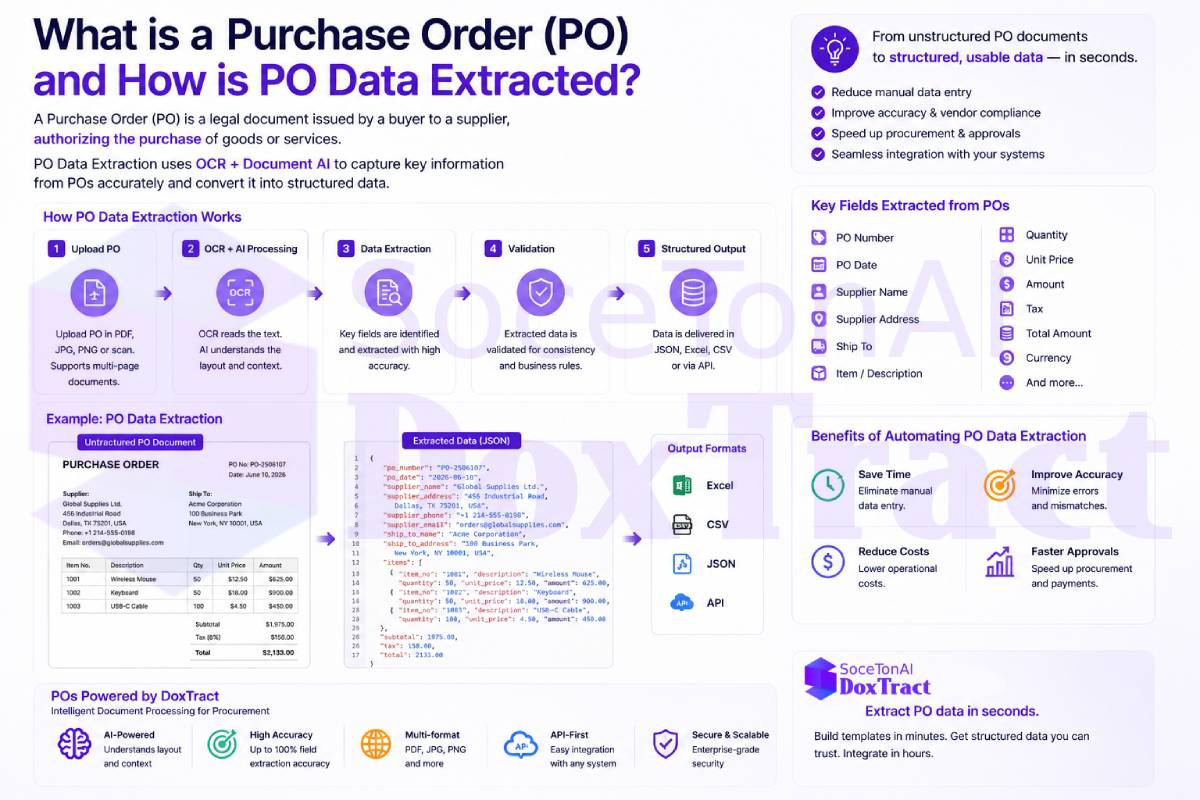
What Is a Purchase Order?
A purchase order (PO) is a formal document a buyer sends to a vendor to authorize a purchase. It typically specifies:
PO number — a unique identifier used to reference the order throughout its lifecycle
Vendor/supplier details — name, address, contact information
Buyer/billing details — the ordering company's information and shipping address
Line items — each product or service ordered, with quantity, unit price, and line total
Order date and delivery date
Payment terms — net 30, net 60, early-payment discounts, etc.
Total order value, often broken out by subtotal, tax, and shipping
Once a vendor fulfills the order and sends an invoice, the PO becomes the reference point for three-way matching: comparing the PO, the goods receipt, and the invoice to confirm they agree before payment is released. This is the core control that prevents overpayment, duplicate billing, and unauthorized purchases.
Why PO Data Extraction Is Its Own Challenge
At first glance, extracting data from a PO sounds like the same problem as extracting data from an invoice — and it's closely related — but there are a few things that make it distinct:
Line-item complexity. POs often contain long, multi-page line-item tables with SKU numbers, unit-of-measure fields, and partial-delivery tracking, which need to be captured row-by-row without merging or dropping entries.
Wide format variation. Every buyer's PO template looks different — some are generated from ERP systems (SAP, NetSuite, Oracle), some are custom PDFs, some are still faxed or scanned. A model trained only on invoices often mishandles PO-specific fields like "ship-to" vs. "bill-to" addresses.
Cross-document matching. PO data is rarely useful in isolation — its value comes from being matched against the corresponding invoice and receipt, which means extraction needs to produce data in a structure that lines up cleanly with how invoice data gets extracted.
Amendments and revisions. POs get revised — quantities change, line items get added or cancelled — and extraction systems need to handle revision numbers and partial fulfillment without losing the audit trail.
Because of this, treating "invoice extraction" and "PO extraction" as the same problem tends to produce messy results. A model needs to specifically understand PO structure — not just generically parse "a business document with numbers on it."
How PO Data Extraction Actually Works
The extraction process for a PO generally follows the same pipeline we described in OCR vs Document AI: What's the Difference? — OCR reads the raw text, and a document-understanding layer figures out what that text means:
Document ingestion — the PO (PDF, scan, or image) is fed into the system, regardless of source format.
OCR pass — raw text is extracted from the page, including text inside tables.
Field and table recognition — a trained model identifies header fields (PO number, dates, vendor) and correctly reconstructs the line-item table, keeping quantities, descriptions, and prices aligned row by row.
Normalization — dates, currency values, and units get cleaned into consistent, structured formats.
Structured output — the result is returned as structured data (typically JSON), ready to be matched against invoice and receipt data or synced directly into an ERP or AP automation workflow.
This is the same extraction backbone that powers the accounts payable automation workflow we covered previously — PO extraction, invoice extraction, and receipt extraction all feed the same downstream process: matching, approval, and payment.
Where DoxTract Fits
DoxTract extracts structured data from purchase orders, invoices, and receipts using the same underlying pipeline — so PO line items, invoice line items, and receipt data all come back in a format that's ready to match and reconcile against each other, rather than needing separate tools or custom logic per document type. You can try it at soceton.com.