What Is a Template-Based Extraction Engine?
Not every document you need to process looks like every other document. A vendor's invoice format, a specific customs form, an internal expense form your company built five years ago — each has its own layout, its own labels, its own quirks. General-purpose extraction can get you most of the way there, but for documents you receive over and over in the exact same format, there's a more precise tool: a template.
This post covers what a template-based extraction engine actually is, how it differs from general document AI extraction, and when it's the better tool for the job.
The Problem: One Layout, Extracted Over and Over
Imagine you receive purchase orders from the same three suppliers every week, and each supplier always uses the same layout: the PO number is always in the top-left, the line-item table always starts at the same spot, the total is always in the bottom-right box. A general-purpose extraction model — the kind we covered in OCR vs Document AI — can already handle this well, because it's trained to understand document structure generically, regardless of layout.
But when you know the layout in advance and it never changes, you can do better than "the model figures it out each time." You can tell the system exactly where each field lives — once — and have it apply that exact mapping every time a document matching that format comes in.
That's what a template does.
What a Template-Based Extraction Engine Is
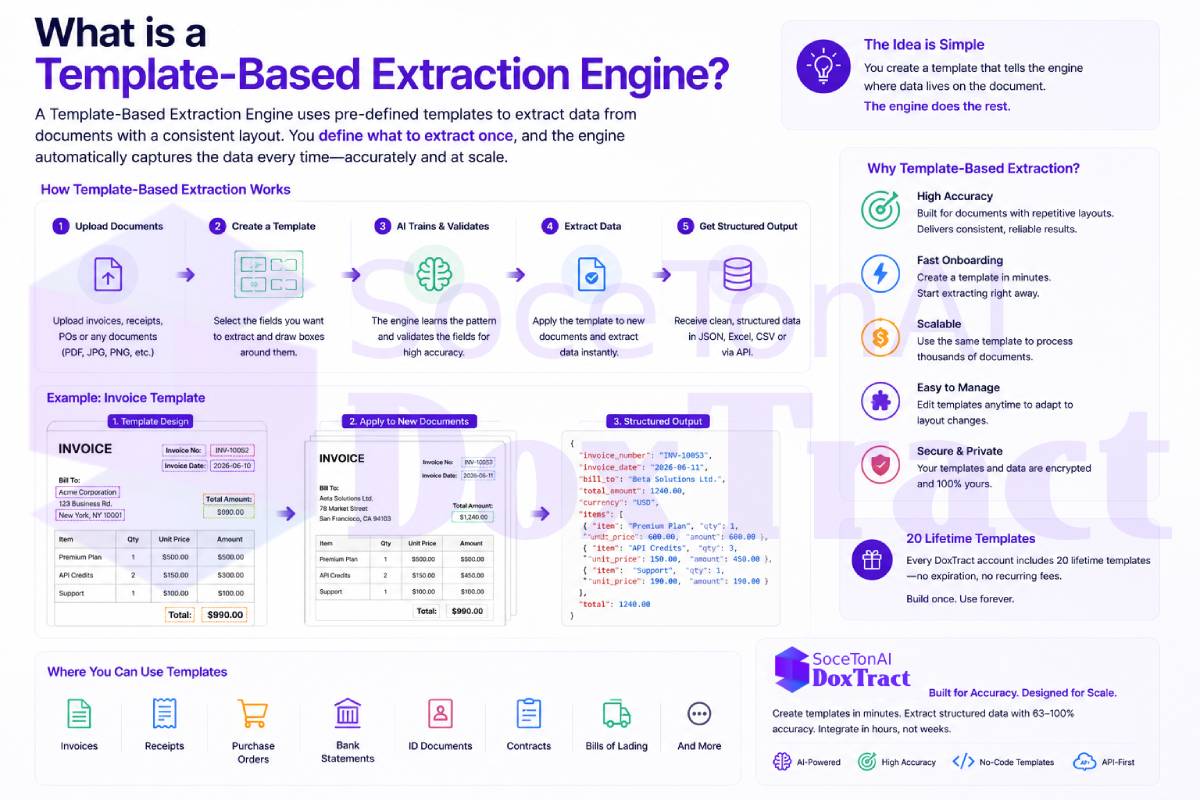
A template-based extraction engine lets you define a reusable extraction blueprint for a specific document layout. Instead of relying purely on a general model to infer what's an invoice number versus a PO number versus a total, you configure a template that says, in effect: "for documents that look like this, the invoice number is always here, the vendor name is always here, the line-item table starts here."
Once a template is defined, every future document matching that layout gets extracted according to the template's rules — fast, consistent, and predictable.
Typically, a template-based system lets you:
Mark up a sample document to define where each field lives (invoice number, date, totals, line-item columns, etc.)
Save that mapping as a reusable template tied to a specific vendor, form, or document type
Automatically match incoming documents to the right template based on layout or vendor
Re-apply the same extraction logic every time a document of that type comes in, without needing to re-configure anything
Template-Based vs. General AI Extraction
These two approaches aren't competitors so much as complements — each is the better tool depending on the situation:
| Template-Based Extraction | General AI/Document Understanding | |
|---|---|---|
| Best for | Recurring documents with a fixed, known layout | Documents with varying or unpredictable layouts |
| Setup | Requires defining the template once | Works out of the box, no setup |
| Consistency | Extremely consistent for matching layouts | Consistent, but relies on the model's general understanding |
| Flexibility | Breaks if the layout changes unexpectedly | Adapts automatically to new/unseen layouts |
| Speed to first extraction | Slight upfront setup cost | Immediate |
In practice, the strongest systems support both: a general model that extracts structured data (as covered in What Is Structured Data Extraction?) as a reliable default, plus templates for the specific, high-volume, recurring documents where you want guaranteed precision and zero variability.
Why Templates Matter for AP and Document Workflows
If you're processing invoices, receipts, or purchase orders — the use cases we've covered in What Is Accounts Payable Automation? and What Is a Purchase Order (PO) and How Is PO Data Extracted? — a large share of your document volume is often repetitive: the same recurring vendors, the same internal forms, the same recurring billing formats. Templates let you lock in perfect extraction for that recurring volume, while general extraction handles the long tail of one-off or unfamiliar documents.
Where DoxTract Fits
DoxTract combines both approaches: general document AI extraction for invoices, receipts, and purchase orders out of the box, plus a template builder for documents you receive repeatedly in a known layout — so your highest-volume, most predictable documents get fast, precise, zero-guesswork extraction every time. You can try it at soceton.com.