What Is Structured Data Extraction?
Every document-processing product claims to "extract data." But there's a big gap between pulling raw text off a page and pulling out data you can actually use in a database, spreadsheet, or workflow. That gap is exactly what structured data extraction is meant to close.
If you've read our post on OCR vs Document AI, you already know that OCR alone just reads characters — it doesn't understand what those characters mean. Structured data extraction is the step that turns that raw text into organized, labeled, machine-usable data. Here's what that actually involves.
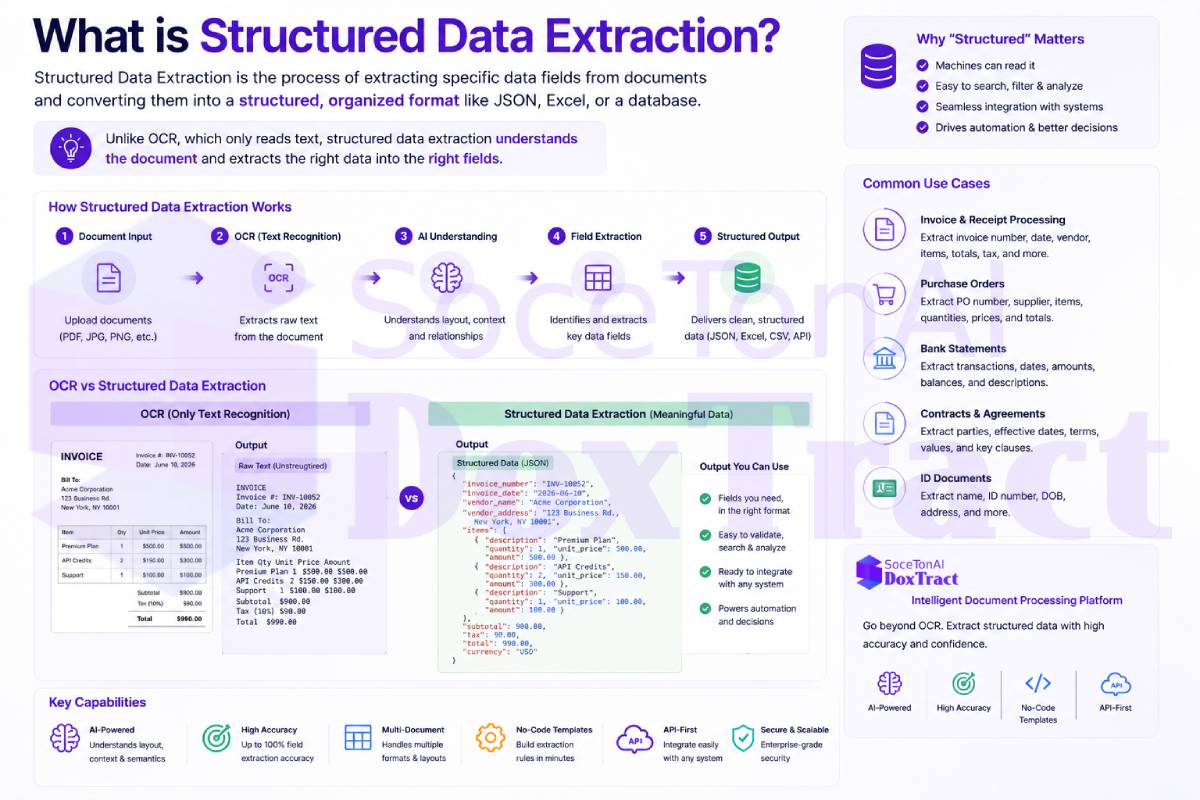
Unstructured vs. Structured Data
Unstructured data is information that doesn't follow a predefined format — free-flowing text, a scanned page, an email body, a photo of a receipt. A computer can store it, but it can't easily reason about it: it doesn't inherently know which part is a date, which part is a total, or which part is a line item.
Structured data is information organized into a consistent, predictable format — rows and columns, key-value pairs, or a JSON object with named fields. Once data is structured, software can search it, sum it, validate it, or feed it directly into another system without a human reading and re-typing it.
An invoice, receipt, or purchase order starts life as unstructured data — a page of text and numbers laid out however that particular vendor's template happens to look. Structured data extraction is the process of converting that page into something like:
{
  "invoice_number": "INV-10432",
  "vendor_name": "Acme Supplies Ltd.",
  "invoice_date": "2026-07-01",
  "due_date": "2026-07-31",
  "line_items": [
    { "description": "Widget A", "quantity": 10, "unit_price": 4.50, "total": 45.00 },
    { "description": "Widget B", "quantity": 5, "unit_price": 12.00, "total": 60.00 }
  ],
  "subtotal": 105.00,
  "tax": 8.40,
  "total": 113.40
}
That's the difference between "we have a scanned invoice on file" and "we have data our accounting system can actually use."
How Structured Data Extraction Works
Turning a document into structured output generally involves a few layered steps:
Text recognition (OCR) — the raw characters on the page are read, regardless of whether the source is a scan, a photo, or a native PDF.
Layout and field understanding — a trained model identifies which piece of text corresponds to which field — recognizing that a number in the top-right area is likely a total, or that a block of text is a table rather than a paragraph.
Table and line-item parsing — repeating rows (like invoice or PO line items) are reconstructed correctly, keeping quantities, descriptions, and prices aligned rather than jumbled together.
Normalization — inconsistent formatting gets cleaned up: dates are standardized, currency symbols and separators are normalized, and stray punctuation or spacing errors from OCR are corrected.
Structured output — the final result is returned in a consistent, predictable format — typically JSON — with named fields ready to be validated, matched, or synced into another system.
This is the same pipeline we walked through in What Is a Purchase Order (PO) and How Is PO Data Extracted? — the specific fields differ by document type, but the underlying goal is always the same: unstructured input in, structured output out.
Why Structured Data Extraction Matters
Structured output is what enables downstream automation. It's the difference between:
A human reading a PDF and retyping numbers into an ERP, versus an invoice automatically posting itself
A finance team manually comparing a PO and an invoice line by line, versus software automatically flagging a mismatch
A pile of scanned receipts, versus a searchable, reportable expense ledger
This is exactly the mechanism behind the workflow described in What Is Accounts Payable Automation? — AP automation only works because structured data extraction turns invoices and POs into something a matching engine or ERP can actually process without human re-entry.
Where DoxTract Fits
DoxTract is built specifically to produce structured, ready-to-use output — not just raw OCR text — from invoices, receipts, and purchase orders. Line items, totals, dates, and vendor details come back as clean, consistent JSON, so they can be matched, validated, and synced into your own systems without extra parsing logic on your end. You can try it at soceton.com.