Document AI/OCR API Price Comparison Table: Every Major Provider (Updated 2026)
Document AI and OCR API pricing pages are some of the least trustworthy pages on the internet. Every provider quotes their best-case number, buries the surcharges for forms and tables three pages deep in the docs, and updates prices without telling anyone. If you've ever tried to figure out what it will actually cost to process 50,000 invoices a month, you've probably ended up with six browser tabs open and still no real answer.
This page exists to fix that. It's a living, continuously updated comparison of document AI and OCR API pricing across every major provider — AWS Textract, Google Document AI, Azure Document Intelligence, Mindee, Nanonets, Veryfi, Docsumo, Rossum, Klippa, ABBYY, and more — normalized so you can actually compare them side by side.
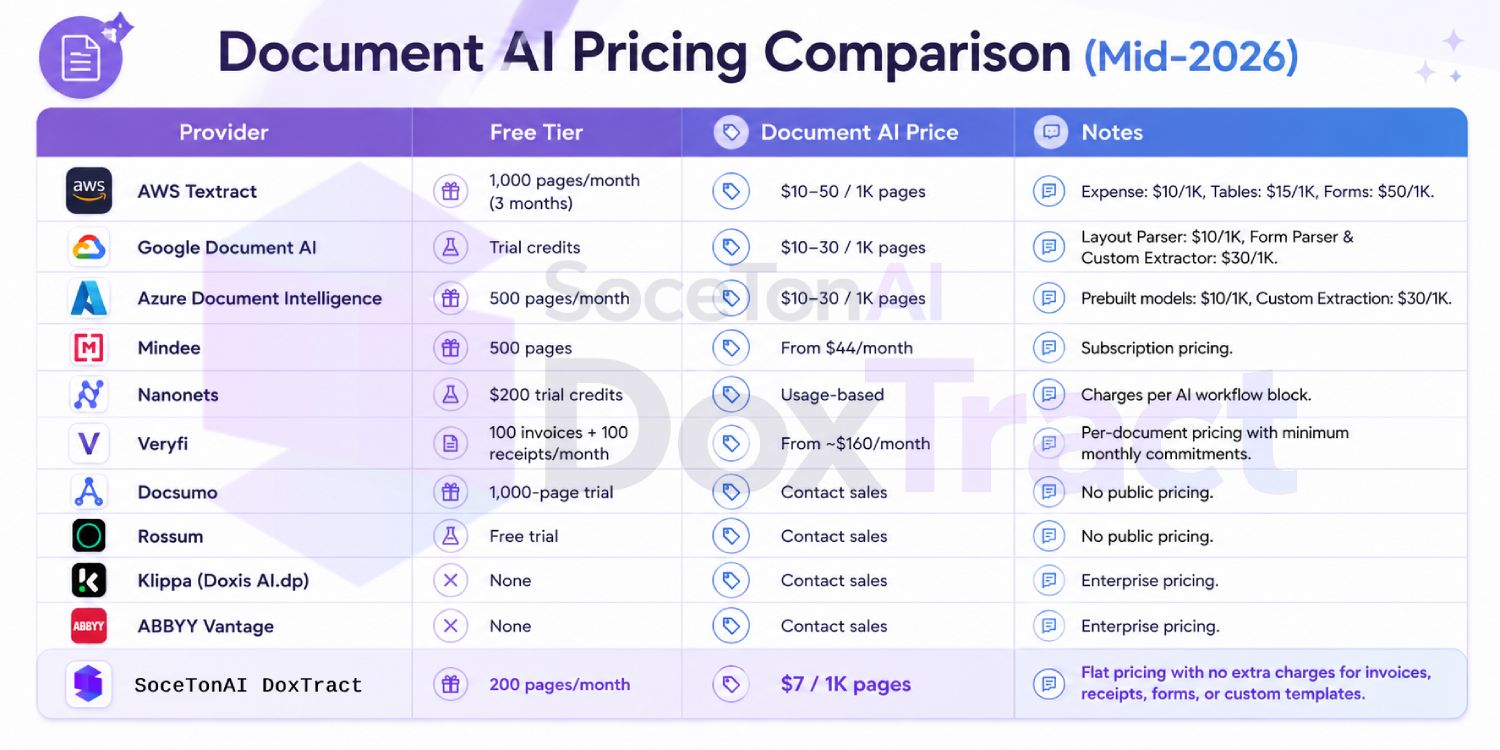
The focus here is document AI pricing: what it costs to go beyond plain text extraction and pull structured data out of invoices, receipts, purchase orders, and forms. That's the tier most teams actually need, and it's also where pricing gets the most opaque — a 7x to 30x jump over basic OCR that catches a lot of teams off guard once they move from prototype to production. (If you just need raw text extraction with no structure, we cover that separately further down.)
Every number here is sourced from public pricing pages, verified as of [Jul 30, 2026], and re-checked on a rolling basis — when a provider changes their pricing, this page changes with it. Where a provider doesn't publish rates and gates pricing behind a sales call, we say so plainly instead of guessing.
Document AI / Intelligent Document Processing Pricing Comparison
This table covers the layer above raw OCR: structured extraction — pulling out invoice numbers, line items, vendor names, form fields, and tables rather than just plain text. Prices jump sharply here because you're paying for the model that understands document structure, not just characters.
| Provider | Free Tier | Document AI Price | Notes |
|---|---|---|---|
| AWS Textract | 1,000 pages/month (3 months) | $10–50 / 1K pages | Modular pricing. OCR, Tables, Forms, and Expense Analysis are billed separately, so costs increase based on the features used. |
| Google Document AI | Trial credits | $10–30 / 1K pages | Different processors have separate pricing. Layout Parser is lower cost, while Form Parser and Custom Extractor are premium features. |
| Azure Document Intelligence | 500 pages/month | $10–30 / 1K pages | Read OCR, prebuilt models, and custom extraction are priced independently based on the selected model. |
| Mindee | 500 pages | From $44/month | Subscription-based pricing with monthly page allowances. Effective cost per page decreases on higher-tier plans. |
| Nanonets | $200 trial credits | Usage-based | Charges based on AI workflow blocks instead of pages. Total cost depends on workflow complexity and automation steps. |
| Veryfi | 100 invoices + 100 receipts/month | From ~$160/month | Designed for financial documents with separate pricing for invoices and receipts, plus monthly minimums. |
| Docsumo | 1,000-page trial | Contact sales | Enterprise-focused platform with custom pricing based on document volume and business requirements. |
| Rossum | Free trial | Contact sales | AI-powered document processing platform with custom enterprise pricing and workflow automation. |
| Klippa (Doxis AI.dp) | None | Contact sales | Sales-led enterprise solution with pricing tailored to deployment size and document volume. |
| ABBYY Vantage | None | Contact sales | Enterprise Document AI platform with negotiated pricing based on use case, document complexity, and scale. |
| DoxTract Freemium | 200 pages/month | $0.6 - $1.00 / 1K pages | Affordable Document AI API for text extraction with predictable flat pricing and no infrastructure required. |
| DoxTract Model1 | No free tier | $4 - $7.00 / 1K pages | Full Document AI with structured data extraction, template-based processing, and flat pricing regardless of document type or fields extracted. |
A few patterns worth calling out:
The hyperscalers charge a 7–20x premium to go from OCR to structured extraction. AWS's basic OCR is $1.50/1K, but Forms jumps to $50/1K — a 33x multiplier for the same page. This is the single most common billing surprise for teams that prototype on OCR pricing and then ship on the Forms API.
Subscription-based pricing (Mindee, Veryfi) trades predictability for less granularity. You're buying a page allowance in a monthly plan rather than metering per document, which is easier to budget but less efficient if your volume is spiky.
Nanonets' workflow-block model makes "price per page" a moving target. Cost depends on how many blocks a document triggers (classify, extract, validate, export), so the same invoice type can cost different amounts depending on how the workflow is built.
Half this list won't tell you the price without a sales call. Docsumo, Rossum, Klippa, and ABBYY all gate pricing behind "contact sales" — common in the enterprise IDP space, but it means teams comparing options can't actually shortlist on cost alone without picking up the phone first.
SoceTonAI DoxTract sits well under the hyperscaler structured-extraction tier — upto $4-$7/1K (Model1) pages for full document AI (invoices, receipts, forms, custom templates all included at the same rate) versus $30–50/1K for the equivalent AWS/Google/Azure tier, and the $0.6-$1/1K (Freemium model) endpoint undercuts their $1.50/1K plain-text rate too. The 200 free pages/month is also the only usable free tier in this table that doesn't cap out after 90 days or require a sales conversation.
Raw OCR Price Comparison
This table isolates pure text-extraction pricing — no invoice parsing, no form fields, no structured output, just "give me the text on the page." It's the fairest apples-to-apples comparison you can make across providers, since structured extraction pricing varies wildly by document type and field count (see the full comparison table above for that).
| Provider | Free Tier | OCR Price | Notes |
|---|---|---|---|
| AWS Textract | 1,000 pages/month for 3 months | $1.50 / 1K pages | Detect Document Text API. |
| Google Document AI | Trial credits | $1.50 / 1K pages | OCR Processor. |
| Azure Document Intelligence | 500 pages/month (2 pages/document) | $1.50 / 1K pages | Read OCR model. |
| Mistral OCR 3 | Limited trial | $2.00 / 1K pages | Flat pricing regardless of document type. |
| LlamaParse | 10,000 Fast credits/month | From $1.25 / 1K pages | Fast mode; optimized for LLM ingestion rather than traditional OCR. |
| Tesseract | Unlimited | $0 (+ infrastructure) | Open source, self-hosted. |
| PaddleOCR | Unlimited | $0 (+ infrastructure) | Open source, self-hosted. |
| docTR | Unlimited | $0 (+ infrastructure) | Open source, self-hosted. |
A few things stand out at this layer:
AWS, Google, and Azure have converged on identical pricing — $1.50 per 1,000 pages for basic OCR. If you're only doing plain text extraction, the three hyperscalers are functionally the same purchase decision on price; the differentiator becomes accuracy on your specific document types, latency, and how deep you already are in each cloud ecosystem.
LlamaParse is priced for a different job. It's technically OCR, but the output is markdown structured for feeding into an LLM or RAG pipeline, not raw text — so the slightly higher price reflects that extra processing, not just character recognition.
Mistral OCR sits a notch above the hyperscalers at $2/1,000 pages but keeps that rate flat regardless of document complexity — no separate charge if a page turns out to have tables or handwriting on it, which the hyperscalers do charge extra for outside this raw-OCR tier.
The open-source row (Tesseract, PaddleOCR, docTR) is the floor — genuinely free per page, but "$0" is doing a lot of work: you're trading API cost for GPU/CPU infrastructure, hosting, and the engineering time to keep accuracy competitive with a managed API.
Methodology / How We Calculated These Prices
Prices are pulled from each provider's official public pricing page, converted to a common cost-per-1,000-pages rate for comparison. We price OCR (plain text) and document AI (structured extraction) separately, since the same provider can cost 10–30x more depending on which API you use. Providers with no public self-serve pricing are marked "Contact sales" rather than estimated. Figures reflect list price only — not custom enterprise discounts — and are re-verified on a rolling basis, with the last-checked date noted per provider.
What's NOT in the Sticker Price
The per-page rate is rarely the whole bill. Watch for:
Overage fees — exceeding your plan's page allowance often costs more per page than the plan rate itself
Template/field limits — some plans cap how many document types or custom fields you can define before forcing an upgrade
Support tier costs — priority support, SLAs, and dedicated account management are frequently gated behind higher (or custom) pricing tiers
Data retention/export fees — storing processed documents or exporting historical data can carry separate charges
Accuracy-based pricing — a few providers charge more for higher-accuracy models or human-in-the-loop review on the same document type
Which Provider Fits Which Use Case
Startups & solo developers testing an idea
Prototype on a free tier before committing. Google Document AI and AWS Textract give you a short-lived free allowance; SoceTonAI DoxTract gives you 200 pages/month recurring with no expiry, which is friendlier for a slow-burn side project.
High-volume invoice/receipt processing on a budget
Flat, predictable per-page pricing matters most once you're past prototype volume. SoceTonAI DoxTract ($4-$7 Model1 or $0.6-$1/1K Freemium) and Mistral OCR 3 ($2/1K, flat regardless of complexity) avoid the forms/tables surcharge that hits AWS and Google hard at scale.
Teams already deep in AWS or GCP infrastructure
AWS Textract or Google Document AI make sense here even at a premium — native IAM, S3/Cloud Storage integration, and unified billing outweigh the per-page savings elsewhere for teams that live in one cloud.
Microsoft/Azure-native enterprises
Azure Document Intelligence plugs directly into existing Microsoft 365, Power Automate, and Azure AD workflows — worth the same $1.50–$30/1K rate as AWS/Google if it saves the integration work.
Mobile receipt/expense capture
Veryfi is purpose-built for camera-based mobile capture with a strong SDK — a better fit than a general document AI API if your use case is field teams photographing receipts on phones.
No-code / non-technical teams
Nanonets and Mindee both offer visual workflow builders, which matter more than raw price if you don't have engineering resources to wire up a custom pipeline.
Lending, underwriting & income verification
Docsumo and Veryfi specialize in financial-document types (bank statements, pay stubs, tax forms) — worth the sales call despite the lack of public pricing.
Enterprise AP automation at scale
Rossum is a common choice for large accounts-payable teams needing approval workflows and ERP integrations layered on top of extraction, not just the raw API.
Regulated/compliance-heavy environments (EU-based)
Klippa (Doxis AI.dp) and Mindee are EU-based with GDPR-first positioning — relevant if data residency is a hard requirement.
Legacy document conversion & desktop OCR
ABBYY still leads on degraded scans, multilingual documents, and desktop/on-prem deployment for teams that can't send documents to a cloud API at all.
RAG pipelines / feeding documents to an LLM
LlamaParse is purpose-built for this — it outputs markdown structured for LLM ingestion rather than raw text, which regular OCR APIs don't do natively.
Zero budget, full engineering control
Tesseract, PaddleOCR, and docTR are free and self-hostable — the right call only if you have the ML/infra resources to maintain accuracy yourselves.
Still Deciding What You Actually Need?
This page compares pricing across providers — but price only matters once you know what you're buying. Two quick reads that might help first:
OCR vs. Document AI: What's the Difference? — if you're not sure whether you need plain text extraction or full structured field extraction, start here before comparing rates.
Build vs. Buy: In-House OCR or API? — if you're weighing a self-hosted open-source option (Tesseract, PaddleOCR) against a managed API, this breaks down the real tradeoff beyond just the sticker price.
Conclusion
Document AI pricing isn't complicated because the math is hard — it's complicated because providers make it hard to see. A per-page rate that looks cheap on the homepage can quietly turn into a 30x markup once you touch forms or tables, and the providers most confident in their pricing tend to be the ones who publish it plainly instead of routing you to a sales call.
The honest takeaway: there's no single "cheapest" or "best" provider across every use case in this table. If you're already deep in AWS or GCP, the native integration may be worth the premium. If you're processing invoices at real volume and want a flat rate with no surprises, that's a narrower, cheaper field. What matters is knowing which tier of pricing — raw OCR versus structured extraction — actually applies to what you're building, and checking that number against your real volume, not the lowest figure on the page.
This comparison will keep getting updated as providers change their pricing — bookmark it rather than a single vendor's page, since that's the one page here that won't go stale. And if you're evaluating document AI for invoice or receipt extraction specifically, SoceTonAI DoxTract's $4-$7/1,000-pages (Model1) and $0.6-$1 (Freemium) pricing is worth a look against whatever you're currently paying per structured page.
Frequently Asked Questions
Is there a truly free OCR API?
Yes, for low volume or self-hosted use. Tesseract, PaddleOCR, and docTR are free and open-source with no page limits (you cover infrastructure costs). Among hosted APIs, AWS Textract, Google Document AI (via trial credits), and Azure Document Intelligence all offer free tiers, but they're capped and often time-limited — Azure's free tier caps at 2 pages per document, and AWS's expires after 3 months.
What's the cheapest OCR API for [X] pages per month?
It depends on whether you need plain text or structured data. For raw OCR at any volume, AWS, Google, and Azure are all priced identically at $1.50 per 1,000 pages. For document AI / structured extraction, SoceTonAI DoxTract's flat $4-$7/1,000 (Model1) pages and $0.6-$1/1,000 (Freemium) pages is the lowest published rate in this comparison — most alternatives run $30–50/1,000 pages at the equivalent tier.
Do these providers charge for failed or rejected extractions?
It varies. AWS Textract explicitly does not bill for failed requests (4xx/5xx errors) or pages where no data was extracted. Google Document AI follows the same policy. Not every provider states this clearly in their pricing docs, so it's worth confirming directly if failure rate matters to your volume.
What's the difference between OCR pricing and document AI pricing?
OCR pricing covers plain text extraction — no structure, no field recognition. Document AI pricing covers structured extraction: pulling out specific fields, tables, key-value pairs, or document-type-specific data (like invoice totals or vendor names). The jump between the two tiers is usually the single biggest and least obvious cost increase in this market — often 10–30x on the same provider.
Why do some providers require a sales call instead of publishing pricing?
Enterprise IDP platforms (Docsumo, Rossum, Klippa, ABBYY) typically price based on volume commitments, custom model training, SLAs, and deployment type (cloud vs. on-premise) — variables that don't fit neatly into a public rate card. It's common in enterprise software generally, not unique to document AI, but it does mean you can't shortlist purely on cost without engaging sales.
Does higher price mean higher accuracy?
Not reliably. Price often reflects the model's structural sophistication (plain OCR vs. form understanding vs. custom-trained extraction) more than raw text accuracy, which can be comparable across providers for clean, printed documents. Accuracy differences show up most on messy inputs — handwriting, skewed scans, non-standard layouts — where testing your own documents matters more than any published benchmark.
How often is this pricing updated?
This page is re-verified against live provider pricing pages on a rolling basis, not a fixed schedule. Each row reflects its last-checked date. If pricing looks out of date, flag it and we'll confirm and correct it.