What Is Document AI? A Practical Guide to Automated Data Extraction
Every day, businesses receive invoices, receipts, purchase orders, contracts, forms, bank statements, and many other documents containing valuable information. Extracting this data manually is time-consuming, error-prone, and difficult to scale as document volumes grow.
Document AI uses artificial intelligence to automatically understand documents and extract structured data from them. Unlike traditional OCR, which only converts images into text, Document AI analyzes document layouts, identifies key fields, understands tables and relationships, and transforms unstructured documents into machine-readable formats such as JSON, Excel, or data that can be sent directly to business applications through APIs.
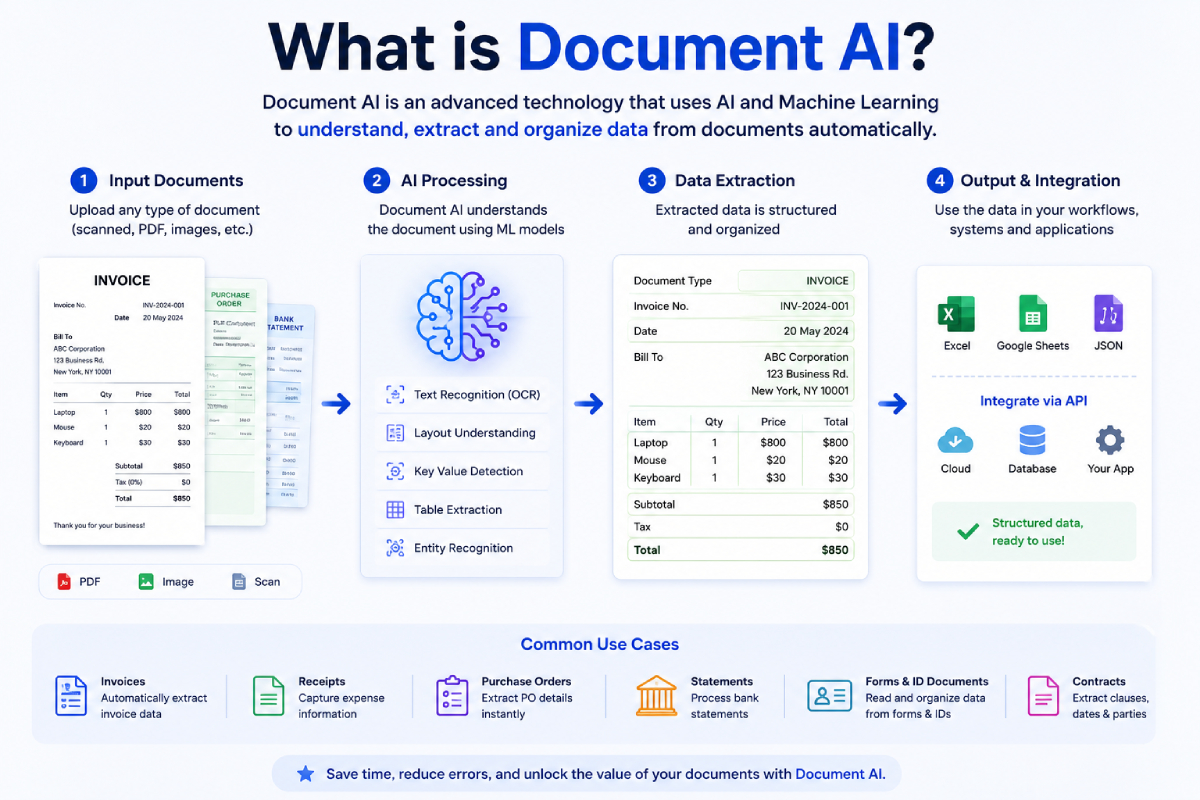
This technology powers modern document automation across industries, helping organizations process invoices, automate accounts payable, classify documents, verify identities, digitize paper records, and reduce manual data entry.
In this practical guide, you'll learn what Document AI is, how it works, how it differs from OCR and Intelligent Document Processing (IDP), common use cases, and how to choose the right Document AI solution for automated data extraction.
What Problems Does Document AI Solve?
Many organizations still rely on manual data entry to process invoices, receipts, purchase orders, contracts, forms, and other business documents. As document volumes grow, these processes become slower, more expensive, and more prone to errors.
Document AI solves these challenges by automatically extracting structured data from unstructured documents. It helps organizations:
Process large volumes of documents faster
Integrate structured data with ERP, CRM, and other business systems
By converting documents into structured, machine-readable data, Document AI enables faster workflows, lower processing costs, and more efficient business operations.
How Document AI Works
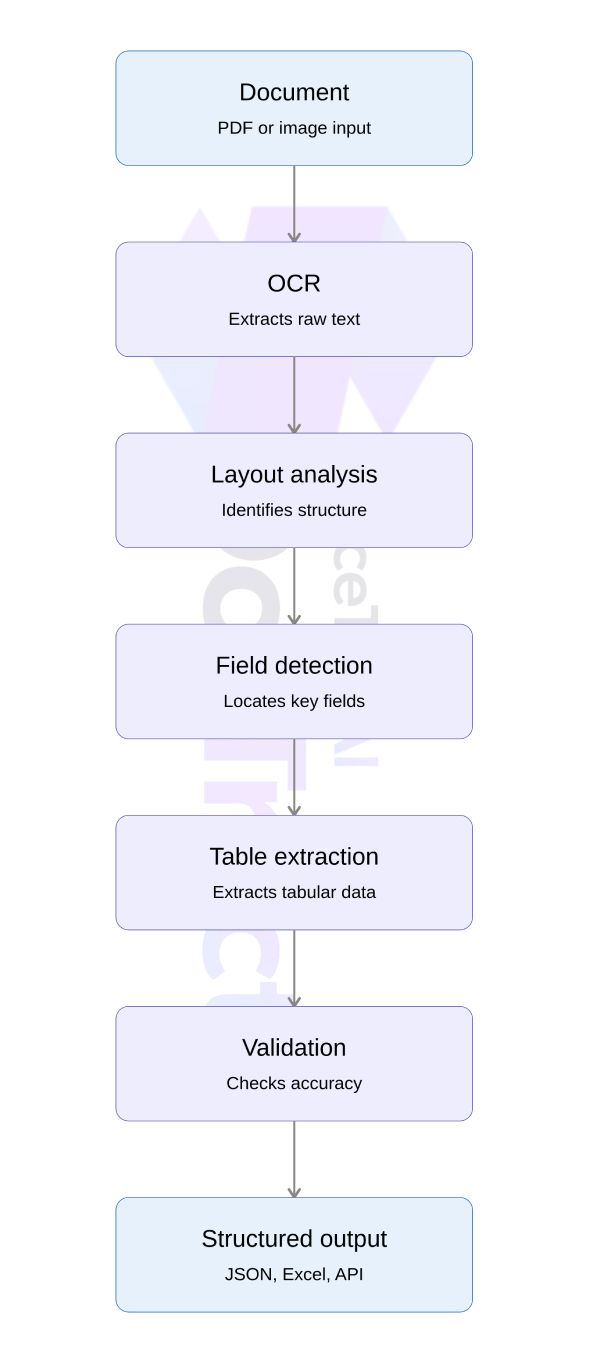
Document AI transforms unstructured documents, such as PDFs, scanned images, and photos, into structured data that applications can use. Unlike traditional OCR, which only recognizes text, Document AI combines multiple AI technologies to understand document structure, identify important information, and extract it into a machine-readable format.
Step 1: OCR Recognizes the Text
The first step is Optical Character Recognition (OCR), which converts printed or handwritten text from scanned documents into digital text. While OCR provides the raw text, it does not understand what the text represents.
Step 2: Document Layout Analysis
Document AI analyzes the document's visual structure. It identifies elements such as tables, key-value pairs, headers, footers, columns, signatures, and checkboxes, preserving the relationships between different pieces of information.
Step 3: AI Extracts Important Information
Machine learning models identify and extract meaningful business data instead of just text. For example, an invoice can be transformed into structured fields such as:
Field Example :
Invoice Number: INV-2026-1045, Supplier: ABC Manufacturing Ltd., Invoice Date: July 15, 2026, Total Amount: $1,284.50, Currency: USD, Line Items, Product descriptions, quantities, unit prices
Step 4: Data Validation
Many Document AI platforms apply validation rules and confidence scoring to improve accuracy. They can normalize date formats, validate totals, detect missing fields, or flag low-confidence extractions for human review.
Step 5: Structured Output
Finally, the extracted information is returned in structured formats such as JSON, CSV, Excel, or through a REST API, making it easy to integrate with ERP systems, accounting software, CRMs, and workflow automation tools.
The Short Answer
Document AI is a category of artificial intelligence that reads documents — invoices, receipts, contracts, ID cards, forms, purchase orders — and converts them into structured, machine-readable data. Instead of a human keying in a vendor name, an invoice number, and a total amount, a Document AI system extracts those fields automatically, in seconds, at scale.
It sits at the intersection of three older technologies:
OCR (Optical Character Recognition) — turns pixels in an image into raw text
NLP (Natural Language Processing) — understands what that text means and how it relates to other text
Machine Learning / Computer Vision — understands the layout of a document, so it knows a number next to the word "Total" is probably the amount due, even if the document has never been seen before
Put together, these let software do something that used to require a trained pair of eyes: look at a messy, real-world document and pull out the exact fields that matter.
How is Document AI Different From Plain Optical Character Recognition (OCR)
This is the point of confusion for most people new to the space. OCR alone just gives you a wall of text — it has no idea what any of that text means. If you run OCR on an invoice, you get every word on the page, but you still have to figure out which number is the subtotal, which is tax, and which is the grand total.
Document AI goes a layer deeper. It combines the extracted text with the document's visual structure — where things sit relative to each other, what's in a table versus a header, what font or box a field lives in — to actually label the data:
invoice_number: INV-2291vendor_name: Acme Supplies Co.total_amount: 482.50due_date: 2026-08-01
That structured output is what makes it usable by other software — accounting systems, ERPs, databases — without a human touching it first.
How Is Document AI Different from Intelligent Document Processing (IDP)
Although the terms are often used interchangeably, Document AI and Intelligent Document Processing (IDP) are not the same.
Document AI focuses on understanding documents and extracting structured data using technologies such as OCR, layout analysis, and AI models. IDP builds on Document AI by adding workflow automation, business rules, human review, and integration with enterprise systems.
In short, Document AI extracts and understands information from documents, while IDP uses that information to automate complete business processes, such as invoice processing, claims handling, and customer onboarding.
Document AI vs OCR vs IDP
| Feature | OCR | Document AI | IDP |
|---|---|---|---|
| Reads text | ✅ | ✅ | ✅ |
| Understands layout | ❌ | ✅ | ✅ |
| Extracts structured fields | ❌ | ✅ | ✅ |
| Classifies documents | ❌ | Limited | ✅ |
| Automates workflows | ❌ | Limited | ✅ |
What It's Actually Used For
Document AI shows up anywhere paperwork creates a bottleneck:
Accounts payable — extracting line items, totals, and vendor details from invoices so they can be matched against purchase orders automatically
Expense management — reading receipts to auto-fill expense reports
Logistics — pulling data from bills of lading, customs forms, and delivery notes
Banking and lending — reading pay stubs, bank statements, and tax forms during underwriting
Healthcare — digitizing insurance claims and patient intake forms
Legal — extracting clauses and key terms from contracts for review
The common thread: high volume, repetitive, rule-based data entry that used to require a human — and where mistakes are costly enough that "close enough" isn't good enough.
Why It's Harder Than It Sounds
A clean, single-template invoice is easy. Real-world documents are not:
No two vendors format things the same way. A system trained on one invoice layout often breaks on the next.
Scan quality varies wildly — phone photos, faxes, low-resolution scans, coffee stains.
Tables are genuinely difficult. Multi-line items, merged cells, and line breaks trip up systems that read top-to-bottom without understanding structure.
Fields aren't always labeled the way you'd expect — "Total Due," "Amount Payable," and "Balance" might all mean the same thing across different vendors.
This is why modern Document AI systems increasingly rely on models trained specifically for document layout understanding, not just generic OCR — and why "accuracy on my test PDF" and "accuracy across ten thousand real invoices from different vendors" are very different claims.
Template-Based vs. Zero-Shot Extraction
Broadly, Document AI tools fall into two camps:
Template-based extraction — you show the system a handful of examples of a specific document type, and it learns exactly where each field lives. Fast, cheap, and very accurate for high-volume, repeating formats (like invoices from the same recurring vendors).
Zero-shot / general extraction — the system tries to identify fields on a document it's never seen before, using its general understanding of what an invoice or receipt looks like. More flexible, useful for long-tail or one-off documents, but typically needs more compute and can be less precise than a well-trained template.
Most real-world platforms offer both, because most businesses have some documents that repeat constantly (your top 20 vendors) and a long tail of one-off documents that don't.
What to Look for in a Document AI Tool
If you're evaluating one, a few things matter more than a flashy demo:
Accuracy on documents like yours, not a marketing benchmark — ask for a trial on your actual files
Speed and cost per page, especially if you're processing thousands of documents a month
Ease of building custom extraction templates without needing a data science team
API-first design so it plugs into your existing workflow instead of becoming a dashboard you have to check manually
Handling of edge cases — rotated scans, handwriting, multi-page documents, low-quality images
Existing Document AI Providers
The space has grown from a handful of cloud giants into a much wider mix of specialized platforms. A few of the better-known options:
Google Document AI — Google Cloud's OCR and parsing platform, with pre-built and custom "processors" for invoices, receipts, IDs, and contracts. [Comparision]
AWS Textract — Amazon's document extraction service, tightly integrated with the AWS ecosystem, commonly used for forms and tables. [Comparision]
Azure AI Document Intelligence — Microsoft's equivalent, formerly Form Recognizer, built for prebuilt and custom document models. [Comparision]
ABBYY FlexiCapture / Vantage — a long-standing enterprise OCR and capture vendor, popular in large-scale, on-premise deployments.
Mindee — a developer-focused API for invoice, receipt, and ID extraction, aimed at teams that want quick integration over enterprise infrastructure. [Comparision]
Nanonets — a no-code/low-code platform for building custom extraction workflows without much engineering overhead. [Comparision]
Veryfi — focused on real-time receipt and invoice OCR, often used in expense management and fintech apps. [Comparision]
Docparser — a rule-based and AI-assisted parsing tool aimed at smaller teams automating document workflows without heavy setup.
SoceTonAI DoxTract — an OCR and structured data extraction API and SaaS platform built for invoices, receipts, and purchase orders, positioned as a lower-cost alternative to the larger cloud platforms and other specialized vendors.
Most of these fall along the same spectrum described above: the cloud giants (Google, AWS, Azure) offer broad, general-purpose infrastructure with usage-based pricing, while the smaller, specialized platforms tend to focus on faster setup, simpler pricing, or a narrower use case (like invoices or receipts specifically). Newer entrants in this space are increasingly positioning themselves as lower-cost, developer-friendly alternatives to the big three cloud providers, competing on price-per-page and ease of integration rather than raw platform breadth.
The Bottom Line
Document AI turns the paperwork sitting in your inbox, your file storage, and your intake forms into data your systems can actually use — without someone retyping it. It's not magic, and it's not perfect on every document out of the box, but for the kind of repetitive, structured paperwork most businesses deal with, it removes a genuinely tedious bottleneck. As the underlying models keep improving, the gap between "a human has to check this" and "this just works" keeps shrinking.
Getting Started with SoceTonAI DoxTract
If you want to see this in practice rather than just in theory, SoceTonAI DoxTract lets you build a working extraction template in a few minutes — no signup required. Prefer a visual walkthrough? Follow the no-code UI tutorial to go from template to extracted data entirely from the dashboard. Building this into your own app or workflow instead? The API tutorial covers the same flow — credentials, template, extraction — entirely through REST calls. Either way, the free tier covers 200 pages a month, enough to pilot it on real documents before committing to anything.
Frequently Asked Questions
What is Document AI?
Document AI is a technology that uses artificial intelligence to understand documents and automatically extract structured data from PDFs, scanned images, and digital files. It combines OCR, layout analysis, and machine learning to identify key information such as names, dates, invoice numbers, totals, and tables.
How does Document AI work?
Document AI first converts document images into text using OCR. It then analyzes the document layout, identifies important fields and tables, validates the extracted information, and returns structured data in formats such as JSON, CSV, or Excel.
Is Document AI better than OCR?
Traditional OCR only recognizes text, while Document AI understands the structure and meaning of a document. It can identify fields, extract tables, classify document types, and return structured data, making it more suitable for business automation.
What types of documents can Document AI process?
Document AI can process invoices, receipts, purchase orders, bank statements, contracts, forms, identity documents, shipping documents, medical records, and many other structured or semi-structured documents.
What is AI document extraction?
AI document extraction is the process of automatically extracting structured information from documents using artificial intelligence. It enables businesses to capture data such as invoice details, customer information, line items, and tables without manual data entry.
What industries use Document AI?
Document AI is widely used in finance, accounting, healthcare, insurance, logistics, legal services, manufacturing, retail, and government to automate document processing and reduce manual work.
Can Document AI extract tables and line items?
Yes. Modern Document AI solutions can detect tables and extract structured line items, including descriptions, quantities, unit prices, taxes, and totals from documents such as invoices and purchase orders.
How accurate is Document AI?
Accuracy depends on document quality, document format, and the AI model used. For high-quality, structured business documents, modern Document AI solutions can achieve high extraction accuracy, while low-confidence fields can be flagged for human review.