Getting Started with DoxTract: From API Key to Extracted Data
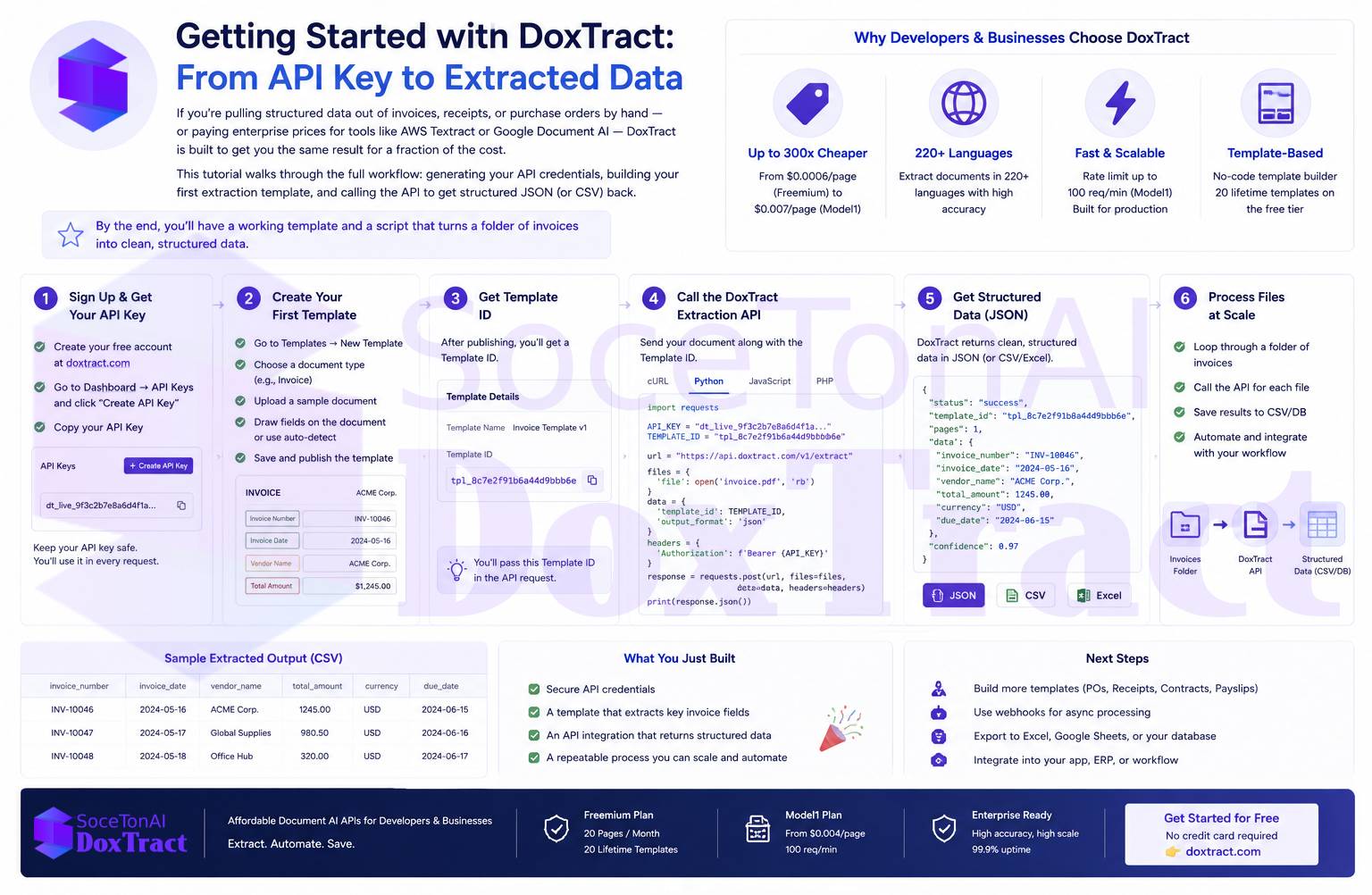
If you're pulling structured data out of invoices, receipts, or purchase orders by hand — or paying enterprise prices for tools like AWS Textract or Google Document AI — DoxTract is built to get you the same result for a fraction of the cost. This tutorial walks through the full workflow: generating your API credentials, building your first extraction template, and calling the API to get structured JSON (or CSV) back.
By the end, you'll have a working template and a script that turns a folder of invoices into clean, structured data.
Quick links: Getting Started docs · Pricing · Try the Template Editor — no signup required
What You'll Need
A DoxTract account (sign up here) — or skip signup entirely and try the Template Editor free
A sample document to work with — an invoice, receipt, or form works well for your first template
curlor any HTTP client for the API calls
Step 1: Generate Your API Keys
Every request to the DoxTract API needs two credentials: an API key and an API secret. You generate both from your dashboard.
Go to your dashboard.
Click Generate New Key.
Give it a Key Name and click Create.
Your
API KeyandAPI Secretappear immediately — copy them now. They're shown only once, and they should never be shared or committed to a public repo.
You'll pass these as headers on every API call:
X-API-KEY: your_api_key
X-API-SECRET: your_api_secret
If a key is ever compromised, go back to the dashboard and click Revoke to disable it.
Step 2: Build Your First Template
DoxTract extracts data using templates — visual mappings you draw once on a sample document, which then apply automatically to every new document with the same layout (think: your recurring vendor invoices).
Head to the Template Editor and:
Click Choose File and upload your sample document.
Give it a template name and description.
Select the extraction model.
Draw a Fixed Header Box around anything that stays the same across every document of this type — a company name, an "Invoice Total" label, a table header row.
Draw a Value Box around the actual data next to it — the invoice number, the total amount, the date.
Connect each Fixed Header Box to its Value Box by dragging from the blue circle (on the header box) to the green circle (on the value box).
Click Save to Cloud.
Why the two-box system matters
Fixed Header Boxes act as anchors. Because labels like "Invoice Total" or "Date" don't move between documents, DoxTract uses them to relocate your Value Boxes even when the rest of the layout shifts slightly — different amounts, different lengths of text, a slightly different print margin. Connected boxes move together, so your field mapping stays accurate across a whole batch of similarly-formatted documents.
Step 3: Extracting Table Data
Invoices and purchase orders usually have at least one line-item table, and DoxTract handles this with the same Fixed Header / Value Box pattern, extended down a column:
Draw a Fixed Header Box around each table column header (e.g., "Description," "Qty," "Unit Price").
Draw a Value Box around the column values beneath it.
Assign a field name to each column from the left sidebar.
Connect each header box to its value box.
If the table can grow (more rows on some invoices than others), enable Expand Height on the value box, and connect its expanding edge to a Fixed Header Box positioned below the table — usually a subtotal or footer label. As that lower anchor moves down (because the table grew), the value box height adjusts automatically.
Repeat for each column you want extracted, and your table structure is captured as part of the same template.
Step 4: Updating a Template
Layouts change, or you'll want to add a field you missed. To update an existing template:
From the Doxtract page, click Modify Selection.
Click the edit icon next to the template.
Make your changes in the Template Editor.
Click Save to Cloud again.
Step 5: Running Extraction from the Dashboard
Before wiring things into your own app, it's worth testing your template manually:
Go to the Doxtract page and click Modify Selection.
Pick your template and click Done.
Upload one or more images/PDFs.
Click Extract Data.
A single file returns results immediately. Multiple files spin up an extraction job — once it finishes, you can download the results as a CSV.
Step 6: Calling the API Directly
Once your template works, you'll usually want to call it from your own backend. Here's the core workflow.
Extract data from a document
curl -X POST "https://api.soceton.com/doxtract/api/read" \
  -H "x-api-key: YOUR_API_KEY" \
  -H "x-api-secret: YOUR_API_SECRET" \
  -F "files=@invoice.pdf" \
-F 'data={"template_id":"123"}'{
"success": true,
"job_id": "string",
"result": {}
}For a single file, result is populated right away. For batches, use the job_id to poll status.
Check job status
curl -X GET "https://api.soceton.com/doxtract/api/jobs/JOB_ID" \
  -H "x-api-key: YOUR_API_KEY" \
-H "x-api-secret: YOUR_API_SECRET"{
"processed_pages": 4,
"total_pages": 10,
"status": "processing"
}Download job results
Once status shows complete, grab a signed download URL (valid for 5 minutes):
curl -X GET "https://api.soceton.com/doxtract/api/download/JOB_ID" \
  -H "x-api-key: YOUR_API_KEY" \
-H "x-api-secret: YOUR_API_SECRET"{
"url": "https://..."
}List your templates
Useful if you're managing templates programmatically rather than hardcoding IDs:
curl -X GET "https://api.soceton.com/doxtract/api/templates?skip=0&limit=10" \
  -H "x-api-key: YOUR_API_KEY" \
-H "x-api-secret: YOUR_API_SECRET"{
"total": 42,
"skip": 0,
"limit": 10,
"data": []
}How DoxTract is different
Most enterprise IDP platforms (Tungsten, ABBYY, Hyperscience, UiPath) are built for large organizations with dedicated implementation teams — deployments commonly run months, and pricing is usually "contact sales." Rossum and Tipalti lean toward finance-specific, template-free workflows but come with enterprise-level pricing floors. The big cloud providers (AWS, Google, Azure) are powerful and reliable, but you're writing your own post-processing logic on top of raw OCR output, and cost adds up fast at scale.
DoxTract's angle is the middle ground: a visual, no-code template editor (draw once, extract forever) paired with a straightforward REST API, usable without a sales call, an implementation project, or per-seat pricing — and a free tier you can start on today.
Wrapping Up
The pattern is the same whether you're processing one invoice or automating an entire accounts-payable pipeline: draw your anchors once, connect them to the values you need, save the template, and let the API do the repetitive work from then on. From here, a natural next step is wrapping the /read and /jobs endpoints into a small polling script so new documents get processed automatically as they land in a folder or inbox.
If you get stuck on a specific field not matching, check the logs page first — nine times out of ten, the debug output tells you exactly why.
Ready to try it yourself? Get started with the docs, check pricing, or jump straight into the Template Editor — no signup required.