Common OCR Errors and How to Fix Them (Post-Processing Guide)
Raw OCR output is almost never production-ready, even when the underlying text recognition is accurate. The characters are usually right — it's the formatting around them that breaks downstream systems: a currency symbol glued to a digit, a hyphen that's actually three different Unicode characters depending on the source document, spacing around punctuation that varies invoice to invoice. None of that is a "wrong reading" in the traditional sense, but all of it will silently corrupt a field if you pipe it straight into a database or a matching system.
This is a practical guide to the OCR errors that actually show up in production document pipelines, and the post-processing fixes we built into DoxTract's normalize_text() utility to handle them.
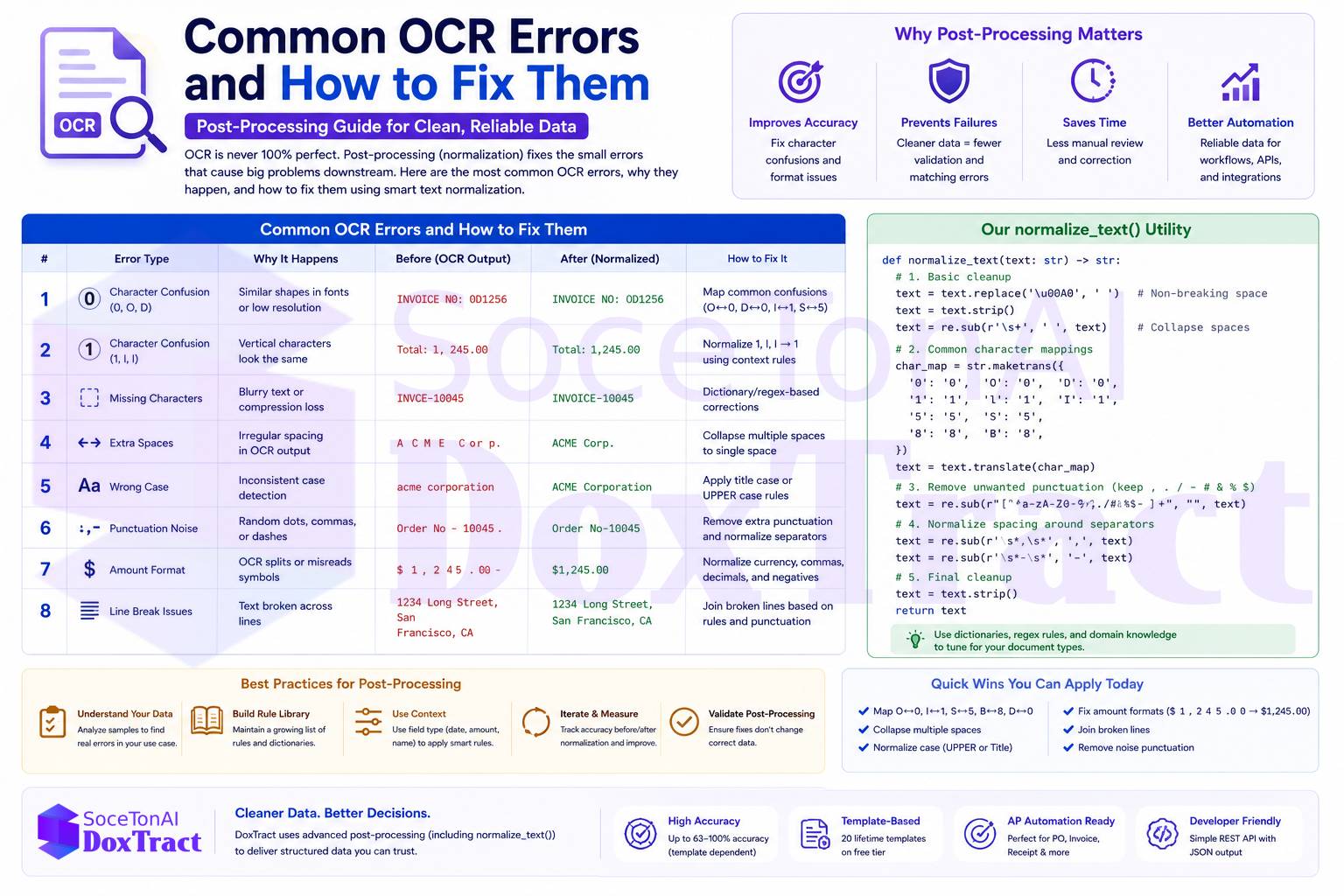
Why Post-Processing Matters More Than People Expect
It's tempting to treat OCR accuracy as a single number and assume "high accuracy" means "usable output." In practice, a field can be character-for-character correct and still fail validation downstream because of formatting inconsistency, not misreading. A total amount extracted as $1,200.00 versus $ 1200.00 versus $1200,00 (a European decimal convention) are three different strings that all represent the same value — and a naive string comparison or database insert will treat them as three different, conflicting answers.
This is a distinct problem from the accuracy issues we've covered elsewhere — a field can be positionally and semantically correct (the model found the right total) and still need normalization before it's safe to use. (See how field-level accuracy varies across document layouts →)
The Error Categories That Actually Show Up
1. Currency Symbol Placement and Spacing
OCR engines frequently produce inconsistent spacing and symbol placement around currency values, depending on the source document's font, scan quality, and layout:
"$ 1,200.00"   →  should normalize to  "$1,200.00"
"1200.00$"     →  should normalize to  "$1,200.00"
"USD1200.00"   →  should normalize to  "$1,200.00" (or preserve currency code, depending on target format)
The fix isn't just stripping whitespace — it's establishing one canonical format (symbol position, decimal convention, thousands separator) and mapping every variant to it before the value hits your database or matching logic.
2. Hyphen and Dash Variants
This one is easy to miss because the characters look nearly identical on screen but aren't the same Unicode code point. Source PDFs and scanned documents produce a mix of:
Hyphen-minus (
-, U+002D) — the standard keyboard hyphenEn dash (
–, U+2013)Em dash (
—, U+2014)Non-breaking hyphen and other typographic variants introduced by PDF generation software
An invoice number like INV-2026-0043 extracted with an en dash instead of a hyphen-minus will fail an exact-match lookup against your system of record, even though it reads identically to a human. Normalization means mapping all dash variants to a single canonical character before any matching or lookup happens.
3. Punctuation Spacing
OCR frequently introduces or drops whitespace around punctuation in ways that depend on font kerning and scan resolution:
"Total :1,200.00"   →  should normalize to  "Total: 1,200.00"
"Item1 , Item2"     →  should normalize to  "Item1, Item2"
"( Net 30 )"        →  should normalize to  "(Net 30)"
None of these are character misreads — every character is correct. The problem is spacing that doesn't match any consistent rule, which breaks regex-based parsing and any downstream logic expecting a predictable format.
4. Bracket and Quote Spacing
Similar to punctuation spacing, but specific to paired characters — brackets, parentheses, and quotation marks. OCR often introduces inconsistent spacing on one or both sides:
"[ PO-4471]"    →  should normalize to  "[PO-4471]"
"\"Net Terms\"" with irregular spacing  →  should normalize to consistent quote spacing
Left unnormalized, these inconsistencies make it harder to reliably strip or parse bracketed reference codes (very common in PO numbers and line-item codes) using simple string operations.
5. Character Confusion Pairs
The classic OCR error category — visually similar characters that get swapped, especially in low-resolution scans or unusual fonts:
| Confused pair | Common cause |
|---|---|
| O / 0 | Nearly identical glyphs in many fonts |
| l / 1 / I | Lowercase L, digit one, and capital I look alike in sans-serif fonts |
| rn / m | Two characters merging into what looks like one at low resolution |
| S / 5, B / 8 | Similar curved shapes |
These are harder to fix with pure normalization rules because the "correct" answer is context-dependent — O should become 0 inside a numeric field but stay O inside a vendor name. This is where field-type-aware post-processing matters: applying different correction rules depending on whether the field is expected to be numeric, alphanumeric, or free text, rather than one universal cleanup pass.
How We Approached This in DoxTract
We built normalize_text() as a dedicated post-correction layer that runs after raw OCR extraction and before structured output is returned — specifically targeting the categories above:
Currency symbols — canonicalizing symbol position and decimal/thousands-separator conventions
Hyphens and dashes — mapping all Unicode dash variants to a single canonical character
Punctuation spacing — normalizing whitespace around colons, commas, and other punctuation to a consistent rule
Bracket and quote spacing — closing inconsistent spacing inside parentheses, brackets, and quotation marks
The design principle behind it is simple: OCR's job is to read the characters; normalization's job is to make the output consistent enough to trust programmatically. Treating these as two separate steps — rather than expecting the OCR model itself to somehow output "clean" data — is what makes structured extraction actually usable in a matching or database-insert pipeline downstream. It's the same principle behind 3-way PO matching: matching logic is only as reliable as the normalized fields it's comparing, and an unnormalized dash or currency symbol is enough to turn a real match into a false exception.
Building Your Own Normalization Layer
If you're building a post-processing step for your own OCR pipeline, a few practical principles worth carrying over:
Normalize before you compare, not after. Any matching, deduplication, or lookup logic should run against normalized fields, never raw OCR output.
Make normalization field-type-aware. A blanket regex pass across every field will fix some problems and introduce others (turning a legitimate
Oin a vendor name into a0). Route normalization rules based on the expected field type.Keep the raw output alongside the normalized version. If normalization ever misfires, you want the original string available for debugging — don't discard it.
Treat this as an ongoing utility, not a one-time script. New document sources introduce new formatting quirks. A normalization layer is something you extend as you encounter new patterns, not something you finish once.
Where This Fits in the Bigger Picture
Post-processing normalization won't fix a genuinely wrong field — if OCR misread a total amount entirely, no amount of formatting cleanup recovers the correct value. But for the much larger category of "the value is right, the formatting is inconsistent," normalization is the difference between structured extraction that's actually production-ready and output that looks clean in a demo but breaks the first time it hits a real database constraint or matching rule.
Try DoxTract free to see normalized, structured output on your own documents — 200 pages a month, no credit card required.