5 No-Code Ways to Automate Receipt and Invoice Processing
You don't need to know how to write a script to stop manually typing receipts and invoices into your books. Every method below is genuinely no-code — point, click, map fields — though they differ in setup time, flexibility, and how well they handle documents that don't fit a generic template. Here's how the main options compare, and which one fits which situation.
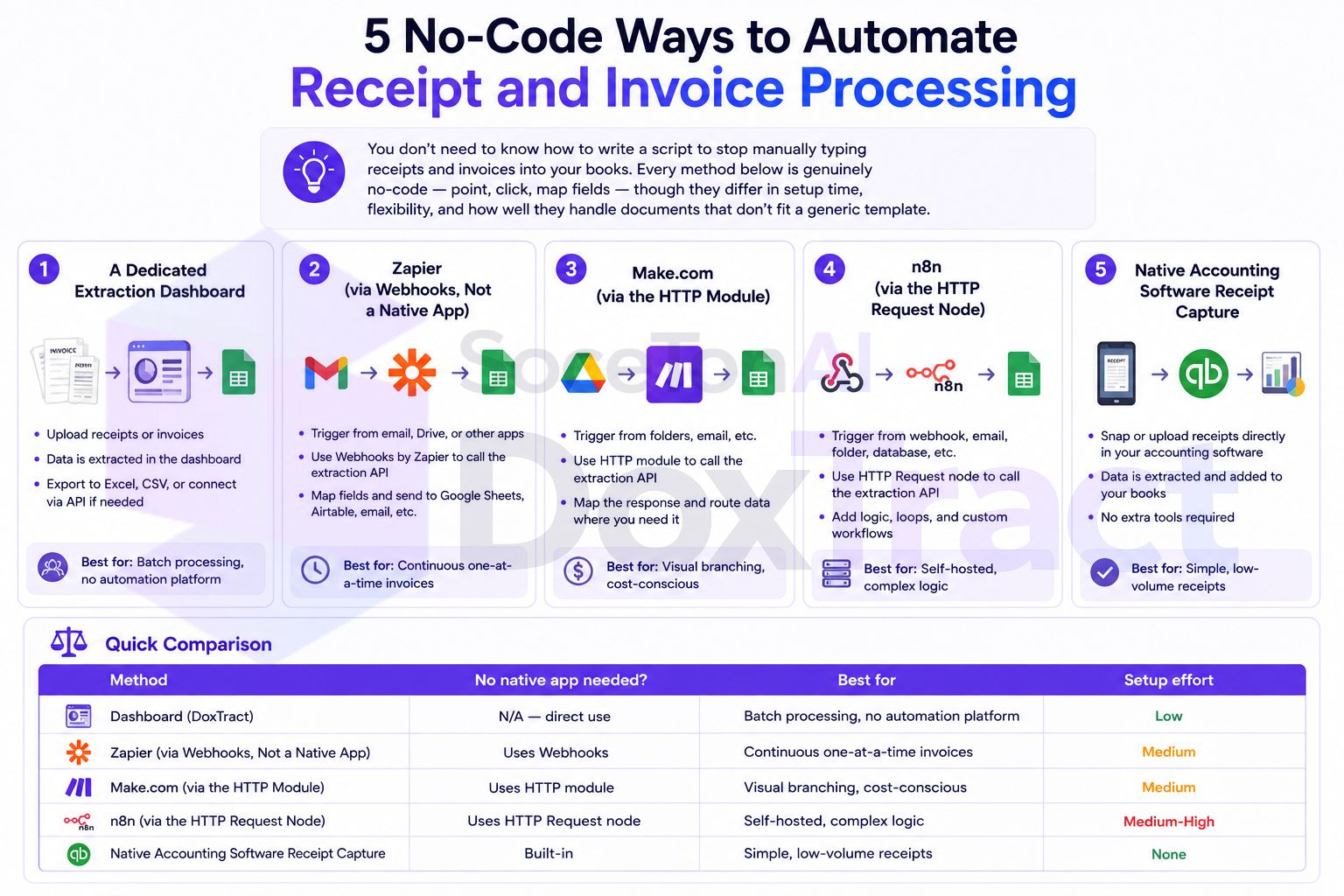
1. A Dedicated Extraction Dashboard
The simplest starting point: upload a document (or a whole batch), click extract, get structured data back. No automation platform involved at all.
With DoxTract, you build a visual template once per document type — drawing boxes around the fields you want instead of relying on a fixed, generic field list — and then reuse it on every future document with that layout. It handles nonstandard invoices and line-item tables that break more rigid receipt scanners, and works entirely from the browser.
Best for: solo bookkeepers and small practices processing documents in batches (weekly or monthly)
Setup time: minutes per template
Full walkthrough: How to Extract Data from Documents Using DoxTract (No Code, UI Only)
2. Zapier (via Webhooks, Not a Native App)
Zapier is the most widely used no-code automation platform, and even without a native DoxTract app listed in its directory, you can still connect the two with zero code using Zapier's built-in Webhooks by Zapier action — a generic, point-and-click way to call any REST API.
A typical Zap: new email attachment or new file in a watched folder → Webhooks action calls DoxTract's extraction endpoint → extracted fields flow into Google Sheets, QuickBooks, or Xero via their native Zapier actions.
Best for: invoices that arrive continuously, one at a time, and teams already using Zapier for other workflows
Setup time: 20–30 minutes for the first Zap
Requires: a paid Zapier plan (Webhooks is a premium action)
Full walkthrough: How to Extract Data from Invoices in Zapier Without Code
3. Make.com (via the HTTP Module)
Make.com works on the same principle as Zapier here — no native DoxTract module, but its built-in HTTP module fills the gap with the same point-and-click configuration, and Make's visual scenario builder makes multi-step logic (like routing failed extractions to a review sheet) easier to see at a glance than Zapier's more linear layout.
A typical scenario: Google Drive or Gmail trigger → HTTP module posts to DoxTract → Google Sheets "Add a Row" module logs the result, with an optional router branch for handling failures.
Best for: users who want more visual control over branching logic, or who are already on Make for cost reasons (its free tier is more generous than Zapier's for this kind of use)
Setup time: 20–30 minutes for the first scenario
Full walkthrough: Building an Automated Invoice-to-Google-Sheets Workflow with Make.com
4. n8n (via the HTTP Request Node)
n8n sits a step closer to technical territory than Zapier or Make — it's popular with teams who want to self-host their automation or who need more complex branching and looping than the other two easily support — but it's still a visual, node-based builder with no scripting required for a workflow like this.
Its HTTP Request node handles the same DoxTract API call as the Webhooks/HTTP approaches above, with the added benefit of storing credentials separately from the workflow itself, and cleaner support for polling job status on batch extractions.
Best for: technically comfortable users who want self-hosting, tighter credential control, or more complex conditional logic than Zapier/Make make easy
Setup time: 30–45 minutes for the first workflow
Full walkthrough: OCR API for n8n: Automating Document Data Extraction
5. Native Accounting Software Receipt Capture
The lowest-effort option, if it's enough for your needs: QuickBooks Online and Xero (via Hubdoc) both include built-in receipt capture that reads a photo or upload and matches it to a transaction. Zero setup, since it's already part of software you're likely paying for anyway.
The tradeoff is flexibility — these tools generally extract a fixed set of fields (merchant, date, total) and don't handle nonstandard invoice layouts or detailed line-item tables well. They're a fine default for simple receipts and a poor fit the moment a client's documents get more complex.
Best for: very light document volume, or clients whose receipts are uniformly simple
Setup time: none — it's already there
Limitation: breaks down on nonstandard formats and detailed line items, which is usually where manual entry was costing you the most time anyway
Quick Comparison
| Method | No native app needed? | Best for | Setup effort |
|---|---|---|---|
| Dashboard (DoxTract) | N/A — direct use | Batch processing, no automation platform | Low |
| Zapier | Uses Webhooks | Continuous one-at-a-time invoices | Medium |
| Make.com | Uses HTTP module | Visual branching, cost-conscious | Medium |
| n8n | Uses HTTP Request node | Self-hosted, complex logic | Medium-High |
| Native software capture | Built-in | Simple, low-volume receipts | None |
Which One Should You Actually Use?
Start with the dashboard if you're processing documents in batches — it's the fastest to set up and needs no automation platform at all. Move to Zapier or Make once documents start arriving continuously and you want them handled without opening anything manually; pick whichever platform you're already using elsewhere, since the underlying capability is nearly identical. Reach for n8n specifically if you need self-hosting or logic more complex than either of those handle cleanly. And if your documents are genuinely simple and low-volume, native capture inside QuickBooks or Xero might be all you ever need — there's no requirement to automate more than the problem actually calls for.
Getting Started
Whichever path you choose, it starts the same way: build one extraction template for your highest-volume document type in the Template Editor, no signup required to try it. Check Pricing — the free tier covers 200 pages a month, enough to test any of the five methods above before committing further.