Bookkeeping for Multiple Small Business Clients: Tools and Systems That Scale
Bookkeeping for one business and bookkeeping for fifteen businesses aren't the same job scaled up — they're different jobs. Past a certain client count, the bottleneck stops being your accounting knowledge and starts being how well your tools handle switching between clients, tracking what's done and what isn't, and keeping document-heavy work from eating every spare hour. This is a look at the categories of tools that actually solve that, and where each one fits.
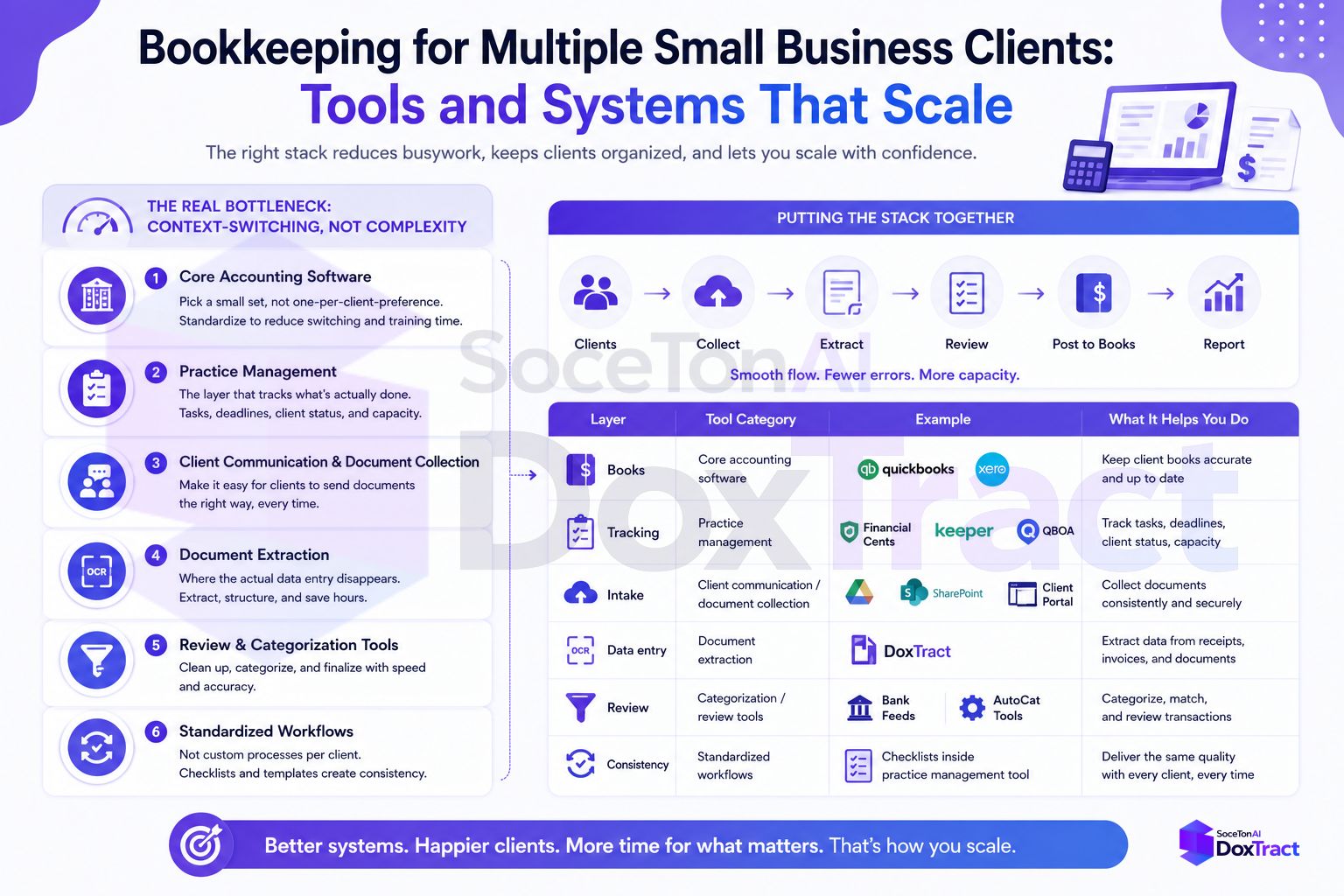
The Real Bottleneck: Context-Switching, Not Complexity
The math bookkeepers already know how to do. What breaks down at volume is everything around it — logging into a different client's books, remembering which workflow step you're on for which client, and re-doing manual work that a system should be tracking for you. Multi-client software built for this need to handle client switching, bulk actions, and permission management as first-class features, not afterthoughts bolted onto single-entity software.
1. Core Accounting Software: Pick a Small Set, Not One-Per-Client-Preference
You can't force every client onto the same accounting platform, but you can resist supporting more than one or two. QuickBooks Online and Xero both dominate the small-business market and both offer accountant-facing views built for exactly this — QuickBooks Online Accountant gives bookkeepers a free, single interface to review transactions, run batch actions, and manage reports across every client's file, while Xero's practice tools sync client data, jobs, and invoices in real time from a similar central view.
The system to build: standardize new clients onto whichever of these you're stronger in, and treat a client's insistence on a third platform as a pricing conversation, not a default yes.
2. Practice Management: The Layer That Tracks What's Actually Done
This is the category most solo and small bookkeeping practices skip too long, and it's usually the first thing that breaks under multi-client load. Practice management software is built specifically for the recurring, deadline-driven nature of bookkeeping — visibility into what's done, what's overdue, and what's next, across every client at once, instead of that state living only in your memory or a personal to-do list.
Options span a wide range of firm sizes:
QuickBooks Online Accountant — free, and enough for practices under a certain size that only need light workflow tracking
Financial Cents / Keeper / Xenett — built specifically for bookkeeping firms, with workflow templates, recurring task tracking, and review tools sized for small-to-mid practices
Karbon — deeper project management, generally a better fit once you have a small team rather than solo
The tell you need this: if "did I already do Client B's bank rec this month?" is a question you answer by opening their file and checking rather than glancing at a dashboard, you're paying an attention tax that a $20–$60/month tool would remove.
3. Client Communication and Document Collection
Email is where multi-client bookkeeping quietly falls apart — threads get buried, attachments get lost, and "did you send me that receipt?" becomes a recurring question instead of a one-time setup problem. Experienced bookkeepers increasingly prefer a dedicated, secure space for document sharing and client communication rather than routing everything through personal inboxes, both for organization and for the access control a shared inbox can't offer.
The system to build: one dedicated channel per client — a shared drive folder, a client portal, or a standing forwarding address — decided once during onboarding, not renegotiated every time a receipt goes missing.
4. Document Extraction: Where the Actual Data Entry Disappears
This is the layer most practice-management tools don't solve, because it's not a workflow-tracking problem — it's a "someone still has to read every receipt and type what it says" problem. Manual data entry consumes a disproportionate share of bookkeeping time compared to the advisory and review work that actually needs a human, and it's also the step most resistant to generic automation, because every client's documents look different.
This is where a template-based extraction tool like DoxTract fits into the stack specifically — not as a replacement for your accounting software or practice management tool, but as the layer that removes typing from the workflow entirely:
Build one extraction template per client (or per recurring vendor) in the Template Editor — no signup required to try it.
Batch-process each client's receipts and invoices instead of reading them one at a time. See the step-by-step tutorial if you want the full walkthrough.
Get back structured JSON or CSV that either imports directly into your accounting platform or feeds an API integration for fully automated posting.
Because pricing is pay-per-page rather than per-seat or per-client, it scales the same way your actual workload does — a light client costs almost nothing, and a heavy one costs proportionally more, rather than a flat subscription regardless of volume. The free tier (200 pages/month, 20 lifetime templates) is usually enough to prove this out on one client before rolling it out further. See Pricing for the full breakdown.
5. Review and Categorization Tools
Once data is extracted (or synced from a bank feed), someone still needs to confirm categorization is right — but this is a fundamentally different task than typing, and some tools are built specifically to speed up that review pass rather than the data entry itself. Chrome-extension-style review tools and categorization assistants that sit on top of QuickBooks or Xero can meaningfully cut the time spent per transaction during review, which matters most for the highest-volume clients on your roster.
6. Standardized Workflows, Not Custom Processes Per Client
The last piece is less about software and more about discipline: use the same monthly checklist — document collection, extraction, review, categorization, reconciliation, close — across every client, with client-specific variations kept to a minimum. Workflow templates inside practice management software exist precisely so this consistency doesn't depend on memory. A process you have to reinvent slightly for each client is a process that will eventually get skipped under deadline pressure.
Putting the Stack Together
A workable multi-client setup usually looks like:
| Layer | Tool category | Example |
|---|---|---|
| Books | Core accounting software | QuickBooks Online, Xero |
| Tracking | Practice management | Financial Cents, Keeper, QBOA |
| Intake | Client communication/document collection | Shared drive, client portal |
| Data entry | Document extraction | DoxTract |
| Review | Categorization/review tools | Bank feed review, extension tools |
| Consistency | Standardized workflows | Checklists inside practice management tool |
No single tool covers all six layers well, and that's fine — the goal isn't consolidation for its own sake, it's making sure every layer is actually covered by something, instead of falling back to memory and manual effort by default whenever a purpose-built tool isn't in place.
Running this more as a solo operation without a team yet? Our freelance bookkeeper tech stack guide covers a leaner version of the same six layers.
Where to Start
If you're currently running most of this out of email and a shared folder, don't try to stand up all six layers at once. Start with whichever one is currently costing you the most hours — for most solo and small bookkeeping practices, that's document extraction, since it's the layer most directly tied to how much paperwork each client generates. Build one template for your highest-volume client in the Template Editor — or follow the UI tutorial for the full flow — and layer in practice management or client portals once that piece is working. The free tier covers 200 pages a month, enough to test it on one client first.