Best Invoice Automation Software for OCR & Data Extraction (2026)
Manually entering invoice data is still one of the biggest time sinks in accounts payable. Every misread digit, every skipped line item, every PO number typed in wrong costs someone an afternoon of reconciliation later. As invoice volumes grow and finance teams stay lean, more companies are turning to OCR and AI-powered data extraction to pull structured data — vendor names, line items, totals, tax, due dates — straight out of PDFs, scans, and photos, with no manual keying required.
But "invoice OCR" means very different things depending on the vendor. Some tools are raw OCR engines that just return text. Others are full extraction platforms that understand invoice structure — line items, tables, multi-currency totals — and output clean, structured JSON ready to drop into your accounting system. Pricing, accuracy, and integration depth vary just as widely.
This guide breaks down the best invoice automation software for OCR and data extraction in 2026 — what each one is actually built for, how they're priced, and which is the right fit depending on whether you're a developer integrating an API, a startup automating your first AP workflow, or an enterprise team processing thousands of invoices a month.
What to Look for in Invoice Automation Software
Not all invoice OCR tools are built the same way, and the right choice depends on what you're optimizing for — accuracy, speed, cost, or flexibility. Here's what actually matters when evaluating options.
Extraction Accuracy
This is the make-or-break factor. Look beyond basic text OCR and check how well a tool handles structured data specific to invoices: line items, multi-column tables, subtotals, tax breakdowns, and multi-currency amounts. A tool that reads text well but can't reliably map a line-item table to structured fields will still leave you doing manual cleanup.
Speed / API Latency
For teams processing invoices in bulk or in real time (e.g., at the point of upload in an AP workflow), API response time matters. A few hundred milliseconds per page adds up fast at scale, and slow processing can bottleneck downstream automation like payment approvals.
Pricing Model
Vendors price this very differently — per page, per document, per API call, or as a flat seat-based SaaS fee. Per-page pricing tends to scale more predictably for high-volume users, while seat-based tools can get expensive fast as teams grow. Watch for hidden costs too, like extra charges for custom fields or templates.
Integration Options
Extraction is only useful if the data lands where you need it. Check for native integrations or APIs into ERP systems, accounting software (QuickBooks, Xero, NetSuite), and automation platforms like Zapier or Make — otherwise you're back to manual exports and imports.
Template / Custom Field Support
Invoices from different vendors rarely follow the same layout. Tools that let you define custom templates or fields — without needing a data science team to retrain a model — make it much easier to handle non-standard or recurring vendor formats.
Security & Compliance
Invoices often contain sensitive financial data, so compliance isn't optional for most businesses. Look for SOC 2 certification, GDPR compliance, and clear data retention/deletion policies, especially if you're processing invoices for clients in regulated industries.
Best Invoice Automation Software in 2026
1. SoceTonAI DoxTract
What it does / who it's for: A document AI API and SaaS platform built specifically for invoice, receipt, and purchase order extraction — with a web console for building templates without writing code, and a flat-rate API for teams that do. Fits developers integrating extraction directly into an AP pipeline as well as early-stage teams who want to test extraction quality before committing engineering time.
Key features:
Structured extraction for invoices, receipts, POs, and custom document types
No-code template editor for defining custom fields
Flat pricing with no surcharge for forms, tables, or document complexity
Recurring free tier (no expiry)
Pricing snapshot: $4-$7/1,000 pages for full document AI (Model1); $0.6-$1/1,000 pages for (Freemium). 200 free pages/month, recurring, no card required. See the full document AI pricing comparison for how that stacks up against every major provider.
Pros: Flat rate regardless of document type or field count; genuinely recurring free tier; console lets you test extraction before integrating.
Cons: Newer platform than the hyperscalers, so ecosystem/integration breadth is still growing.
Best for: Startups, solo developers, and high-volume invoice processors who want predictable pricing without a forms/tables surcharge. Ranked the cheapest managed document AI API with a real free tier in our cheapest document AI API breakdown.
2. AWS Textract
What it does / who it's for: Amazon's document AI service, built for teams already running infrastructure on AWS. Handles OCR, tables, forms, and expense/invoice analysis as separate, modularly priced APIs.
Key features:
Native S3, IAM, and Lambda integration
Dedicated Expense Analysis API for invoices and receipts
Strong at scale within existing AWS pipelines
Pricing snapshot: $1.50/1,000 pages for raw OCR; $10–50/1,000 pages for structured extraction depending on which API (Forms, Tables, Expense Analysis) you use. Free tier: 1,000 pages/month for 3 months.
Pros: Deep AWS ecosystem integration; mature, well-documented APIs.
Cons: Modular pricing means costs jump fast once you need forms or tables on top of plain OCR; free tier expires after 90 days.
Best for: Teams already deep in AWS infrastructure where native IAM and storage integration outweighs the per-page premium.
3. Google Document AI
What it does / who it's for: Google Cloud's document processing platform, with separate processors for layout parsing, form parsing, and custom-trained extraction.
Key features:
Prebuilt invoice and receipt parsers
Custom Extractor for training document-type-specific models
Tight integration with GCP and Vertex AI
Pricing snapshot: $1.50/1,000 pages for OCR (Layout Parser); $10–30/1,000 pages for structured extraction, rising to ~$30/1,000 for Custom Extractor. No standing free tier — only trial credits.
Pros: Strong accuracy on prebuilt invoice/receipt models; scales well inside GCP.
Cons: No recurring free tier; custom extraction pricing climbs quickly.
Best for: GCP-native teams that want prebuilt invoice parsing without building custom models.
4. Azure Document Intelligence
What it does / who it's for: Microsoft's document AI offering, aimed at teams already using Microsoft 365, Power Automate, or Azure AD.
Key features:
Prebuilt invoice, receipt, and ID models
Read OCR model for plain text
Power Automate integration for no-code workflows
Pricing snapshot: $1.50/1,000 pages for OCR; $10–30/1,000 pages for structured extraction. Free tier: 500 pages/month, capped at 2 pages per document.
Pros: Easy to plug into existing Microsoft workflows; competitive entry-level structured extraction pricing.
Cons: Free tier's 2-page-per-document cap makes it hard to test on real invoices.
Best for: Microsoft/Azure-native enterprises building on Power Automate or existing Azure infrastructure.
5. Nanonets
What it does / who it's for: A no-code, workflow-based document automation platform aimed at ops and finance teams rather than developers.
Key features:
Visual workflow builder (classify, extract, validate, export)
Prebuilt invoice and receipt models
Approval and export automation on top of extraction
Pricing snapshot: Usage-based, priced per workflow "block" rather than per page — so cost varies by workflow complexity. $200 in trial credits on signup.
Pros: Strong no-code experience; good for teams without engineering resources.
Cons: Workflow-block pricing makes cost-per-page hard to predict in advance.
Best for: Non-technical teams that want to build extraction workflows without writing integration code.
6. Mindee
What it does / who it's for: A developer-friendly OCR and document AI API with subscription-based pricing, popular for invoice and receipt parsing.
Key features:
Prebuilt invoice, receipt, and ID parsers
Custom API builder for other document types
EU-based, GDPR-first positioning
Pricing snapshot: From $44/month (starting around 500 pages), with per-page cost dropping at higher tiers. 14-day, 500-page free trial, no card required.
Pros: Card-free trial; EU data residency for GDPR-sensitive use cases.
Cons: No standing free tier after the trial ends; subscription model less flexible for spiky volume.
Best for: EU-based teams needing GDPR-first document processing.
7. Veryfi
What it does / who it's for: A document AI platform purpose-built for mobile receipt and invoice capture, with a strong SDK for camera-based workflows.
Key features:
Mobile SDK optimized for photographed receipts/invoices
Separate models for invoices vs. receipts
Fast turnaround for expense-report use cases
Pricing snapshot: From ~$160/month with monthly minimums. Free tier: 100 invoices + 100 receipts/month.
Pros: Best-in-class for mobile capture; fast processing for expense workflows.
Cons: Higher price floor than API-first competitors; monthly minimums add cost even at low volume.
Best for: Field teams and expense-management apps built around camera-captured receipts.
8. Rossum
What it does / who it's for: An enterprise-grade AP automation platform combining extraction with approval workflows and ERP integrations, aimed at large accounts-payable teams rather than individual developers.
Key features:
End-to-end AP workflow (extraction → validation → approval → export)
Deep ERP integrations
Human-in-the-loop review tooling
Pricing snapshot: Contact sales — no public pricing.
Pros: Strong fit for large-scale AP operations with existing approval chains.
Cons: No self-serve pricing; requires a sales conversation to evaluate cost.
Best for: Enterprise AP teams needing workflow and approval automation layered on top of extraction, not just a raw API.
Connecting Extraction to Your Workflow: OCR Alone Isn't Automation
It's worth flagging one distinction that gets glossed over in most "invoice automation" comparisons: a document AI API like DoxTract extracts the structured data — vendor, date, totals, line items — but it isn't itself a workflow automation platform. Getting from "data extracted" to "invoice logged in my books with no manual step" requires connecting that extraction to wherever the data needs to end up: a spreadsheet, an accounting app, or a no-code automation tool.
The good news is that this connection is usually a short setup, not a development project — and there's more than one way to do it depending on your comfort with code and how your invoices arrive.
No-code, invoices arrive continuously (email, a watched folder):
Extract invoice data in Zapier without code — uses Zapier's Webhooks action to call DoxTract's API and route the result into Google Sheets, QuickBooks, or Xero.
Build an automated invoice-to-Google-Sheets workflow with Make.com — the same idea via Make's HTTP module, with a router step for handling failed extractions.
Direct into your accounting software:
OCR for QuickBooks/Xero: how to auto-import receipts and invoices — covers both a no-code CSV import path for batch processing and a full API path (with sample QuickBooks Bill / Xero Invoice payloads) for continuous, hands-off posting.
Building extraction into your own product:
How to add invoice OCR to your accounting app in under a day — an hour-by-hour walkthrough (with FastAPI and Node code samples) for developers wiring extraction directly into an existing app.
The right path depends mostly on volume and how invoices arrive: occasional batches are usually faster to handle with a CSV export, while a steady trickle of one-at-a-time invoices is a better fit for a Zapier or Make automation — and if you're building extraction into your own product rather than a client workflow, the direct API integration is the one to start with.
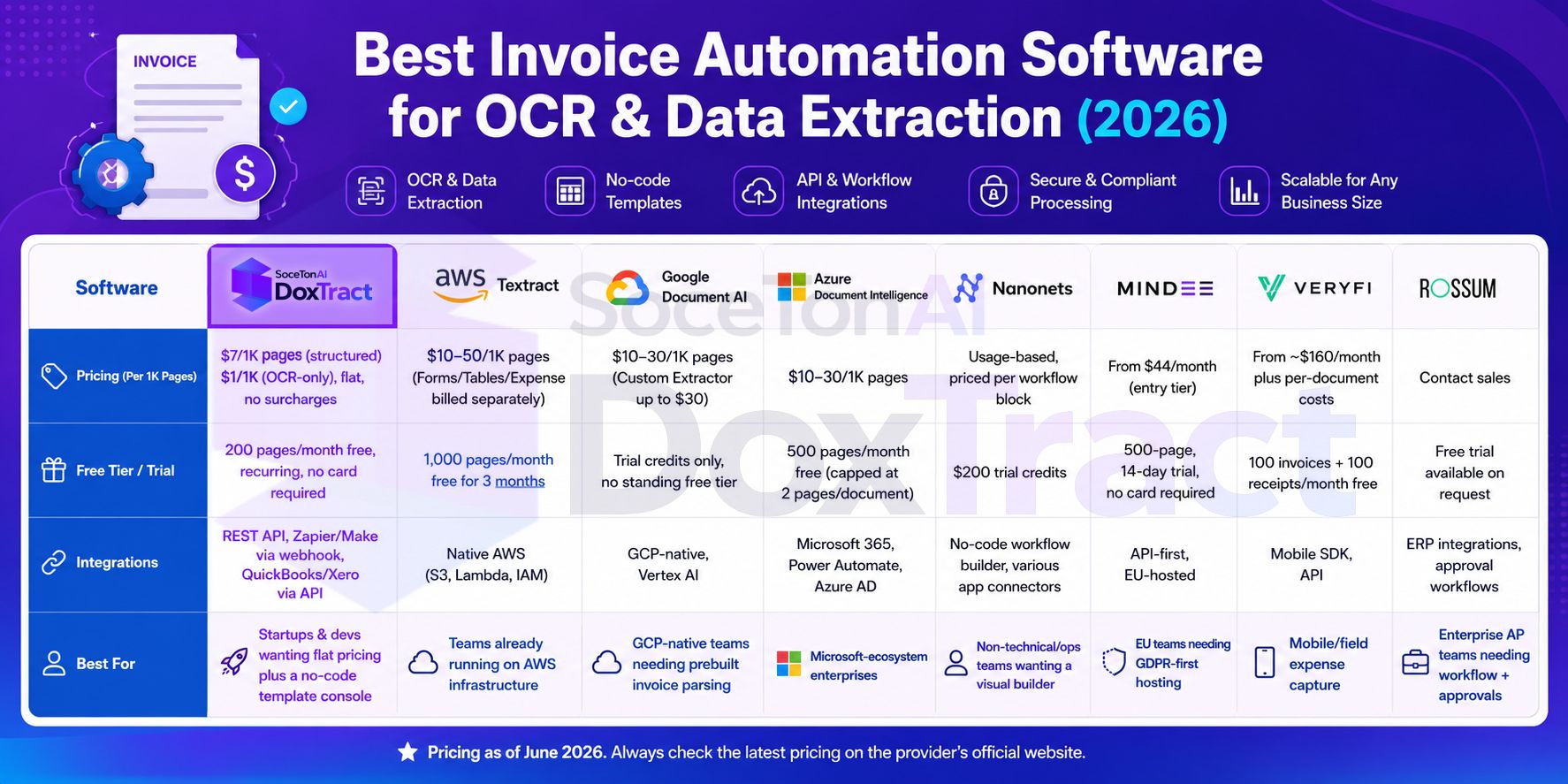
Comparison at a Glance
SoceTonAI DoxTract
$7/1K pages (structured) · $1/1K (OCR-only), flat, no surcharges — 200 pages/month free, recurring, no card required
Integrations: REST API, Zapier/Make via webhook, QuickBooks/Xero via API
Best for: Startups & devs wanting flat pricing plus a no-code template console
AWS Textract
$10–50/1K pages (Forms/Tables/Expense billed separately) — 1,000 pages/month free for 3 months
Integrations: Native AWS (S3, Lambda, IAM)
Best for: Teams already running on AWS infrastructure
Google Document AI
$10–30/1K pages (Custom Extractor up to $30) — trial credits only, no standing free tier
Integrations: GCP-native, Vertex AI
Best for: GCP-native teams needing prebuilt invoice parsing
Azure Document Intelligence
$10–30/1K pages — 500 pages/month free (capped at 2 pages/document)
Integrations: Microsoft 365, Power Automate, Azure AD
Best for: Microsoft-ecosystem enterprises
Nanonets
Usage-based, priced per workflow block rather than per page — $200 trial credits
Integrations: No-code workflow builder, various app connectors
Best for: Non-technical/ops teams wanting a visual builder
Mindee
From $44/month (entry tier) — 500-page, 14-day trial, no card required
Integrations: API-first, EU-hosted
Best for: EU teams needing GDPR-first hosting
Veryfi
From ~$160/month plus per-document costs — 100 invoices + 100 receipts/month free
Integrations: Mobile SDK, API
Best for: Mobile/field expense capture
Rossum
Contact sales — free trial available on request
Integrations: ERP integrations, approval workflows
Best for: Enterprise AP teams needing workflow + approvals
Pricing above reflects structured document AI / invoice-level extraction. For a detailed cost breakdown by volume — including the raw OCR tier — see the full document AI/OCR pricing comparison.
Accuracy isn't listed here since none of these vendors publish independently benchmarked figures — each measures against its own document set. Worth testing on your own invoice formats before committing to volume.
How to Choose
The right invoice automation software depends less on which tool is "best" overall and more on which use case you're solving for. Here's how the options break down by situation.
Startups & low-volume teams
At this stage, predictable cost and a real free tier matter more than enterprise-grade workflow features — you're validating whether the extraction pipeline works before committing engineering time or budget to it. Flat, recurring-free-tier options like SoceTonAI DoxTract fit best here: no card required to start, no 90-day countdown, and pricing that doesn't need a business case to justify. Avoid tools gated behind "contact sales" at this stage — you don't have the volume yet to make that conversation worthwhile.
Developers wanting API-first, no-frills integration
If you're building extraction directly into a product or internal tool, prioritize flat per-page pricing (so cost scales predictably with usage), clear API docs, and no surcharge for structured fields. SoceTonAI DoxTract, AWS Textract, and Google Document AI are all genuinely API-first; the deciding factor becomes whether a forms/tables surcharge (AWS, Google) or a flat rate (DoxTract) fits your volume better, and whether you're already inside AWS/GCP infrastructure enough to make the native integration worth the premium.
High-volume processors on a budget
Once you're past prototype volume, tiered hyperscaler pricing starts to sting — a per-page rate that looked fine in testing turns into a real line item at 50,000+ pages a month. Flat-rate providers avoid the forms/tables markup entirely, which matters most in this middle range: big enough to feel per-page costs, nowhere near the volume where AWS/Google's high-volume discounts actually kick in.
Non-technical teams (ops, finance, bookkeeping)
If nobody on the team is writing integration code, a visual workflow builder or template editor matters more than raw price. Nanonets and Mindee both offer no-code workflow builders; DoxTract's template editor covers the same need — build an extraction template through the UI, with the option to move to the API later if automation needs grow.
Mobile / field-based capture
If invoices or receipts are typically photographed on a phone rather than uploaded as PDFs, general-purpose document AI tools aren't optimized for that input. Veryfi's SDK is purpose-built for camera-based capture and is worth its higher price floor for this specific use case.
Enterprise AP teams needing workflow + approvals
At real enterprise AP scale, extraction alone isn't the bottleneck — approval chains, ERP integration, and exception handling are. Rossum is built for this layer specifically, and the lack of public pricing reflects that it's sold as a full workflow platform, not just an extraction API. Worth the sales call if approval automation is the actual gap you're solving for.
Already committed to a cloud provider
If you're running production infrastructure on AWS, GCP, or Azure with existing IAM, storage, and billing set up, the native document AI service is often the pragmatic choice even at a price premium — the integration savings (unified billing, native auth, no new vendor relationship) can outweigh the per-page cost difference versus a cheaper standalone API.
The short version: match the tool to the actual constraint you're solving — cost predictability, no-code accessibility, mobile capture, or enterprise workflow — rather than picking whichever tool ranks "best" in the abstract. Most teams change tools as they scale anyway; starting with a low-commitment, flat-rate option keeps that switch cheap if you outgrow it.
Conclusion
There's no single "best" invoice automation software across every use case — the right pick depends on your volume, your budget, how much engineering time you have, and whether you need workflow/approval features on top of extraction. Enterprise AP teams with approval chains will get more value from a platform like Rossum than a raw API, while a solo developer testing an idea is better served by a flat, low-commitment option than a tool that requires a sales call before you even know the price.
That said, if you're evaluating options and want to see extraction quality on your own invoices before committing to anything, SoceTonAI DoxTract is worth starting with: flat $7/1,000-page pricing with no surcharge for line items or custom fields, a template editor you can test without signing up, and a free tier — 200 pages/month, recurring, no card required — that's usable for real invoice processing, not just a countdown trial.
Frequently Asked Questions
What's the best invoice automation software for small businesses?
It depends on volume and budget, but for small businesses testing invoice automation for the first time, a tool with a genuine recurring free tier and flat per-page pricing — like SoceTonAI DoxTract — avoids the upfront commitment that hyperscaler or enterprise platforms require. No-code options like Nanonets or Mindee are also worth considering if nobody on the team writes code.
Is invoice OCR the same as invoice automation?
Not quite. OCR extracts text from a document, and document AI/structured extraction pulls that text into specific fields (vendor, amount, line items). "Invoice automation" usually refers to the full pipeline — extraction plus routing that data into an accounting system, approval workflow, or spreadsheet without manual steps. A tool can do great extraction and still leave you doing the "automation" part yourself by connecting it to Zapier, Make, or a direct API integration.
How accurate is AI invoice data extraction in 2026?
Accuracy varies more by document quality and layout complexity than by vendor — clean, standard-format invoices are handled well by most major providers, while handwriting, skewed scans, and non-standard layouts separate the accurate tools from the rest. No provider publishes independently audited, cross-vendor benchmarks, so testing on your own real invoice formats is the most reliable way to compare accuracy before committing to volume.
What's the cheapest way to automate invoice data extraction?
Self-hosted open-source OCR (Tesseract, PaddleOCR, docTR) is free per page but requires building structured extraction logic yourself. Among managed APIs with real document AI capability, flat-rate providers avoid the forms/tables surcharge that hits AWS, Google, and Azure at scale — see the full cheapest document AI API breakdown for exact numbers.
Can I automate invoice extraction without writing code?
Yes. Zapier and Make.com can both connect an extraction API to Google Sheets, QuickBooks, or Xero using their built-in webhook/HTTP actions, even without a native app listed for that provider. Several platforms (Nanonets, Mindee, DoxTract) also offer visual template builders, so the extraction setup itself doesn't require code either — only the routing does, and that's handled through point-and-click automation tools.
Does invoice automation software integrate directly with QuickBooks and Xero?
Most extraction APIs don't post directly to QuickBooks or Xero out of the box — you either export a CSV formatted to match your accounting fields, or connect via API using OAuth 2.0 to create Bills (QuickBooks) or Invoices (Xero) programmatically. Batch processing is usually faster with CSV import; continuous, per-document automation is better handled through the direct API path.
How long does it take to integrate an invoice OCR API into an existing app?
For a straightforward integration — one document format, an existing file-upload flow already in place — a working endpoint that extracts and stores structured invoice data is realistically a single working day of engineering time, not a multi-week project. Timeline extends mainly with document format variety, not with the size of the app it's being added to.
Is there a free invoice OCR API?
A few options offer a genuinely recurring free tier rather than a time-limited trial: DoxTract (200 pages/month, no card required) and self-hosted open-source tools (unlimited, but no built-in structured extraction). AWS, Azure, and Google all offer free tiers too, but they're either time-limited, capped at very low page counts per document, or require a credit card and full cloud account to access.